@Amiwell79 - if your ethernet port works, it's better to use that one
You might right, as the USB Tether has a network address of 10.106.15.78, which work great for Internet browsing. But my Samba Server is on network address : 192.168.0.5 so the USB tether will not find the Samba server. Without complex NAT routing.
The Ethernet chip in the HP T630 is: RTL81111/8168/8211/8411 according to the PCItool.
So according to the AROS HCL, the rtl8169.device supports;
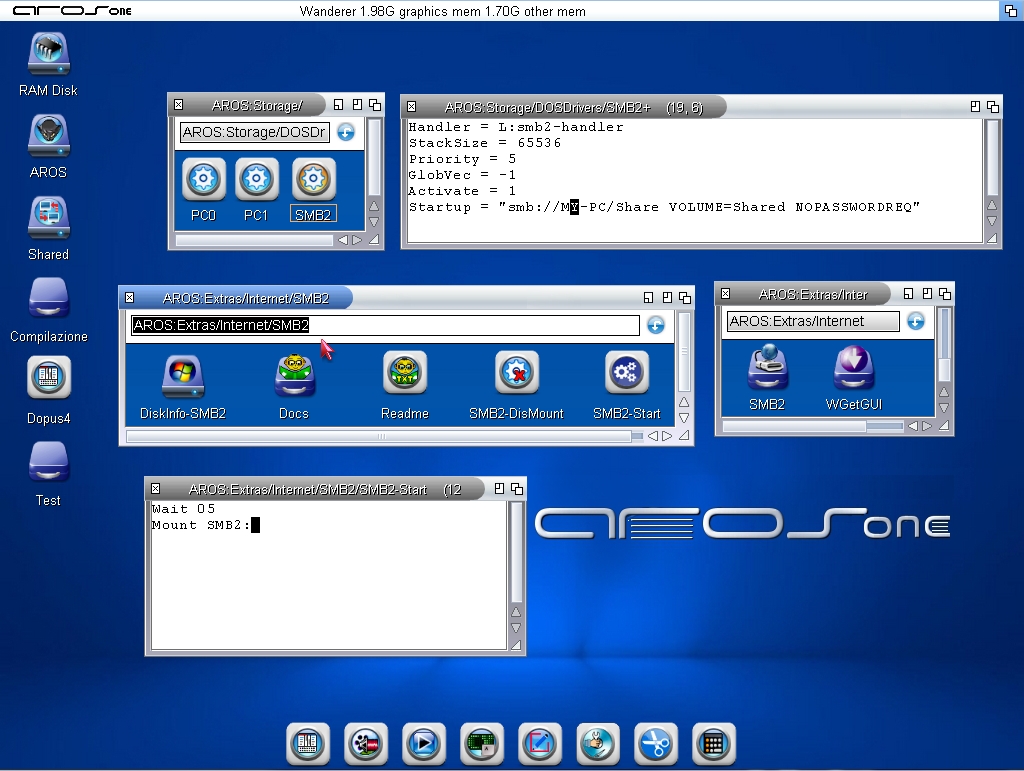
On AROS One, in the Internet folder, there is SMB2, which works very well. I connect directly with Tethering to the shares on my PCs even without a password and using automatic IP configuration; in this case, you don’t need to do anything. Here is my SMB2 DOSDriver:
MY-PC = Computer name
Share = Shared network drive or shared folder
Shared = Volume that appears in Wanderer
Copy the SMB2 Mountlist to Storage/DOSDrivers
You can mount SMB2 manually or use a script to be copied into WBStartup and run via an icon using IconX; in this case, add ‘wait 5’ at the top of the script. Example script:
I have shared my Linux PC Ethernet connection with AROS x64 computer, which the Internet browsing by OWB is alot faster than with USB Tethering to a mobile phone.
I am still trying to get Smaba to connect to the Samba Server.
I entered the Samba details into the Mounted Shared tab in the Network Preferences, as I could not see a SMB2-GUI programme to setup the SMB2 connection.
The SMB mountlist is:
Control = "USER=*"derek*" WORKGROUP=*"WORKGROUP*" PASSWORD=*"password*" SERVICE=*"//192.168.0.5/data*""
You must not use SMB0 in Network Preferences; that method doesn't work. As mentioned, you must use SMB2.
- Delete all network preferences and the SMB0 driver
- Create the Mountlist (DOSDrivers SMB2) manually; you don't need anything else—smb2-handler and filesysbox.library are already installed on AROS One.
- Use my Mountlist as a guide, and create your own DOS Drivers SMB2
- Copy DOS Drivers SMB2 to Storage/DOSDrivers
- In Storage/DOSDrivers, you’ll also find my SMB2.info icon
- In Extras/Internet/SMB2, you’ll find the SMB2-Start and SMB2-Dismount scripts
- Copy SMB2-Start to WBStartup
- This way, the SMB2 mount will happen automatically on every reboot
If the mount fails, you can unmount the incorrect DOS driver using SMB2-Dismount; once that’s done, you can run SMB2-Start to mount it again
I’ve attached a screenshot showing what I’ve described—it’s easier to do than to explain!
First thing to check would be if instead of adding "noacpi" you can just add "noioapic" (be careful with spelling). This might solve both of your problems.
I tried noioacpi, and no change, so I reerched the ACPI interface and changed the nopcpi to acpi=strict and the system booted up with full stereo sound.
I check the AHI preferences and the Musci Unit is mapped to: hdaudio: HIFI 16 bit stero++
I have some strange behaviour on my HP T630 with AROS One x64 v2.3 installed.
All works perfectly connecting to the Internet and Samba share by Ethernet.
I have a USB Joystick controller, connected to the system and all games work great with the Joystick Controller.
If I leave the Joystick connected to the front USB connector and power up the T630, the HP bios loads and proceeds to load AROS, but hangs at a blank screen.
If I disconnect the Joystick from the USB connector the T630 boots up okay.
I have disabled all USB boot devices in the HP BIOS. It looks like AROS is trying to boot from the USB.
So I connect the Joystick after AROS has booted up.
Derek, have you tried a different build? Maybe the problem isn't with AROS One but with AROS in general, or maybe the issue has been fixed in the updated builds.
I'm downloading and installing AROS One x86-64 in VMWare Workstation Pro.
Mostly I'll be using it on a regular basis for compiling and testing software.
Are there any special VMWare settings or instructions about setting up a VM
for use with AROS One? I'm downloading v1.3 as a ISO if that helps any.
I'm running out of storage space on my VMWare computer. I only have 30GB left. I suppose I can allocate 4GB RAM and 15GB for AROS HDD?
I will add a new m.2 SATA SSD to add more space for programming.
You can view all discussion threads in this forum. You cannot start a new discussion thread in this forum. You cannot reply in this discussion thread. You cannot start on a poll in this forum. You cannot upload attachments in this forum. You can download attachments in this forum.

 AMIGASYSTEMDistro Maintainer