- Home
- Discussion Forum
- AROS FORUMS
- General Chat
- Adf disk with partition tool
Adf disk with partition tool
Last updated on 3 hours ago
CoolCat5000Member
Posted 1 day agoHi,
My next step with the (bellatrix) emulator is the iso support so I can boot from aros iso.
But before I would like to try some adfs: amiga test kit, sysinfo, directory opus and if exists an adf with aros partition tool.
If someone know links to adf booting specific for aros 68k of those softwares would be welcomed.
Regards,
My next step with the (bellatrix) emulator is the iso support so I can boot from aros iso.
But before I would like to try some adfs: amiga test kit, sysinfo, directory opus and if exists an adf with aros partition tool.
If someone know links to adf booting specific for aros 68k of those softwares would be welcomed.
Regards,
Edited by CoolCat5000 on 17-05-2026 17:43, 1 day ago
miker1264Software Dev
Posted 1 day agoWhen you use the Build System to compile AROS 68k it makes and partitions a boot adf using code.
CoolCat5000Member
Posted 1 day agoHi @mikert1264 ,
I am not building aros atm, but if you say the boot disk i couldn’t boot from it.
But afaik it was supposed to just have a program to load aros to rom, not a partition tool.
Infact, I was trying to test that aros could boot an adf, and it somehow allready boot some disks that doesn’t run cause of emulation issues, but none of the adfs that I have, including the aros boot adf.
https://github.co.../src/disks
But those boot under KS13, maybe i should just forget the disk boot path of AROS and just implement the ISO support.
And about it, I was also curious, if I had usb support from the ARM side could I have the ISO burned to a pen drive and AROS would boot from that?
(Mostly I am thinking of those 2 approaches, aros booting from an iso placed in the FAT partition of the sdcard and maybe from an ISO burned into the pen drive)
Regards,
Ps: in theory, booting from adf i could test if AROS does see the USB and sdcard medias.
I am not building aros atm, but if you say the boot disk i couldn’t boot from it.
But afaik it was supposed to just have a program to load aros to rom, not a partition tool.
Infact, I was trying to test that aros could boot an adf, and it somehow allready boot some disks that doesn’t run cause of emulation issues, but none of the adfs that I have, including the aros boot adf.
https://github.co.../src/disks
But those boot under KS13, maybe i should just forget the disk boot path of AROS and just implement the ISO support.
And about it, I was also curious, if I had usb support from the ARM side could I have the ISO burned to a pen drive and AROS would boot from that?
(Mostly I am thinking of those 2 approaches, aros booting from an iso placed in the FAT partition of the sdcard and maybe from an ISO burned into the pen drive)
Regards,
Ps: in theory, booting from adf i could test if AROS does see the USB and sdcard medias.
Edited by CoolCat5000 on 17-05-2026 23:20, 1 day ago
An ADF DD floppy is too small to hold HDToolBox and the required libraries.
I tried to create a bootable HD floppy on the Amiga (AROS seems to have a bug when handling HD floppy disks)
The HD floppy disk booted from WinUAE with the AROS ROMs, but although it managed to copy the necessary libraries as well, HDToolBox did not open fully; it probably needed some components from the Wanderer ‘Classes’, but there is no more space on the floppy disk.
I think the only option is to boot a HardFile or an AROS 68k ISO and use the corresponding AROS ROMs; you must always use the ROMs included in the AROS 68k build you are using.
I can prepare a bootable HardFile with an AROS 68k build for you if you need it.
I tried to create a bootable HD floppy on the Amiga (AROS seems to have a bug when handling HD floppy disks)
The HD floppy disk booted from WinUAE with the AROS ROMs, but although it managed to copy the necessary libraries as well, HDToolBox did not open fully; it probably needed some components from the Wanderer ‘Classes’, but there is no more space on the floppy disk.
I think the only option is to boot a HardFile or an AROS 68k ISO and use the corresponding AROS ROMs; you must always use the ROMs included in the AROS 68k build you are using.
I can prepare a bootable HardFile with an AROS 68k build for you if you need it.
CoolCat5000Member
Posted 18 hours agoVery thanks for the clarification @AMIGASYSTEM , in the next sprint I will work on the iso support.
I think that we can try 2 workflows:
1) the iso on the fat partition of the sdcard. (But maybe this would be a waste of space, even worse with bigger distro ISO’s)
2) make possible from boot of the usb as an ISO burned
The first is probably easier and will be useful to test the ISO support.
The second i think would be better, but I don’t even know what will be needed to achieve it.
Hdf wouldn’t help, thanks.
(Probably i will be able to reuse the emu68 sdcard support, having all in place, make the mouse works correctly and i think it will be possible to boot and install aros, hopefully)
It’s quite confusing cause some stuff is from the arm side and other is from amiga side.
For keyboard and mouse, the usb support is from the arm side, but for aros boot from usb it would need usb support from the amiga side! 🙃 (and I am not sure yet how to handle this situation)
Wish me luck, 🍀
I think that we can try 2 workflows:
1) the iso on the fat partition of the sdcard. (But maybe this would be a waste of space, even worse with bigger distro ISO’s)
2) make possible from boot of the usb as an ISO burned
The first is probably easier and will be useful to test the ISO support.
The second i think would be better, but I don’t even know what will be needed to achieve it.
Hdf wouldn’t help, thanks.
(Probably i will be able to reuse the emu68 sdcard support, having all in place, make the mouse works correctly and i think it will be possible to boot and install aros, hopefully)
It’s quite confusing cause some stuff is from the arm side and other is from amiga side.
For keyboard and mouse, the usb support is from the arm side, but for aros boot from usb it would need usb support from the amiga side! 🙃 (and I am not sure yet how to handle this situation)
Wish me luck, 🍀
CoolCat5000Member
Posted 14 hours agoHi,
Does aros rom size changed?
I was using 1.024 Kb, but the one in the iso that i got is 1.349kb
What is right, what should i do? is there any special aproach for the emulator to support roms > 1mb?
Kind regards,
ps: infact i have a lot of questions, as far as i understood AROS relies on gayle to use the cd room boot support, but gayle is not a universal amiga machine design, is my impression correct?
I will have to wait until i really understand the issue with the aros rom, cause i dont have atm support for >1mb and im not sure if this is the limitation for the iso not boot with my 1mb version.
[GAYLE-ID] DE1000 read -> 80 (remaining shift=0)
[GAYLE-ID] DE1000 read -> 80 (remaining shift=a)
[GAYLE-ID] DE1000 read -> 80 (remaining shift=4)
[GAYLE-ID] DE1000 read -> 00 (remaining shift=8)
[GAYLE-ID] DE1000 read -> 80 (remaining shift=0)
[GAYLE-IDE] CMD 90
[GAYLE-IDE] CMD 90
[SERIAL] [ATA ] ata_ReadSignature: Found signature for ATA device, but further validation failed
[SERIAL] [ATA ] ata_ReadSignature: Found signature for ATA device, but further validation failed
[SERIAL] [EXEC] InitCode: calling InitResident (-49 01 "ATA boot wait"
Does aros rom size changed?
I was using 1.024 Kb, but the one in the iso that i got is 1.349kb
What is right, what should i do? is there any special aproach for the emulator to support roms > 1mb?
Kind regards,
ps: infact i have a lot of questions, as far as i understood AROS relies on gayle to use the cd room boot support, but gayle is not a universal amiga machine design, is my impression correct?
I will have to wait until i really understand the issue with the aros rom, cause i dont have atm support for >1mb and im not sure if this is the limitation for the iso not boot with my 1mb version.
[GAYLE-ID] DE1000 read -> 80 (remaining shift=0)
[GAYLE-ID] DE1000 read -> 80 (remaining shift=a)
[GAYLE-ID] DE1000 read -> 80 (remaining shift=4)
[GAYLE-ID] DE1000 read -> 00 (remaining shift=8)
[GAYLE-ID] DE1000 read -> 80 (remaining shift=0)
[GAYLE-IDE] CMD 90
[GAYLE-IDE] CMD 90
[SERIAL] [ATA ] ata_ReadSignature: Found signature for ATA device, but further validation failed
[SERIAL] [ATA ] ata_ReadSignature: Found signature for ATA device, but further validation failed
[SERIAL] [EXEC] InitCode: calling InitResident (-49 01 "ATA boot wait"
Edited by CoolCat5000 on 18-05-2026 12:27, 13 hours ago
miker1264Software Dev
Posted 11 hours agoSome of your architecture questions might be better asked in the Apollo OS forum since they use the AROS 68k and roms for their SAGA chipset and their 68k fpga accelerators.
If you get hooked up with the development team ask for Ronnie Beck. He's one of the AROS/Amiga 68k developers. :-)
http://www.apollo...wledge.php
If you get hooked up with the development team ask for Ronnie Beck. He's one of the AROS/Amiga 68k developers. :-)
http://www.apollo...wledge.php
Edited by miker1264 on 18-05-2026 15:04, 11 hours ago
@CoolCat5000 - Hi,
Does aros rom size changed?
I was using 1.024 Kb, but the one in the iso that i got is 1.349kb
What is right, what should i do? is there any special aproach for the emulator to support roms > 1mb?
There are two official AROS 68k ROMs (included in all builds): ‘aros-rom.bin’ and ‘aros-ext.bin’, both of which are 512 KB in size.
Almost all major emulators, such as WinUAE, use either the two separate ROMs or a single 1,024 MB file combining them.
To merge them on a PC, for example, use the Copy command!
CoolCat5000Member
Posted 8 hours agoHi @AMIGASYSTEM , thanks again, I had descompacted the zipped one to avoid the join, but you are right.
I will deep dive in the atapi support as I allready had some progress and see if the version mismatches are an issue.
Hi @miker1264 , probably you mean my Gayle question. I like the Emu68 approach for boards using the expansion/autoconfig system to load the board+driver , it seems like a plug-in system for boards, I think that is the cleaner way, I will do the Gayle path for the moment cause I think it is the faster/easier way to get it rolling, but my desire would be to have the CD-ROM using the z3 scsi board approach
https://github.co...
Not emulating this full hardware, but following the allready used approach on Emu68 (it feels cleaner for me, the driver is loaded when the device is present, and using an amiga specific approach for this)
Regards,
I will deep dive in the atapi support as I allready had some progress and see if the version mismatches are an issue.
Hi @miker1264 , probably you mean my Gayle question. I like the Emu68 approach for boards using the expansion/autoconfig system to load the board+driver , it seems like a plug-in system for boards, I think that is the cleaner way, I will do the Gayle path for the moment cause I think it is the faster/easier way to get it rolling, but my desire would be to have the CD-ROM using the z3 scsi board approach
https://github.co...
Not emulating this full hardware, but following the allready used approach on Emu68 (it feels cleaner for me, the driver is loaded when the device is present, and using an amiga specific approach for this)
Regards,
CoolCat5000Member
Posted 7 hours agoOk, some AI feedback
Sector 0 of the ISO is all zeros — no AmigaOS boot block. Dosboot reads LBA 0, doesn't find the magic DOSx?? and gets stuck in retry mode. The PVD ISO 9660 is in LBA 16, which is the standard. Let me see how AROS m68k actually tries to boot from CD:
Now I understand the complete flow. ata_RegisterVolume creates a boot node with DosType='CDVD' and BootBlocks=2 (2×2048=4096 bytes). dosboot_BootBlock reads 4096 bytes from LBA 0 — but our ISO has LBA 0 zeroed, so
BootBlockCheckSum fails, dosboot discards the CD and boots via ROM. The TUR+READ we see afterwards are the auto-mount of dos.library trying to mount CD0:.
somehow i dont know if this is a version mismatch issue you metioned. it says that the cdromhas an standard format and that aros dont found the boot magic on the initials blocks. it suggest a hacky, but its not my idea. i will try deeper. (inclunding a winuae check of the iso i have)
have winuae it also doesnt boot this iso (at least not with a straigh config using the bultin rom)
i will investigate further,
but, i could use a slim iso, i would like to have a confirmed to boot rom/iso pair! not sure where i will find. i will try other winuae configs, but more moving parts to check.
regards,
Sector 0 of the ISO is all zeros — no AmigaOS boot block. Dosboot reads LBA 0, doesn't find the magic DOSx?? and gets stuck in retry mode. The PVD ISO 9660 is in LBA 16, which is the standard. Let me see how AROS m68k actually tries to boot from CD:
Now I understand the complete flow. ata_RegisterVolume creates a boot node with DosType='CDVD' and BootBlocks=2 (2×2048=4096 bytes). dosboot_BootBlock reads 4096 bytes from LBA 0 — but our ISO has LBA 0 zeroed, so
BootBlockCheckSum fails, dosboot discards the CD and boots via ROM. The TUR+READ we see afterwards are the auto-mount of dos.library trying to mount CD0:.
somehow i dont know if this is a version mismatch issue you metioned. it says that the cdromhas an standard format and that aros dont found the boot magic on the initials blocks. it suggest a hacky, but its not my idea. i will try deeper. (inclunding a winuae check of the iso i have)
have winuae it also doesnt boot this iso (at least not with a straigh config using the bultin rom)
i will investigate further,
but, i could use a slim iso, i would like to have a confirmed to boot rom/iso pair! not sure where i will find. i will try other winuae configs, but more moving parts to check.
regards,
miker1264Software Dev
Posted 6 hours agoIf it's a digital file which ISO is you could use a Hex Editor to look at the data and compare it to a know good ISO that boots properly. Shouldn't the ISO boot code be in the first 2 blocks? If it's zeroed out maybe it's a bad ISO.
CoolCat5000Member
Posted 6 hours agoOk, that is the actual situation:
On winuae it boots the floppy and ask for the iso (that it didn’t found)
My floppy isn’t boot yet, if the workflow is boot the adf to it goes to the iso step I would need first fix the adf path.
(I thought that booting from the iso would not need the adf)
Regards,
On winuae it boots the floppy and ask for the iso (that it didn’t found)
My floppy isn’t boot yet, if the workflow is boot the adf to it goes to the iso step I would need first fix the adf path.
(I thought that booting from the iso would not need the adf)
Regards,
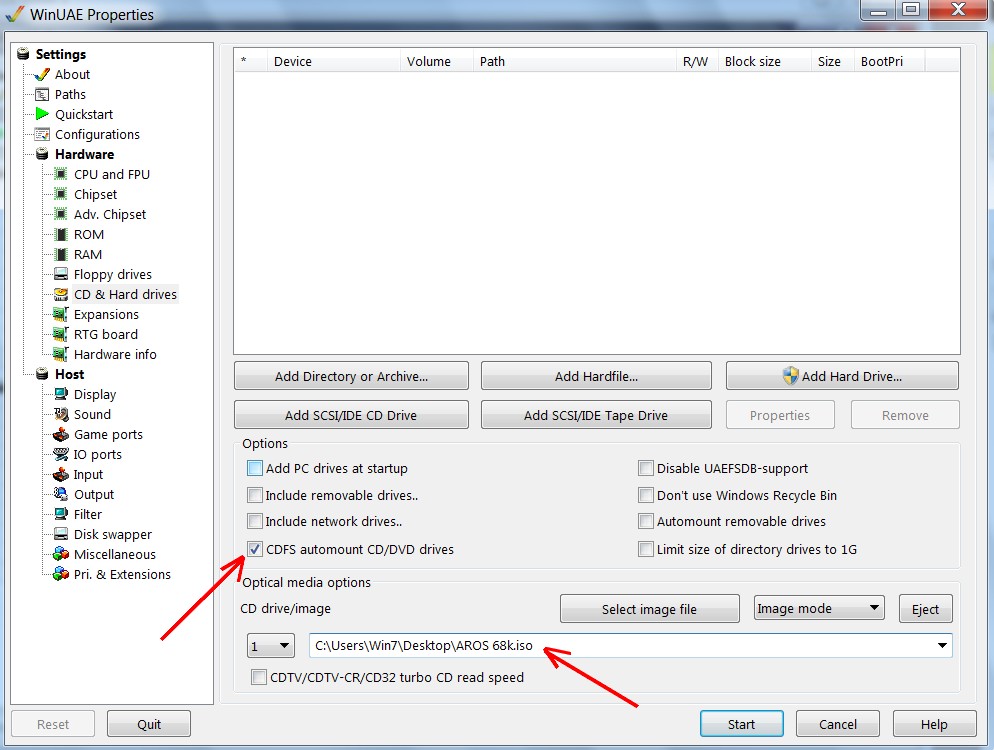
No, the ISO boots directly on WinUAE, it doesn’t need a floppy disk (Of course, in WinUAE you need to set up CD/DVD automount
Which ISO are you using? Is it a native AROS 68k ISO or a native Amiga ISO?
If you are using the ‘Nightly Build’ ISO from sourceforge.net, the default WinUAE ROM will not be compatible.
To boot the ‘Nightly Build’ ISO on WinUAE, you must use the ROMs included in the ISO’s Boot/Amiga folder.
You should be aware that, just like AROS x86, there are two branches for AROS 68k: the standard version from sourceforge.net, and the deadwood fork, which is the one I use for my AROS One 68k distribution.
That said, the ROM provided by WinUAE works well with AROS 68k Fork by deadwood
Which ISO are you using? Is it a native AROS 68k ISO or a native Amiga ISO?
If you are using the ‘Nightly Build’ ISO from sourceforge.net, the default WinUAE ROM will not be compatible.
To boot the ‘Nightly Build’ ISO on WinUAE, you must use the ROMs included in the ISO’s Boot/Amiga folder.
You should be aware that, just like AROS x86, there are two branches for AROS 68k: the standard version from sourceforge.net, and the deadwood fork, which is the one I use for my AROS One 68k distribution.
That said, the ROM provided by WinUAE works well with AROS 68k Fork by deadwood
CoolCat5000Member
Posted 6 hours agoHi @miker , more less, I don’t have a good iso to compare, maybe it shouldn’t have the boot bits at all.
Regards,
Ps: the iso support somehow works, aros detects the media and garbage the screen when it notices it’s not bootable (maybe the emulation did step into it where not supposed to, as the insert media screen should not get away if the iso is not bootable)
The problem now is more my ignorance than the code itself.
Regards,
Regards,
Ps: the iso support somehow works, aros detects the media and garbage the screen when it notices it’s not bootable (maybe the emulation did step into it where not supposed to, as the insert media screen should not get away if the iso is not bootable)
The problem now is more my ignorance than the code itself.
Regards,
CoolCat5000Member
Posted 6 hours agoThe AROS 68k Nightly Build ISO from sourceforge.net is a bootable ISO; you don’t need to modify anything, you just need to use the ROMs included in the ISO and set up CD/DVD automount in WinUAE
https://aros.sour...htly1.html
AROS 68k fork by deadwood is distributed as an archive; it is not distributed as an ISO
Bootable AROS ISOs can be created! If you need something specific, I can try to create one for you!
https://aros.sour...htly1.html
AROS 68k fork by deadwood is distributed as an archive; it is not distributed as an ISO
Bootable AROS ISOs can be created! If you need something specific, I can try to create one for you!
CoolCat5000Member
Posted 5 hours agoHi @AMIGASYSTEM ,
yes, i would apreciate if you could make a bootable iso with the necessary files.
i use a single 1mb rom (i can concat myself) cause it is initrd argument.
i am not winuae, but i will use the automount to see the behaviou and see how to add it.
I will try the link you gave me and wait for the custom one,
thanks one more time!
yes, i would apreciate if you could make a bootable iso with the necessary files.
i use a single 1mb rom (i can concat myself) cause it is initrd argument.
i am not winuae, but i will use the automount to see the behaviou and see how to add it.
I will try the link you gave me and wait for the custom one,
thanks one more time!
The ISO used by AROS 68k is a standard Joliet/RockRidge ISO and does not contain a bootloader; it is essentially the same as Windows ISOs, and you can create them using any ISO-burning programme.
The AROS x86 ISO, on the other hand, like Amiga CD32 discs, has a custom bootloader, and you will need a burning programme that supports the import of this bootloader.
The ISO file provided in the link should already contain all the tools you need, including HDToolBox. If you need to add any data, please send me a list.
In the attached screenshot, you can see where to configure the automount!
The AROS x86 ISO, on the other hand, like Amiga CD32 discs, has a custom bootloader, and you will need a burning programme that supports the import of this bootloader.
The ISO file provided in the link should already contain all the tools you need, including HDToolBox. If you need to add any data, please send me a list.
In the attached screenshot, you can see where to configure the automount!
CoolCat5000Member
Posted 5 hours agoOk, thanks @AMIGASYSTEM !
I will first try to sucess on winuae before I go any further on the iso support (it allready proofed that the atapi thing is alive).
I had borked something in the insert media screen that I will need to fix as well.
Now is more thinking before coding (prompting).
Winuae is my friend now!
Thanks again,
I will first try to sucess on winuae before I go any further on the iso support (it allready proofed that the atapi thing is alive).
I had borked something in the insert media screen that I will need to fix as well.
Now is more thinking before coding (prompting).
Winuae is my friend now!
Thanks again,
CoolCat5000Member
Posted 3 hours agoAnother question:
I saw somewhere that aros try to boot from usb, is that behave also on the 68k port.
That is even more challenging for me but it would be the right behavior, I think.
Burn the iso to a pen drive and boot from there.
Kind regards,
I saw somewhere that aros try to boot from usb, is that behave also on the 68k port.
That is even more challenging for me but it would be the right behavior, I think.
Burn the iso to a pen drive and boot from there.
Kind regards,
You can view all discussion threads in this forum.
You cannot start a new discussion thread in this forum.
You cannot reply in this discussion thread.
You cannot start on a poll in this forum.
You cannot upload attachments in this forum.
You can download attachments in this forum.
You cannot start a new discussion thread in this forum.
You cannot reply in this discussion thread.
You cannot start on a poll in this forum.
You cannot upload attachments in this forum.
You can download attachments in this forum.
Moderator: Administrator, Moderators