Oh no! Where's the JavaScript?
Your Web browser does not have JavaScript enabled or does not support JavaScript. Please enable JavaScript on your Web browser to properly view this Web site, or upgrade to a Web browser that does support JavaScript.

System Shock

Last updated on 17 days ago
S
sonountalebanJunior Member
Posted 21 days ago
Hi at all,
I'm trying to port the mythical System Shock on Amiga... as first step I've decided to make it with AxRuntime on my Ubuntu machine and it runs fine - I've created its repository here https://github.com/sonountaleban/AmiShockolate. There are missing things like audio that I hope to implement as soon as possible, however as next thing to do I want to make the executable for the native AROS (64 bit version, of course). Could somebody here point to resources so that then I can do cross compiling on Ubuntu please?

Cheers,
G.
A
Amiwell79Distro Maintainer
Posted 20 days ago
Hi

i see this https://www.axrt.org
M
magoriumSoftware Dev
Posted 20 days ago
@Amiwell79
sonountaleban already uses axrt and now wishes to (cross)-compile for native AROS which afaik (still) requires another setup.

I am out of the loop for too long to know if there is a faster/quicker solution other than setting up the AROS build-system on his host.

As long as sonountaleban did not use any host-API's and/or relies on host functionality it should be possible to (cross)-compile the existing sources in order to create a native AROS version.

edit: There was a recent thread -> https://www.arosw...post_10129 which mentions -> https://arosnews....osted-wsl/ so I guess nothing really changed wrt my earlier written assumption.
Edited by magorium on 28-12-2025 01:18, 20 days ago
Farox, sonountaleban
D
deadwoodAROS Dev
Posted 20 days ago
@magorium

Welcome back Smile
A
Amiwell79Distro Maintainer
Posted 20 days ago

magorium wrote:

@magorium - @Amiwell79
sonountaleban already uses axrt and now wishes to (cross)-compile for native AROS which afaik (still) requires another setup.

I am out of the loop for too long to know if there is a faster/quicker solution other than setting up the AROS build-system on his host.

As long as sonountaleban did not use any host-API's and/or relies on host functionality it should be possible to (cross)-compile the existing sources in order to create a native AROS version.

edit: There was a recent thread -> https://www.arosw...post_10129 which mentions -> https://arosnews....osted-wsl/ so I guess nothing really changed wrt my earlier written assumption.


ok thank you
D
deadwoodAROS Dev
Posted 20 days ago
@sonountaleban

It's great to see someone using AxRuntime the way that it was intended. I hope it made the initial stages of the port easier Smile

Now, for cross-compilation into 64-bit AROS, please follow this guide. Just skip initial parts about setting up WSL.

https://arosnews.github.io/how-to-cross-compile-aros-hosted-wsl/

If you have additional questions or feedback on AxRuntime or AROS let us know Smile
Edited by deadwood on 28-12-2025 02:15, 20 days ago
Argo, sonountaleban, Amiwell79
F
FaroxMember
Posted 20 days ago
Ciao and welcome @sonountaleban
I see your github and this project use Code::Blocks as a IDE.
After you have built the AROS toolchain as @deadwood suggested...

You have 2 things to try to cross-compile on Linux for AROS :

Adapt a Makefile from the Code::Blocks project (if i remember well CB could save also a project (.cbp) into a Makefile...but i going from memory)
and then compile with it (maybe Makefile it need to be adjusted).

Second option...try to setup the Aros toolchain into Code::Blocks...(i remember doing it cross-compiling for ARM when i was following GP2X scene..long ago) and then continue to use Code::Blocks.
Edited by Farox on 28-12-2025 03:12, 20 days ago
sonountaleban, Amiwell79
S
sonountalebanJunior Member
Posted 20 days ago
Thank you for the replies, as soon as possible I'll try to set up the AROS toolchain and make the executable, so that people won't finally need to deal with Code::Blocks and build the game on their own. Smile
Argo, Farox, Amiwell79, Deremon
A
Amiwell79Distro Maintainer
Posted 19 days ago
Great thank you ciao
S
sonountalebanJunior Member
Posted 19 days ago

deadwood wrote:

@deadwood - @sonountaleban

It's great to see someone using AxRuntime the way that it was intended. I hope it made the initial stages of the port easier :)

Now, for cross-compilation into 64-bit AROS, please follow this guide. Just skip initial parts about setting up WSL.

https://arosnews.github.io/how-to-cross-compile-aros-hosted-wsl/

If you have additional questions or feedback on AxRuntime or AROS let us know :)


Hello,
I've tried to install and use the cross-compile package on my Ubuntu machine and it doesn't compile the classic hello.c, namely, it can't find the standard stdio.h include...
If I type the command
x86_64-aros-gcc -xc -E -v -
, I got this output:

Using built-in specs.
COLLECT_GCC=/home/peppe/Documents/arosbuilds/toolchain-core-x86_64/x86_64-aros-gcc
Target: x86_64-aros
Configured with: /home/peppe/Documents/arosbuilds/toolchain-core-x86_64-build/bin/linux-x86_64/Ports/host/gcc/gcc-10.5.0/configure --prefix=/home/peppe/Documents/arosbuilds/toolchain-core-x86_64 --target=x86_64-aros --with-dwarf2 --with-sysroot=/home/peppe/Documents/arosbuilds/toolchain-core-x86_64-build/bin/linux-x86_64/AROS/Development --with-native-system-header-dir=/include --bindir=/home/peppe/Documents/arosbuilds/toolchain-core-x86_64 --libdir=/home/peppe/Documents/arosbuilds/toolchain-core-x86_64/lib --enable-languages=c,c++ --enable-long-long --enable-version-specific-runtime-libs --enable-frame-pointer --with-isl=/home/peppe/Documents/arosbuilds/toolchain-core-x86_64 --disable-isl-version-check --disable-bootstrap --disable-sjlj-exceptions --disable-tls --disable-plugins --disable-nls --disable-libssp --disable-libstdcxx-pch --disable-build-with-cxx --disable-build-poststage1-with-cxx --with-target-cflags=-mcmodel=large --with-target-cxxflags=-mcmodel=large
Thread model: posix
Supported LTO compression algorithms: zlib zstd
gcc version 10.5.0 (GCC)
COLLECT_GCC_OPTIONS='-E' '-v' '-mtune=generic' '-march=x86-64'
 /home/peppe/Documents/arosbuilds/toolchain-core-x86_64/libexec/gcc/x86_64-aros/10.5.0/cc1 -E -quiet -v -isysroot ~/Documents/arosbuilds/core-linux-x86_64-d/bin/linux-x86_64/AROS/Development -idirafter ~/Documents/arosbuilds/core-linux-x86_64-d/bin/linux-x86_64/AROS/Development/include/aros/posixc -idirafter ~/Documents/arosbuilds/core-linux-x86_64-d/bin/linux-x86_64/AROS/Development/include/aros/stdc - -mtune=generic -march=x86-64
ignoring nonexistent directory "~/Documents/arosbuilds/core-linux-x86_64-d/bin/linux-x86_64/AROS/Development/include"
ignoring nonexistent directory "~/Documents/arosbuilds/core-linux-x86_64-d/bin/linux-x86_64/AROS/Development/include/aros/posixc"
ignoring nonexistent directory "~/Documents/arosbuilds/core-linux-x86_64-d/bin/linux-x86_64/AROS/Development/include/aros/stdc"
#include "..." search starts here:
#include <...> search starts here:
 /home/peppe/Documents/arosbuilds/toolchain-core-x86_64/lib/gcc/x86_64-aros/10.5.0/include
End of search list.


Obviously those "nonexistent" directories are absolutely existent. What could the issue be?

Thanks.
D
deadwoodAROS Dev
Posted 19 days ago
You need to pass the absolute patch to your Development directory via the --sysroot arguments to gcc. In the tutorial there is a section on this after setting up network and compiling contrib.
S
sonountalebanJunior Member
Posted 19 days ago

deadwood wrote:

@deadwood - You need to pass the absolute patch to your Development directory via the --sysroot arguments to gcc. In the tutorial there is a section on this after setting up network and compiling contrib.


Yes, I'm already passing that sysroot argument and looks it's ignored.
Edited by sonountaleban on 29-12-2025 10:34, 19 days ago
D
DeremonMember
Posted 19 days ago
I don't know if you already did, you should create an executable file with this content:
exec /<whatever>/arosbuilds/toolchain-core-x86_64/x86_64-aros-gcc --sysroot=/<whatever>/core-linux-x86_64-d/bin/linux-x86_64/AROS/Development $@


passing sysroot in CPPFLAGS/CFLAGS may not work

I usually put that file in /usr/bin/x86_64-pc-aros-gcc so I can also cross-compile "the standard way"
Edited by Deremon on 29-12-2025 12:49, 19 days ago
S
sonountalebanJunior Member
Posted 19 days ago
Lol, ok, I found it doesn't like my ~/Documents/arosbuilds/... path, but it wants something like /home/myusername/Documents/arosbuilds/...
S
sonountalebanJunior Member
Posted 19 days ago
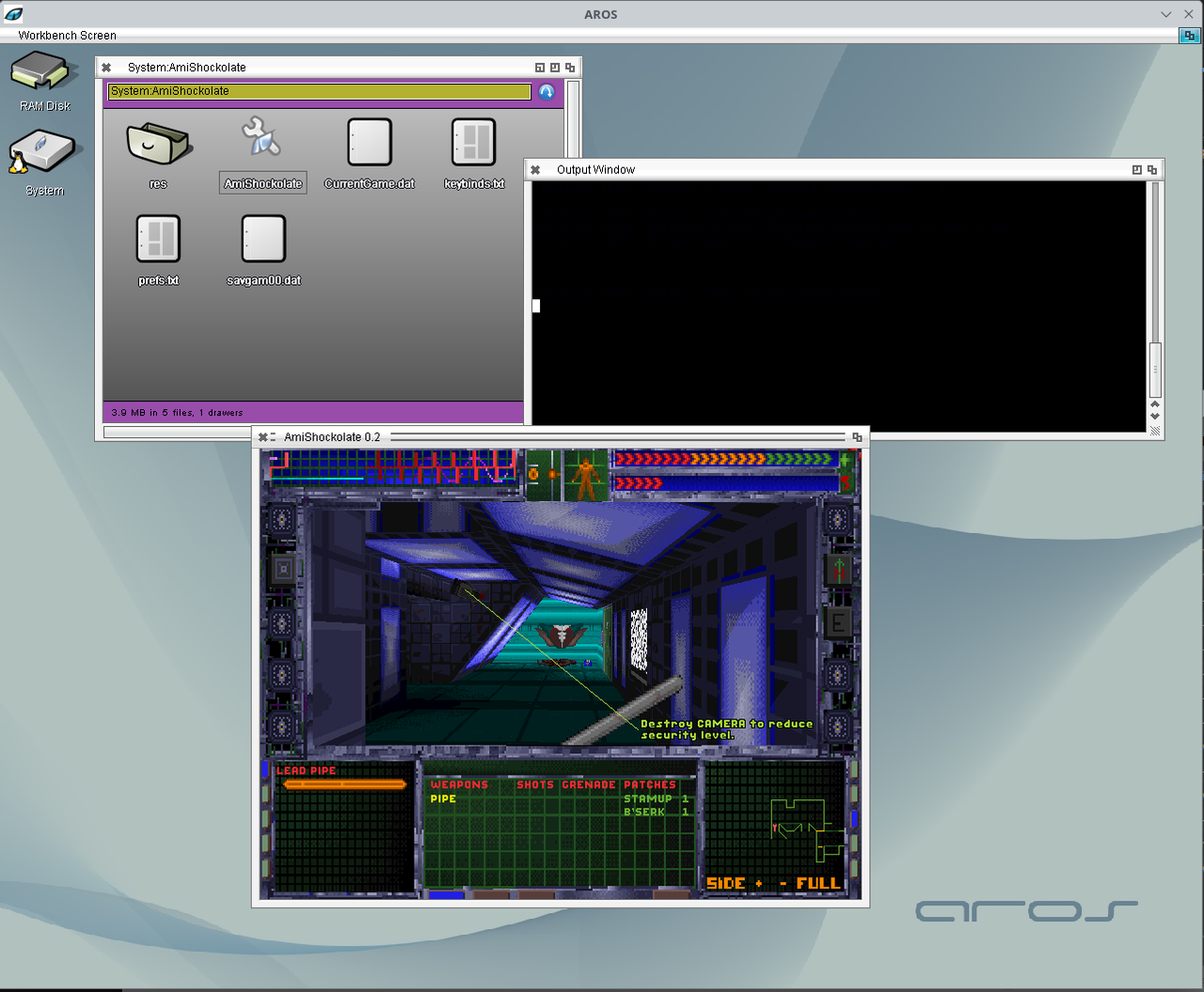
I got it. Smile

i.postimg.cc/g0d4jsJS/Screenshot-20251229-184657.png


Just I had to get rid very few c++ stuff like istream (does AROS have incomplete C++ support, isn't it?) not actually used by the game fortunately as well as fixed little things related to the C dialect used here (ANSI C99) and that required to build for native AROS (gnu99?).

I see that the game corrupts partially the palette of the Workbench, is there a way to fix it? Or doesn't it depend by the game itself?
Edited by sonountaleban on 29-12-2025 14:21, 19 days ago
retrofaza, Deremon, Farox
M
magoriumSoftware Dev
Posted 19 days ago
/me waves to deadwood
Hope you're doing well and thx for the ack
M
magoriumSoftware Dev
Posted 19 days ago

sonountaleban wrote:

@sonountaleban - I got it. Smile

I see that the game corrupts partially the palette of the Workbench, is there a way to fix it? Or doesn't it depend by the game itself?


It depends :-)

If code changes the (existing) intuition colours then it basically is interfering with the development guidelines as that states that you should not touch the first N palette colours (where N is depending on the number of planes that the workbench uses).

That is why most games uses their own screen that uses their own separated palette which does not interfere with the system colours.

So there are several options:
- store palette before start and restore palette after ending (drawback, Amiga is multitasking so switching to WB (potential running other software as well) still is observed by users as 'broken' colours).
- use your own screen using your own palette (fixes the above drawback but then your game runs on its own separate screen, which is not a solution for every software but it might suit your situation).
- do as you do now but do not let the game touch the workbench palette colour numbers. If I remember correctly there exist special API calls for that to let intuition pick that colour from a palette that matches best) or in case existing code does it the hard way do not touch the workbench palette colours (skip).

afaik those are the available options.[/quote]
Edited by magorium on 29-12-2025 15:08, 19 days ago
S
sonountalebanJunior Member
Posted 19 days ago

magorium wrote:

@magorium -

sonountaleban wrote:

@sonountaleban - I got it. Smile

I see that the game corrupts partially the palette of the Workbench, is there a way to fix it? Or doesn't it depend by the game itself?


It depends :-)

If code changes the (existing) intuition colours then it basically is interfering with the development guidelines as that states that you should not touch the first N palette colours (where N is depending on the number of planes that the workbench uses).

That is why most games uses their own screen that uses their own separated palette which does not interfere with the system colours.

So there are several options:
- store palette before start and restore palette after ending (drawback, Amiga is multitasking so switching to WB (potential running other software as well) still is observed by users as 'broken' colours).
- use your own screen using your own palette (fixes the above drawback but then your game runs on its own separate screen, which is not a solution for every software but it might suit your situation).
- do as you do now but do not let the game touch the workbench palette colour numbers. If I remember correctly there exist special API calls for that to let intuition pick that colour from a palette that matches best) or in case existing code does it the hard way do not touch the workbench palette colours (skip).

afaik those are the available options.
[/quote]

Thanks for the reply. Yes, I was suspecting that it modifies the first 4/16 system colours, I thought AROS was already able to deal with this as it runs in true colours. Definitely the ideal is to run the game in its own screen, which would be the next thing to implement, especially it was designed originally for low resolutions like 320x256.
Edited by sonountaleban on 29-12-2025 15:28, 19 days ago
M
magoriumSoftware Dev
Posted 19 days ago
@sonountaleban
Ah, yes. In case the resolution is not matching the WB and the game does not scale then yes a separate screen would be the way of the least resistance :-)

it is not hard todo, see also here for basics: http://www.pjhutc...reens.html . In addition you probably need a (non-visible) backdrop window to use on that screen (sorry I haven't had a good look at the repo you linked to so, not sure if it is necessary for this case).

Well, if you have questions then feel free to ask. Can't promise I am able to provide proper advise (I have been away from AROS/Amiga development for a while but things are starting to come back :-) ) but there are skilled people here that do know.

In anyways, good luck and looking good sofar :thumbsup:
Edited by magorium on 29-12-2025 15:57, 19 days ago
D
deadwoodAROS Dev
Posted 18 days ago

sonountaleban wrote:

@sonountaleban

Thanks for the reply. Yes, I was suspecting that it modifies the first 4/16 system colours, I thought AROS was already able to deal with this as it runs in true colours.


I'm not sure AROS "can" deal with this. If a software (Zune/MUI in this case) uses pens and original graphics.library pen-based API's to draw lines or filled areas, then the only way to deal with this would be to not to use these APIs (and for example blit bitmaps all over the place). However this would make the behavior non-compatible with original MUI where someone modyfing system pens would expect the changes to be propagated to MUI/Zune windows as well.
You can view all discussion threads in this forum.
You cannot start a new discussion thread in this forum.
You cannot reply in this discussion thread.
You cannot start on a poll in this forum.
You cannot upload attachments in this forum.
You cannot download attachments in this forum.
Users who participated in discussion: magorium, deadwood, AMIGASYSTEM, Amiwell79, Jeff1138, Farox, Deremon, sonountaleban