Oh no! Where's the JavaScript?
Your Web browser does not have JavaScript enabled or does not support JavaScript. Please enable JavaScript on your Web browser to properly view this Web site, or upgrade to a Web browser that does support JavaScript.

How Add New partition

Last updated on 5 hours ago
A
Amiwell79Distro Maintainer
Posted 5 hours ago
ok I'm at your disposal, bye
B
BilboJunior Member
Posted 9 hours ago
I’ll put this attempt on hold—perhaps if I find a different partitioning program for AROS, I’ll try again. Thanks for your time.
A
Amiwell79Distro Maintainer
Posted 17 hours ago
Open hdtoolbox, choose the device, it has to be MBR first of all, then create an RDB partition, it doesn't matter how big it is, then create a new partition and resize it. SFS doesn't support more than 120 GB, it has to be of type BE. Then just select to mount it at startup, not to boot from it—all this is regarding a new HD.
J
Jeff1138Member
Posted 2 days ago
Hi,

What does View -> Device Information say?
B
BilboJunior Member
Posted 2 days ago
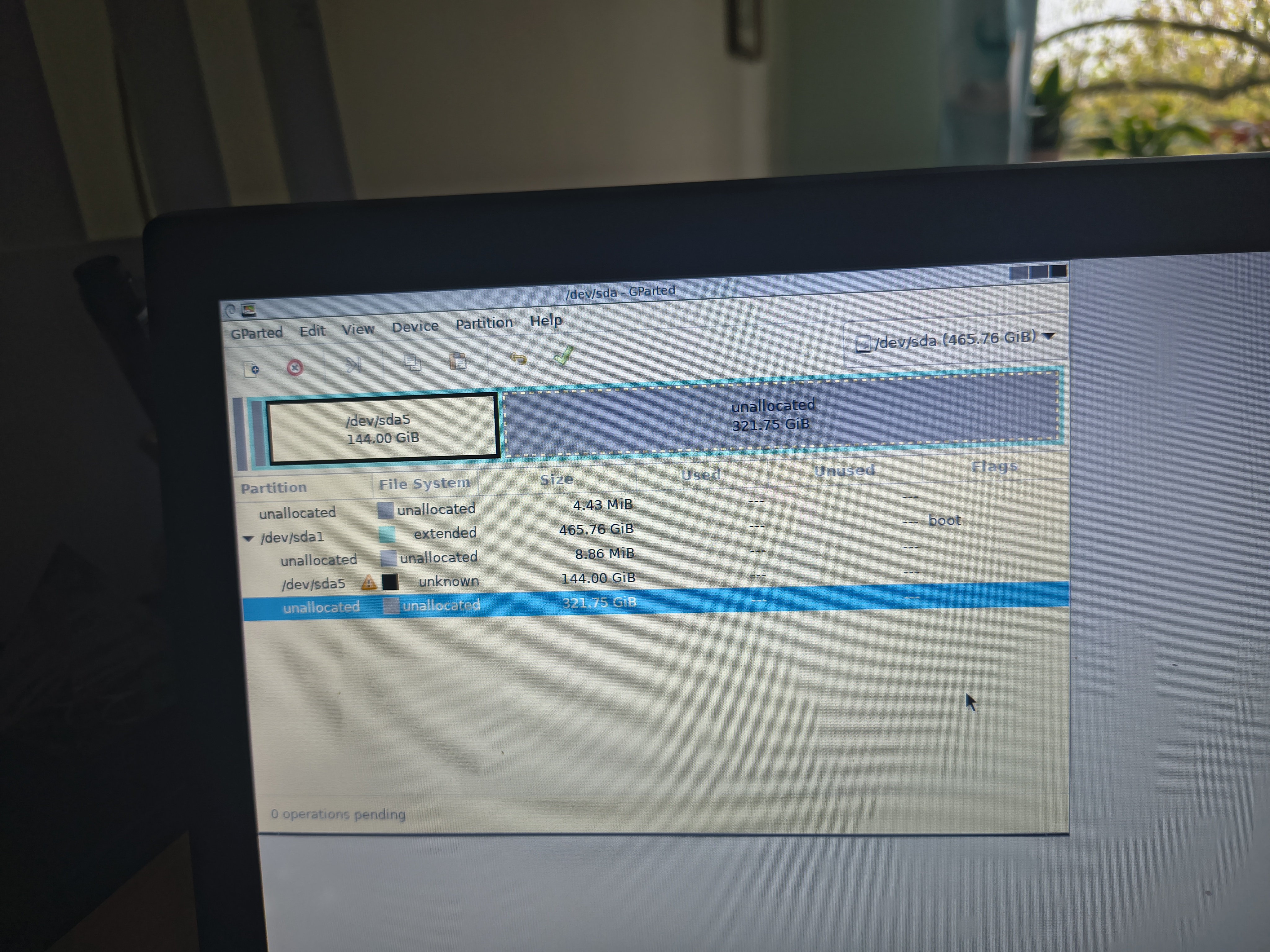
A 500 GB disk, with 45 GB for the System and 124 GB for "Work"—is the rest unformatted, i.e., RAW?
Bilbo attached the following image:
img_20261108_105130446_hdr.jpg
AMIGASYSTEMAMIGASYSTEMDistro Maintainer
Posted 2 days ago
You need to be careful: AROS will only use partitions as its disks if they are RAW; if they are initialized or formatted, it will take up the entire disk.
With HDToolbox, you can actually create as many partitions as you want, but it's not easy—check out this old video of mine from 15 years ago.

B
BilboJunior Member
Posted 2 days ago
If I create an additional partition using GParted, will it be visible in AROS?
J
Jeff1138Member
Posted 2 days ago
Hi,

Have a look here https://en.wikibo...sdos_disks but it does start with wiping the drive and adding partitions is half way down. The details are old so like Deadwood says test on something you do not mind wiping.
Edited by Jeff1138 on 07-11-2026 15:04, 2 days ago
B
BilboJunior Member
Posted 2 days ago

deadwood wrote:

@deadwood - You can use SYS:Tools/HDToolBox but it's not easy to use for beginner. My suggestion is to first experiement with using it under a scratch system installation under a VM before you start using it on real hardware as it is easy to damage your disk if you have no experience with using it.

I have two drives; one has ArosGames installed, and the other also has ArosGames (I couldn't get ArosOne64 to boot from the disc, as I mentioned in another thread). I’d like to experiment a bit with this second one—is there a guide somewhere on how to use it? So far, I haven't been able to do anything other than see the names of the drives.
D
deadwoodAROS Dev
Posted 3 days ago
You can use SYS:Tools/HDToolBox but it's not easy to use for beginner. My suggestion is to first experiement with using it under a scratch system installation under a VM before you start using it on real hardware as it is easy to damage your disk if you have no experience with using it.
B
BilboJunior Member
Posted 3 days ago
Hello,
By default, there are two partitions: a system partition and a work partition. I have some free space on the disk and would like to add a third partition, which should also be visible on the AROS desktop.
Best regards,
You can view all discussion threads in this forum.
You cannot start a new discussion thread in this forum.
You cannot reply in this discussion thread.
You cannot start on a poll in this forum.
You cannot upload attachments in this forum.
You can download attachments in this forum.
Users who participated in discussion: deadwood, AMIGASYSTEM, Amiwell79, Jeff1138, Bilbo