
- Home
- Discussion Forum
- AROS FORUMS
- Development General
- BoingIconBar Update
BoingIconBar Update
Last updated on 5 hours ago
 AMIGASYSTEMDistro Maintainer
Actually, you can back up data on AROS with a simple “Copy” command, but in my opinion, performing a generic or global backup isn't a good idea.
I may develop an application in the future that will allow you to select and choose which folders to include in the backup, including individual folders.
I may develop an application in the future that will allow you to select and choose which folders to include in the backup, including individual folders.
miker1264Software Dev
Posted 6 hours agoNow that you have Icon backup it's just one more step to make System Backup. Same concept, just add up all the file sizes on your system you are about to copy, and get the free space available on the target volume containing your Backup folder, such as an SD card or USB flash drive. If the files to be copied is less than free space, then copy the files! ;-)
AMIGASYSTEMDistro MaintainerRegarding BoingIconBar, if I like how it looks, I’ll add the time and date. As mentioned in the post, the source code will be distributed along with the software as usual. I’m waiting to see if I can publish it or if there are any restrictions, since it’s a system application.
Regarding IconBackup, I’m putting the finishing touches on it, and it will be available with the source code. Features:
- Backup: Copies the icons while preserving the folder structure starting from the root of the volume,
into a folder with date (Backup_YYYY-MM-DD_HHMM, optional).
- Restore: Each icon is restored to its ORIGINAL location (the first folder in the backup is named after the volume).
- Icons are copied byte-for-byte: stacks, tooltypes, and images remain identical.
The copy process uses a temporary file, so an error does not corrupt the existing icon.
- Actual percentage (first pass of counting) and path of the icon being copied; Lock button; the destination
folder is skipped during the scan.
- Log file containing errors (IconBackup.log in the backup, or RAM:IconBackup-Restore.log for restoration).
- Interface in 6 languages. Source code in pure ASCII: accented letters are written as ISO-8859-1 octal escape sequences.
Regarding IconBackup, I’m putting the finishing touches on it, and it will be available with the source code. Features:
- Backup: Copies the icons while preserving the folder structure starting from the root of the volume,
into a folder with date (Backup_YYYY-MM-DD_HHMM, optional).
- Restore: Each icon is restored to its ORIGINAL location (the first folder in the backup is named after the volume).
- Icons are copied byte-for-byte: stacks, tooltypes, and images remain identical.
The copy process uses a temporary file, so an error does not corrupt the existing icon.
- Actual percentage (first pass of counting) and path of the icon being copied; Lock button; the destination
folder is skipped during the scan.
- Log file containing errors (IconBackup.log in the backup, or RAM:IconBackup-Restore.log for restoration).
- Interface in 6 languages. Source code in pure ASCII: accented letters are written as ISO-8859-1 octal escape sequences.
2 users reacted to this post
Bohun, miker1264
You do not have access to view attachments
miker1264Software Dev
Posted 8 hours agoAMIGASYSTEM
You've been doing some amazing work with these new applications!
Yes, I'd like to see the sources for your icon Backup and other tools. I'd also like to see your sources for the BoingIconBar so I can try it to see what you've added or improved. :-)
Currently I'm working on SerialDiskReader decoding mfm data which has taken up my time lately, no time for working on my other projects atm. I've spent 30 hours in the last 2 weeks to get it working to my satisfaction. ;-)
You've been doing some amazing work with these new applications!
Yes, I'd like to see the sources for your icon Backup and other tools. I'd also like to see your sources for the BoingIconBar so I can try it to see what you've added or improved. :-)
Currently I'm working on SerialDiskReader decoding mfm data which has taken up my time lately, no time for working on my other projects atm. I've spent 30 hours in the last 2 weeks to get it working to my satisfaction. ;-)
 olivier2222Junior Member
BoingIconBar/BoingIconBarPrefs:
This a good advice, true, people could believe from the name it is the same app.
In the same vein, the prefs file is ENV:iconbar.prefs !
This a good advice, true, people could believe from the name it is the same app.
In the same vein, the prefs file is ENV:iconbar.prefs !
AMIGASYSTEMDistro MaintainerThanks for your reply, Olivier. Since I’m 73 years old, I was mainly interested in knowing if it’s possible to put everything on Arosarchive and, above all, if I can make some changes to the names. Originally, both the main program and the Preferences program have the same name, and I wanted to rename them BoingIcon and BoingIconPrefs, as also recommended by I.A.
A while back, I signed up for GitHub just to report bugs. As I mentioned, since I have no experience, I don’t know how licenses work, and I wouldn’t want to cause any problems.
A while back, I signed up for GitHub just to report bugs. As I mentioned, since I have no experience, I don’t know how licenses work, and I wouldn’t want to cause any problems.
olivier2222Junior MemberI agree, it is complicated, but this is the way.
Another way is to provide it on your github page (I see you have such an account, but empty). Someone would create a patch diff from there and the necessary meta make file to build it. Zero effort for you.
Anyway, talk about it with you favorite IA helper, I'm pretty sure it will be proud to help you in coding for AROS, and show you the path to walk.
per aspera, ad astra
Another way is to provide it on your github page (I see you have such an account, but empty). Someone would create a patch diff from there and the necessary meta make file to build it. Zero effort for you.
Anyway, talk about it with you favorite IA helper, I'm pretty sure it will be proud to help you in coding for AROS, and show you the path to walk.
per aspera, ad astra
AMIGASYSTEMDistro MaintainerThanks, Olivier. It’s too complicated for me—I’m not a developer. If posting everything on Arosarchive doesn’t cause any problems, then anyone interested can find the source code there.
If there’s a place to report this change perhaps via email—that would be easier.
I’m getting on in years, and creating these applications takes up a lot of my time, on top of all the work I put into keeping AROS One up to date.
If there’s a place to report this change perhaps via email—that would be easier.
I’m getting on in years, and creating these applications takes up a lot of my time, on top of all the work I put into keeping AROS One up to date.
olivier2222Junior MemberIf you want to publish it on the AROS github you may have to "fork" the project in your github account, create a branch for that very project, commit your sources to this branch and propose a PR to AROS. Prefer to create small moves, they will be readable and understandable, more likely to be integrated. They could also be a project in itself, like ports, and be remotely pulled at building time.
Speaking of sources, I would like to read the edits you made to Info, could you please point me to them?
Speaking of sources, I would like to read the edits you made to Info, could you please point me to them?
BohunSenior Member
Posted 13 hours ago@AMIGASYSTEM
I think publishing it on archives.arosworld, as long as it includes the source, is fine. It's probably worth noting that it's licensed under the APL. I've uploaded my Time (Prefs) modification to GitHub, and I don't think the location matters; the only thing that matters is that the sources and the APL license are included.
AROS developers are so busy that they probably won't use these modifications anytime soon, but it's good for them to know about them. When work on the system becomes less demanding, they'll be able to track the changes and incorporate them into the AROS source if they find them interesting.
There's also a more professional approach—forking the AROS source, applying changes to it, and proposing their inclusion in the master branch, but I think this is more for experienced developers.
In any case, I can't wait to see your sources so I can recompile them on aarch64 and upload them to piAROS.
I also find that icon backup tool very helpful. Having them would simplify the process of releasing new versions of piAROS, because with these icons it is a lot of work to update the system and contrib.
I think publishing it on archives.arosworld, as long as it includes the source, is fine. It's probably worth noting that it's licensed under the APL. I've uploaded my Time (Prefs) modification to GitHub, and I don't think the location matters; the only thing that matters is that the sources and the APL license are included.
AROS developers are so busy that they probably won't use these modifications anytime soon, but it's good for them to know about them. When work on the system becomes less demanding, they'll be able to track the changes and incorporate them into the AROS source if they find them interesting.
There's also a more professional approach—forking the AROS source, applying changes to it, and proposing their inclusion in the master branch, but I think this is more for experienced developers.
In any case, I can't wait to see your sources so I can recompile them on aarch64 and upload them to piAROS.
I also find that icon backup tool very helpful. Having them would simplify the process of releasing new versions of piAROS, because with these icons it is a lot of work to update the system and contrib.
AMIGASYSTEMDistro MaintainerBoingIconBar is a system-level program. As you know, I’m not a developer; it’s only thanks to AI and my own experience that I’m developing software that I believe is important.
Regarding the distribution of IconBar, I’m not sure how to proceed—whether to publish it as I always do on Arosworld along with the source code, or whether I should send the source code to the AROS developers. I hope whoever created BoingIconBar could give me some guidance.
@miker1264
I've also created a program you'll like that backs up all your icons and lets you restore them to the same folders.
Still on the topic of icons, there's an application that resizes icons so you can view up to 100 in a single window. I've also created an application to reduce or enlarge system icons.
I’ve fixed a bug that prevented the second side of the icons from displaying correctly. Now all that’s left is to fix the Icon.library to achieve the highest quality; I’ve sent the source code for the Icon.library fix to Deadwood.
Regarding the distribution of IconBar, I’m not sure how to proceed—whether to publish it as I always do on Arosworld along with the source code, or whether I should send the source code to the AROS developers. I hope whoever created BoingIconBar could give me some guidance.
@miker1264
I've also created a program you'll like that backs up all your icons and lets you restore them to the same folders.
Still on the topic of icons, there's an application that resizes icons so you can view up to 100 in a single window. I've also created an application to reduce or enlarge system icons.
I’ve fixed a bug that prevented the second side of the icons from displaying correctly. Now all that’s left is to fix the Icon.library to achieve the highest quality; I’ve sent the source code for the Icon.library fix to Deadwood.
BohunSenior Member
Posted 16 hours ago@AMIGASYSTEM
Great! Would you share the modified code or compile it for aarch64 as well? I was thinking about modifying this program, but you were faster
Great! Would you share the modified code or compile it for aarch64 as well? I was thinking about modifying this program, but you were faster
miker1264Software Dev
Posted 22 hours agoVery well done! Do you plan to post the binary and sources on AROS Archives?
Thank you for developing software for AROS. :-)
Thank you for developing software for AROS. :-)
AMIGASYSTEMDistro Maintainer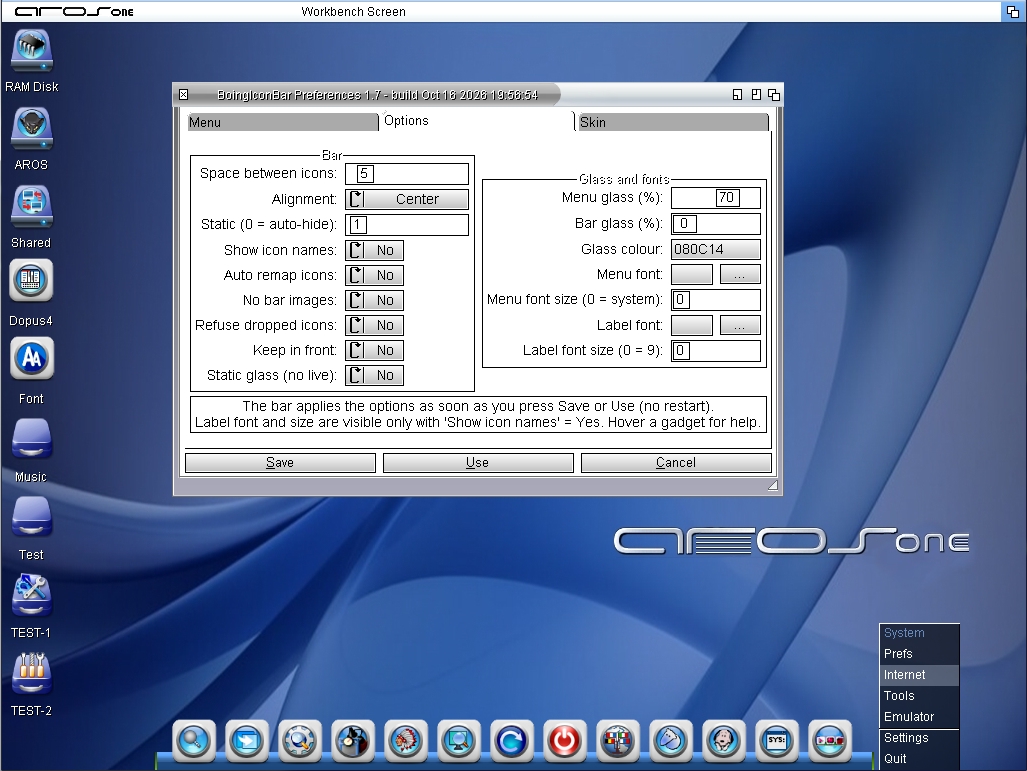
BoingIconBar has been updated with the help of AI. I’ve added many new features to BoingIconBar and fixed several issues; among other things, you can now move windows and the Shell over it without any problems.
New Features:
- You can drag program icons onto the bar; they will be automatically saved
- Remove icons from the bar by simply dragging them off the bar with the mouse; you’ll receive a confirmation message
- The bar menu is transparent, but you can change the font, size, and disable transparency
- The bar can be aligned to the left, right, or center
- The Preferences GUI can be accessed via the preset icon on all submenus
- Localization files for a large number of countries (in progress)
- The Preferences GUI has gained many new features; previously, adding programs required only partially manual input,
but now it includes many new automated functions.
- The Preferences GUI now has two new tabs: Options (Bar Group and Glass Group) and Fonts and Skins
Bar Group:
- Space between icons (SPACE): pixels between icons, from 0 to 50. Default 5.
- Alignment (ALIGN): where the bar appears on the screen: Center, Left, or Right.
- Static (STATIC): 0 = the bar hides when inactive and reappears when you move the mouse over the bottom edge. From 1 to 30 = always visible, with a brief delay before it appears.
- Show icon names (NAMES): displays the name below each icon.
- Auto remap icons (AUTOREMAP): adapts icon colors to match the screen’s colors, useful with palette-based screens.
- No bar images (TRANSPARENT): does not draw the toolbar’s background images (Images:bibgfx); the icons sit directly on the background.
- Refuse dropped icons (NODROP): rejects icons dragged from Wanderer onto the toolbar.
- Keep in front (FRONT): keeps the bar in front of windows instead of behind them. With Bar glass set above 0, it is always in front.
- Static gl**** no live (NOLIVE): when the bar has a glass effect, this prevents redrawing when you move windows beneath it (no flickering).
Glass and Fonts:
- Menu glass (MENUGLASS): Opacity of the dark glass in the menus, from 0 to 100. 0 = opaque menu. Default 70.
- Bar glass (BARGLASS): Opacity of the glass in the bar, from 0 to 100. 0 = normal bar. Requires a true-color screen.
- Glass Color (GLASSCOLOR): Glass color as RRGGBB in hexadecimal. Default 080C14. Applies to both menus and the bar.
- Menu Font (SYSFONT): Menu font. Blank = screen’s system font.
- Menu Font Size (SYSFONTSIZE): Menu font size. Works only if you have selected a Menu font. 0 = 8.
- Label font (LABELFONT): font for the labels under the icons. Default: arial.font.
- Label font size (FONTSIZE): label size. Default: 9. To see the effect, set “Show icon names” to “Yes.”
Apply the options with Save or Use (no restart required). Label font sizes are only visible when “Show icon names” is set to Yes. Hover over the gadget for help
Skin:
- Left Image: Select the left side image for the background
- Middle Image: Select the background
- Right Image: Select the right side image for the background
- Apply Image: Path to images in SYS:System/BoingIconBar/Skins (Left, Middle, and Right)
are copied to Images:bibgfx/ (left, middle, right). The bar reloads them immediately.
Save and Use copy the selected images. They will not be displayed when ‘Bar Glass’ is set to 0.
5 users reacted to this post
coffeecat, retrofaza, Bohun, sonountaleban, Deremon
You do not have access to view attachments
You can view all discussion threads in this forum.
You cannot start a new discussion thread in this forum.
You cannot reply in this discussion thread.
You cannot start on a poll in this forum.
You cannot upload attachments in this forum.
You cannot download attachments in this forum.
You cannot start a new discussion thread in this forum.
You cannot reply in this discussion thread.
You cannot start on a poll in this forum.
You cannot upload attachments in this forum.
You cannot download attachments in this forum.
Moderator: Administrator, Moderators