
Inspired by the questions above, I thought it might be an idea to do a bit of customer research at the Zzap show as to just what potential usres might wish from AROS, just of course with those people who are happy to do complete it.
I've created a BeeBase form to record this feedback (please see image); is there anything else I should be including here?
Cheers,
Nigel.
Edit: Typos fixed, I've added a section asking about interest in native, hosted and portable, plus I've added more information about each option in the bubble help, i.e. explaining what currently exists in AROS and what does not.
Edited by ntromans on 12-05-2026 07:44,
1 day ago
ntromans attached the following image:
Opps, sorry - double post.
Edited by ntromans on 10-05-2026 13:33,
3 days agoMay I ask if there is a download for CUBE 2 I only see windows mac linux versions
amigamiaAdminPosted
4 days agoVery nice! Good luck Nigel!
We'll be cheering you on from afar.
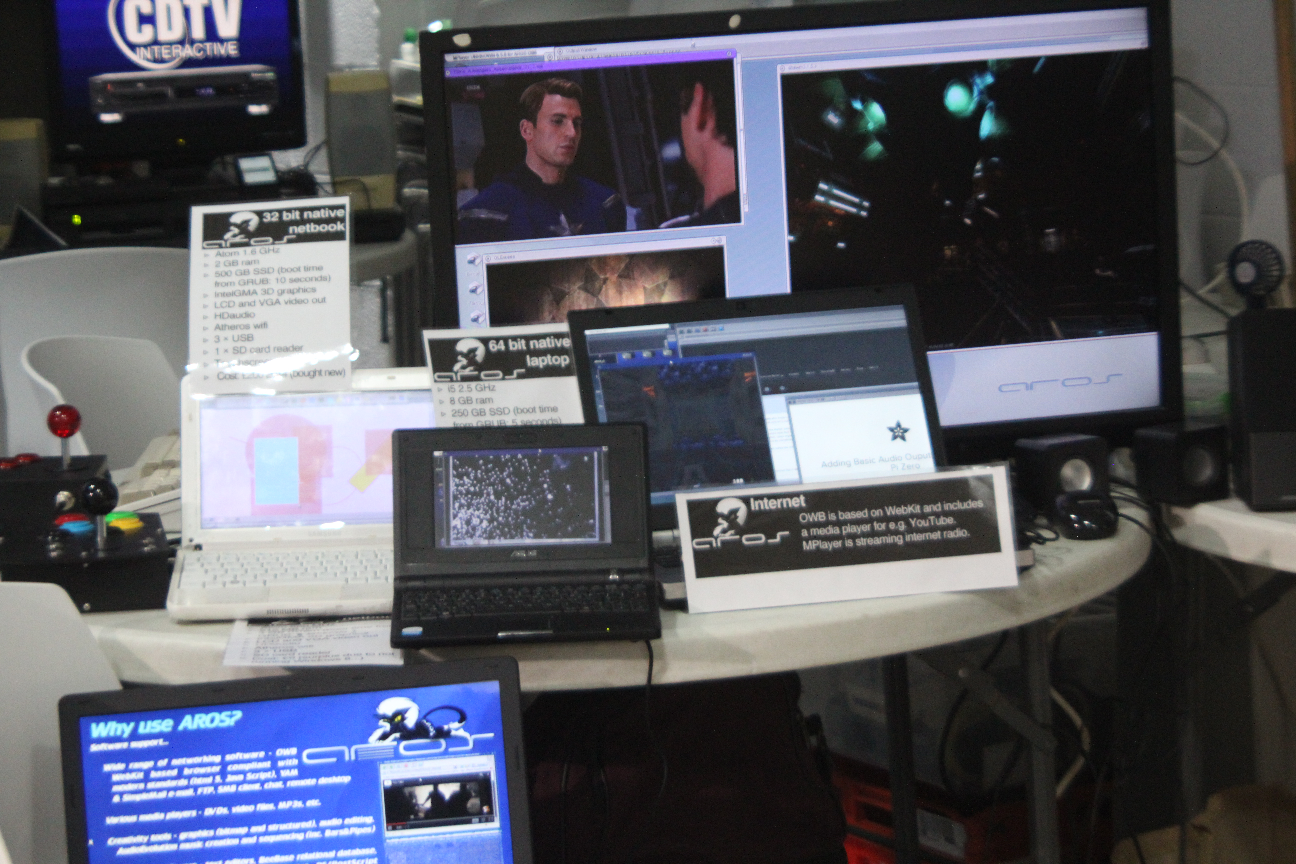
Everything pretty much finalised for the show aside from the bit of issue with laptop for the presentation mentioned elsewhere. The demos will be:
i7 desktop running 32 bit native - simultaneously showing Cube 2, Hollyman (Pacman clone) and a DVD on a big-screen TV. Not just to show 3D capabilities and CPU grunt but also how flexible Trident is - I've mapped the Cube 2 controls to a wireless USB game pad and the Hollyman ones to a classic digital joystick (connected via an Amiga 2000 keyboard converted to USB via a Keyrah) so that both games can be played simultaneously through their respective controllers.
i5 HP laptop 64 bit native - showing OWB and internet radio (just hope the wifi at the venue is good).
Sansung netbook - showing the sort of productivity software I use for work, each program running on its own screen, the use of touchscreen on AROS and the ability to transmit a chosen screen to a second display (via an ASUS 4G surf running 32 bit native); second screen will be a 17" TV. (This has been incredibly useful at work this week; the college PCs have been particularly problematic so I've needed to transfer my presentation to my Samsung several times).
ACER Aspire - showing 'What is AROS' presentation. Looks like being on standard 64 bit so no USB which is a little tricky as the keyboard on this laptop has stopped working. However, if I boot from hard drive and start the presentation from user-startup this will be OK for the show (the presentation just runs in a loop).
Computer spec sheets and demo explanatory panels have all been produced, I just need to print and laminate those. Lukily I've been allocated a 6 foot table so there will be plenty of room for all the machines.
Cheers,
Nigel.
It's a GForce 8400.
Cheers,
Nigel.
What video card do you have in that i7 machine?
Will do, although a Zzap I'll have the i7 running 32 bit as it will be showing 3D capabilities.
Also hopefully my first AROS article will appear in the next but one Amiga Addict magazine (might have been sooner but it seems my original e-mail back in February got lost in the e-mail system somewhere).
Cheers,
Nigel.
Ok, glad to hear that. Have fun at MAE!
i5 and i7 are good candidates to have USB3 working on them. Looking forward to your tests.
I'm actually at a MAE event rigth now, some dicsussion re. what's happening next month.
Personal life has been a bit busy these last couple of weeks but I hopefully after Sunday I shoudl be able to try the latest USB 3 and get the rsources together for the show.
Cheers,
Nigel.
Glad to hear you finalized your setup and looking forward to hear how people react to your presentation/AROS.
I've been using the send screen application for a couple of weeks in class now.
I decided to park the RPi idea for the moment (as looking on the net it seemed many people were having problems setting an RPi up as an access point) and instead I'm using a little ASUS 4GSurf, running AROS of course, as the receiver connected to the class-room's screen.
My Samsung with its touchscreen then sends the selected screen to the ASUS for display. I combined the sending code with my ViewPubscreen application so I can choose which screen to send; I can be looking at one screen on the Samsung (e.g. with student details or speaker notes) whilst the screen with SimpleWhiteboard is presented to the students. It's obviously easy to flick between the screens as I need to.
So far it's working out well to give rooms without a smart board that functionality and with the added bonus I can stay facing the students rather than having to keep turning back to the board to write. This is on 32 bit (to use Hollywood's networking library) and I appreciate it's a bit of a niche application but if anyone's intersted I'll happily post up the code. In any case, hopefully it will provide an interesting demo of a practical use for AROS at the upcoming show.
Cheers,
Nigel.
P.S. I just saw Hollywood's PDF library was updated and was really hopeful it would finally support the loading of PDFs in AROS' Holywood but unfortunately not. A real shame as it's more capable at handlng current PDFs that our current version of GhostScript.
Glad to hear that! How many machines can you bring? Will you be showing both AROS One (native) and AROS Portable? Also do you need any help with preparations?