Oh no! Where's the JavaScript?
Your Web browser does not have JavaScript enabled or does not support JavaScript. Please enable JavaScript on your Web browser to properly view this Web site, or upgrade to a Web browser that does support JavaScript.

piAROS distro

Last updated on 17 hours ago
B
BohunDistro Maintainer
Posted 12 days ago

miker1264 wrote:

@miker1264 -
I'm curious, what is the little gadget on the right side of the Screen Titlebar? Is that 45% battery, 4.39 hours left?

yes, that's the Pi-Top case battery monitor.
[url]
https://archives....4-aros.lha[/url]
B
BohunDistro Maintainer
Posted 12 days ago
i.imgur.com/SxwPcHm.png

The dock clock syncs automatically now with the server after connecting to the internet Grin
And this screengrabber replacement is absolutely fantastic. AROS on the Pi is starting to get some traction Smile
aha, retrofaza, Argo, miker1264
B
BohunDistro Maintainer
Posted 11 days ago

Jeff1138 wrote:

@Jeff1138 - Hi,

@Bohun

Were you able to add the weather widget to the dockbar?


I understand why you're asking about widgets. piAROS launches the dockbar from WBStartup and looks for widgets in the directory it's launched from. It doesn't find them because they're in the installation directory, i.e., Packages/dockbar. For the same reason, after upgrading to the latest version 0.6, the old 0.52 dockbar will still launch because the program in WBStartup isn't overwritten. For this reason, I recommend removing the dockbar from WBStartup and adding the above line to User-Startup.
M
miker1264Software Dev
Posted 11 days ago
Only Pi_Aros makes it possible! ;-)

Sorry, wrong slogan. That was an Amiga advertisement.
M
miker1264Software Dev
Posted 11 days ago
Anyone know how to copy the build files and which ones to setup GCC in the shell for compiling small apps?

Is there a guide or instructions?

It's interesting that making the SD card image doesn't put the files in the image automatically since we simply unzip and copy to micro SD. We don't have an installer to choose add development. What can we do?
M
miker1264Software Dev
Posted 11 days ago
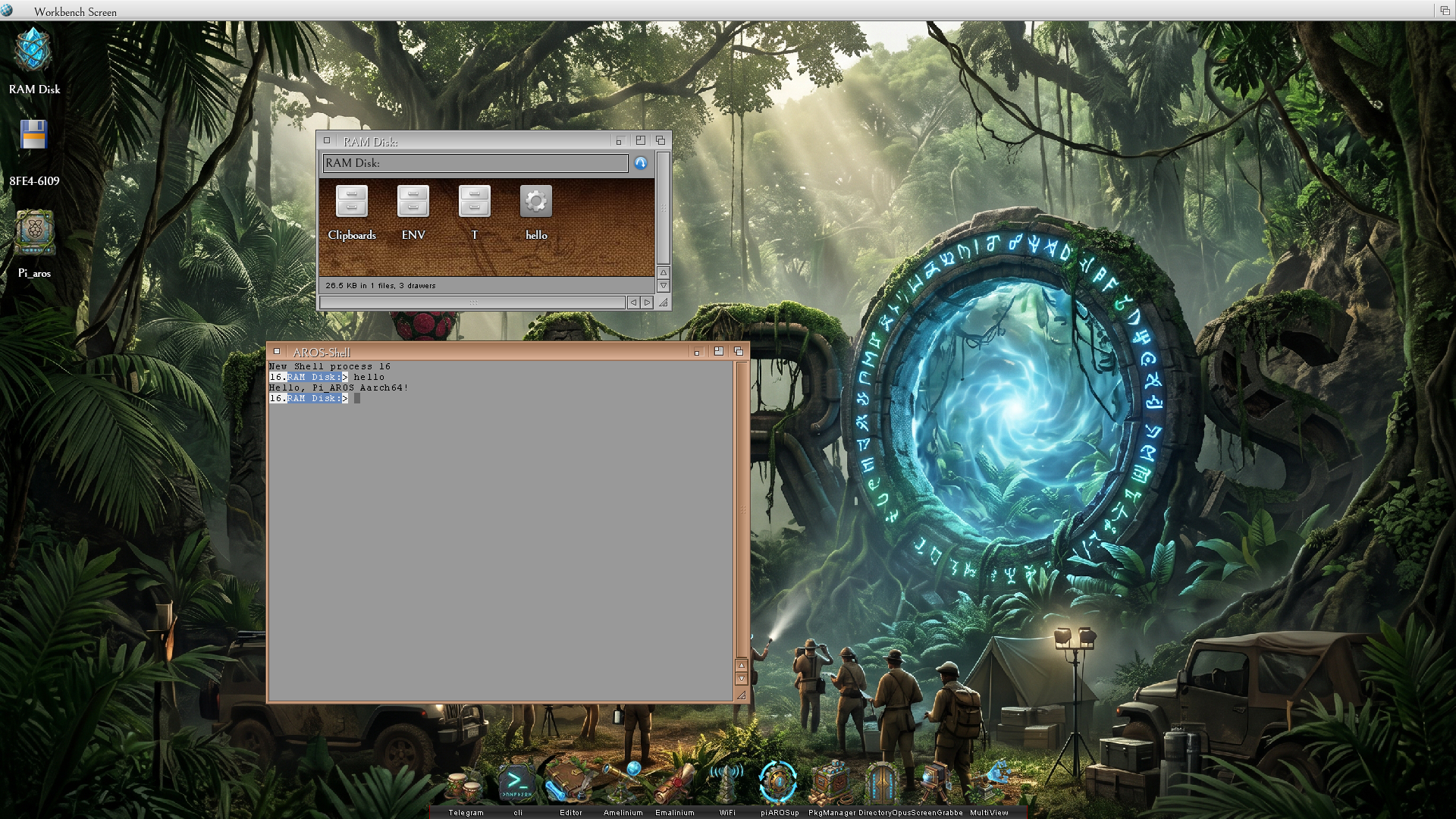
First let's get this out of the way...

Hello Pi_Aros!
miker1264 attached the following image:
aarch64_running_hello_11-07-26.png
M
miker1264Software Dev
Posted 11 days ago
I fixed a couple of issues with Pi_Aros so far. Only one remains - getting gcc to work in the shell.

I had an issue on startup with "Dopus icon not found.." and then "Please insert PiAros volume in any drive". That tells me that something was calling PiAros instead of Pi_Aros. It was an erroneous entry in the settings for the IconBar. I removed it and the error went away. I added Dopus4 back to the IconBar and it works now.

The other issue was that double-clicking either a picture file or sound file would not open these items in
MultiView but rather MultiView had an error "Couldn't open..." I narrowed it down to the datatypes system
by systematically replacing Datatypes Library, MultiView itself and both picture.datatype and sound.datatype.

At first I replaced the datatypes.library with the version that I compiled for Pi_Aros. It didn't fix the datatypes issue. So then I replaced MultiView and the picture and sound datatypes. I don't know which one of those did it,
but now picture and sound files open correctly with a double-click. I will include the archive with these files here.
Edited by miker1264 on 07-11-2026 12:30, 11 days ago
miker1264 attached the following file:
datatypes_fix_11-07-26.zip [116.14kB / 38 Downloads]
M
miker1264Software Dev
Posted 11 days ago
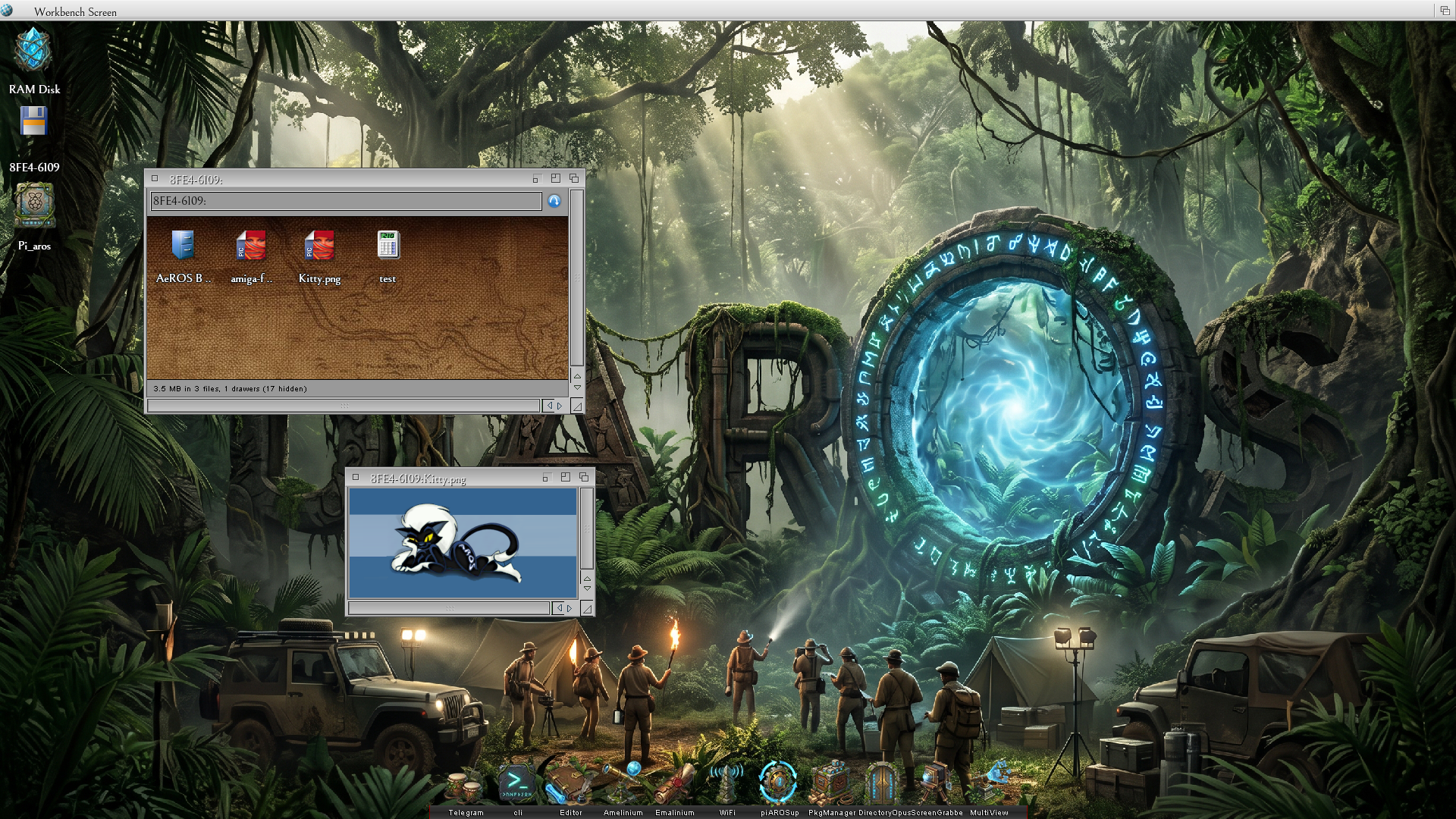
Here is the screenshot of fixing datatypes...of course it's a picture of aros kitty!

Next I will compile my Targa and PCX datatypes and do some tests.

The Pi400 starts up and shuts down in just a few seconds like an Amiga. It even has the keyboard wedge shape. It looks like a little Amiga!

Pi_Aros is fun! :-)
Edited by miker1264 on 07-11-2026 12:27, 11 days ago
miker1264 attached the following image:
aarch64_fixing_datatypes_11-07-26.png
J
Jeff1138Senior Member
Posted 11 days ago
Hi,

PkgManager now offers wordcraft but will not install due to missing library - crt, stdlib, and m. Any idea where they can be found?
D
deadwoodAROS Dev
Posted 11 days ago
These libraries are not available for ABIv1 Aarch64 and won't be. It might be a misconfiguration of package in PkgManager (software for Aarch64 cannot require them, unless someone ported them and I'm not aware of it ^^)
B
BohunDistro Maintainer
Posted 11 days ago
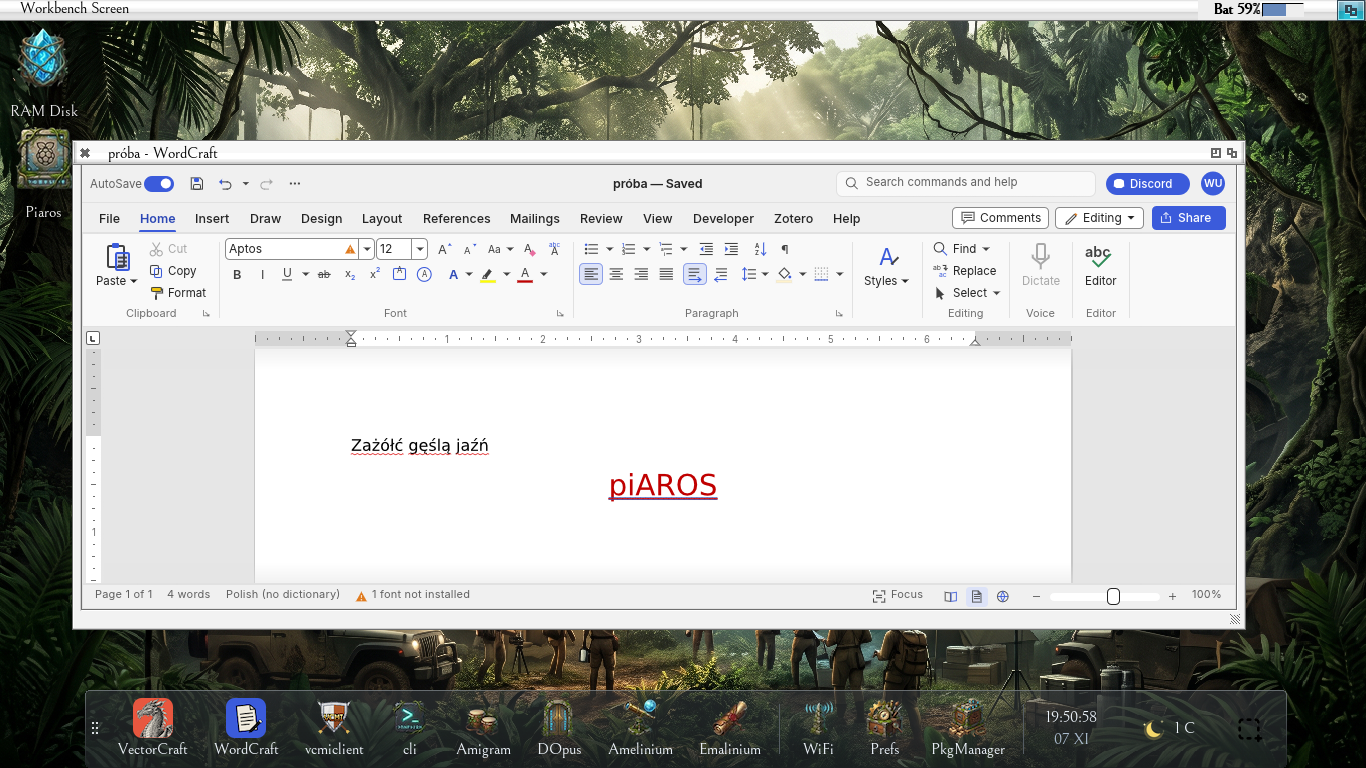
Well, I have no words...
Bohun attached the following image:
capture-2026-11-07_19-50-53.png
J
Jeff1138Senior Member
Posted 11 days ago
Hi,

Nice, thanks. The manifest file has those library requested which the vectorcraft did not.
Install by unzipping and double clicking works as above.
B
BohunDistro Maintainer
Posted 11 days ago
@Jeff1138
Yes, this is a bug in pkg. The author is already aware of it and is correcting it. Check PM. Smile
Edited by Bohun on 07-11-2026 14:32, 11 days ago
J
Jeff1138Senior Member
Posted 11 days ago
Hi,

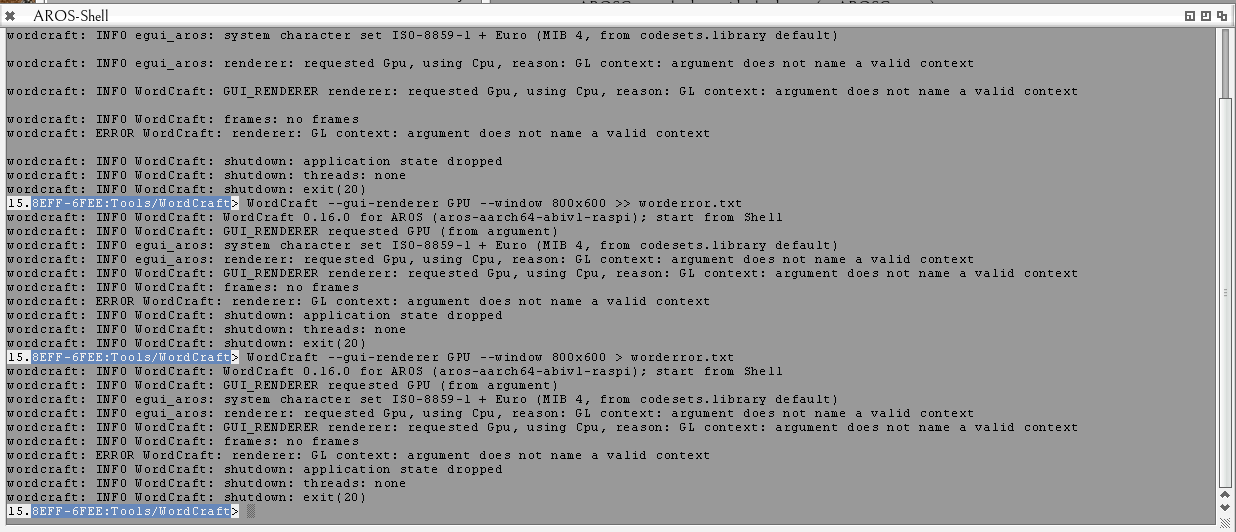
Thanks, now working. Just to try, I changed the tooltype option from CPU to GPU and get error

renderer: GL context: argument does not name a valid context

So acceleration might not work? It is okay to go back to CPU again - just wondered.
Jeff1138 attached the following image:
capture-2026-11-07_19-50-10.png
B
BohunDistro Maintainer
Posted 10 days ago
https://forums.raspberrypi.com/viewtopic.php?p=2392201#p2392191

Quote

Hello, I just discovered this distro and tried it out on my raspi 4.
It is still not working, same error.
I used piAROS_0.4.2.zip from 05-Nov-2026 18:47
Used several different unpackers on Windows and MACOS with a SanDISK 32GB card.


I don't understand why these problems are happening. Any ideas?
J
Jeff1138Senior Member
Posted 10 days ago
Hi,

Idea but not sure, incompatible bootloader / start4 issue like below?

https://www.risco...pics/19399

Don't have a Pi4 so cannot advise, are all issues Pi4 only? There have been 2 or 3 revisions.

Is there a way to determine the eeprom version so we can build a table of what works or doesn't? In PiOS it would be vcgencmd bootloader_version.
Does VCStat show eeprom version or in a shell vcdiag?

Releases https://github.co...eleases.md

This is only a guess
Edited by Jeff1138 on 08-11-2026 06:39, 10 days ago
amigamiaamigamiaAdmin
Posted 10 days ago

Bohun wrote:

@Bohun - https://forums.raspberrypi.com/viewtopic.php?p=2392201#p2392191

Quote

Hello, I just discovered this distro and tried it out on my raspi 4.
It is still not working, same error.
I used piAROS_0.4.2.zip from 05-Nov-2026 18:47
Used several different unpackers on Windows and MACOS with a SanDISK 32GB card.


I don't understand why these problems are happening. Any ideas?


This is what I'd recommend:

1) If the files are extracted on MAC OS and then copied over the SD card, run this command from Terminal against the SD Card volume:

dot_clean -m /Volumes/SDCard_Label

Note: SDCard_Label is the name given to the SD Card when it was formatted as FAT32

2) If the files are extracted on Windows and then copied over the SD Card, from command prompt (Not the terminal which drops you into PowerShell) CD into the SD card drive letter (i.e. CD E: if E: is the drive for the SD Card with piAROS files on it) and run this command:

del /s /q /f /a:h ._*

This should clean those files that I have seen causing problems on boot.
Edited by amigamia on 08-11-2026 06:54, 10 days ago
B
BohunDistro Maintainer
Posted 10 days ago
@amigamia
piAROS 0.4.2 from November 5th is cleaned of dot files. This must be another reason why the system does not boot on RPi 4.
M
miker1264Software Dev
Posted 10 days ago
I seem to remember a time long ago when AROS x86-64 wouldn't boot. As with Pi_Aros, in time this will be resolved as it was with 64bit AROS.

On a more positive note: I like the slogan "Pi_Aros brings people together...".

I also like "Pi_Aros makes things possible..." and "Pi_Aros Inspires Greatness..."

Can you think of a Good Slogan?
amigamiaamigamiaAdmin
Posted 10 days ago

Bohun wrote:

@Bohun - @amigamia
piAROS 0.4.2 from November 5th is cleaned of dot files. This must be another reason why the system does not boot on RPi 4.


I believe, if you extract the files locally to the OS drive and then copy them over to the SD-Card, they show up again if you do that on MacOS
You can view all discussion threads in this forum.
You cannot start a new discussion thread in this forum.
You cannot reply in this discussion thread.
You cannot start on a poll in this forum.
You cannot upload attachments in this forum.
You can download attachments in this forum.
Moderator: Administrator