Withint that drawer on USB FAT disk - do you have any files? If yes, delete them. If the problem goes away starts introducing the files back and see which one causes this issue.
True, it could be a corrupted file: it's the USB I use to transfer files at work and the machines there have corrupted it on more than one occasion.
Cheers,
Nigel.
Lock-up just happened again, this time on a drawer on an SFS partition in which I'm certain there are no corrupted files. It happened when setting 'show all files'. With muli-line listing removed for windows in Wanderer prefs the lock-up does not occur.
Can you tell me which drawer you entered exactly? On a clean hosted build I only marked the "Use multiline" in Prefs/Wanderer Drawers section and then entered Fonts and Libs drawer which have many "multiline" file. I didn't experience any issue.
@deadwood - Can you tell me which drawer you entered exactly? On a clean hosted build I only marked the "Use multiline" in Prefs/Wanderer Drawers section and then entered Fonts and Libs drawer which have many "multiline" file. I didn't experience any issue.
I've the exact cause of the error - if you set multiline but look into a draw with icon titles that still longer than the lines set, the lock-up occurs. So long as the number of lines to display is at least as long as that needed for the full title of all icons, no crash.
E.g. the lock-up mentioned above was for a drawer with .mp3 music tracks in it. With 3 lines set, not all song titles (icon titles) are fully displayed on using 'show all files' => lock up. With 5 lines set, every title is fully displayed => no lock-up.
Hmm, I just tried that with a 3 line setup and a file whose filename was not fitting into 3 lines and I didn't get a lookup. Tried that on hosted. There propobly needs to me some more conditions for this lockup to occur.
Is it possible that the complete name of the file (with extension) in your case was longer than 105 characters?
Edited by deadwood on 10-01-2026 09:42, 9 months ago
@deadwood - Hmm, I just tried that with a 3 line setup and a file whose filename was not fitting into 3 lines and I didn't get a lookup. Tried that on hosted. There propobly needs to me some more conditions for this lockup to occur.
Is it possible that the complete name of the file (with extension) in your case was longer than 105 characters?
Check if this version works better for you (or if it crashes, is it the same crash?).
No luck I'm afraid - please see attached.
One other symptom - after the crash I can't start other programs requiring a reboot (I have to have ScreenGrabber running before the crash occurs to get the image).
Try to have Avail running in another sheel window in loop every second or so. Check if it starts showing weird memory readings (too low or too high) at some point when opening the pdf.
Edit: That's when testing the 2010 version from Archives on older 32 bit hosted AROS. With the linked duster_whatever.pdf stacksnoop stack usage shown was something like 60000 bytes.
Edited by aros-sg on 12-01-2026 05:37, 9 months ago
[quote name=aros-sg post=10668]@aros-sg - arospdf: stack size of 40960 is too small.
Edit: That's when testing the 2010 version from Archives on older 32 bit hosted AROS. With the linked duster_whatever.pdf stacksnoop stack usage shown was something like 60000 bytes.[/quote]
Thank you, and I've been really really dumb. I increased teh stack in the program's icon but forgot to increase the stack above the default in def_PDF when I installed that test nightly: with the stack incereased as suggested the crash disappears.
Really, really sorry for setting off this wild goose-chase.
The AROSpdf error is not such a wild goose-chase... Using the version from post #226 I opened from the prigram's icon (so no dcoument, empty display) and then directly closed it - had the crash shown below. Stack is set to 1600000 so it's not a stack issue. For me the crash is fully reproduceable, happens on every test both if using the close button or quit menu item.
Cheers,
Nigel.
Edited by ntromans on 18-01-2026 17:42, 9 months ago
@deadwood - Can you see what Tooltypes your icon has? If it has CLI tooltype, the stack on the icon gets ignored.
No, no tooltyoes set at all.
Cheers,
Nigel.
P.S. I wasn't aware of the CLI tooltype - if that a more geenral thing or just for AROSpdf?
ntromans, the CLI Tooltypes, as mentioned by deadwood, allows you to run a binary as if you were doing so from a Shell, so no options or parameters can be executed.
If, on the other hand, the WB parameter (or no parameter) is present in Tooltypes, Wanderer will execute the binary and, if provided, the options included in Toolpypes.
AROS is based on AmigaOS3.1, so the CLI parameter must be added manually. On subsequent Amiga OS versions, however, everything is done automatically through tabs. See an example of OS 3.9 tooltypes.
ntromans, the CLI Tooltypes, as mentioned by deadwood, allows you to run a binary as if you were doing so from a Shell, so no options or parameters can be executed.
If, on the other hand, the WB parameter (or no parameter) is present in Tooltypes, Wanderer will execute the binary and, if provided, the options included in Toolpypes.
AROS is based on AmigaOS3.1, so the CLI parameter must be added manually. On subsequent Amiga OS versions, however, everything is done automatically through tabs. See an example of OS 3.9 tooltypes.
Thank you. That tab is in 3.1 too, but I'd totally forgotten it's existence. I haven't made active use of my (emulated) OS3 Workbench for well over a decade, these days it's really just an interface to the 68k tools I use (PageStream, FinalCalc and a few others).
However, this CLI tooltype is just what I've been looking for. WBxCLI is such a useful tool in x86 and I've been trying to think of a way to replicate it's functionality in 64 bit, especailly for def_ icons. The CLI tooltype lets this be done.
Set up a sript with the 'S' flag set that reads in one parameter, and make this the 'tool' in the def_ icon. When a file using the def_ icon is clicked, the path and name of the icon is be passed into the script allowing it to be processed.
I'm planning to make a Hollywood program to be run by the script which will read the other tooltypes, so like WBxCLI you could set the program to run, stack, further arguments and an optional screen to open the program on (as you know I do like to have all my application son separate screens ).
No, OS3.1 does not have that screen. OS3.1 is the same as AROS; the CLI, WB and ARexx parameters must be added manually.
WBxCLI is very useful for adding options to DOS Commands.
Important: AROS has a different way of managing icons. If you have an executable file, you will never be able to add a project icon. AROS will automatically recognise that it is an executable file and will transform the icon into a tool icon.
History:
- integrated ~90 commits from Kalamatee from October-January period
Areas to test:
- does it still boot on your hardware
- if you have a laptop, it's possible the beterry state can be read in SysExplorer now
- does playing audio still works (if you have an older, pre 2010 CPU)
- basic cpu scaling governor added:
- does your machine work faster now
- does your machine work slower now
- is your CPU fan working all the time if it weren't previously (for laptops)
Edited by deadwood on 04-02-2026 10:44, 8 months ago
Baterry -> Either I misread the commits or something isn't loading. Can you check with 'liblist' if you have power.hidd and acpibattery.hidd on the list?
CPU Frequency -> I don't know if we have a tool that can read current CPU frequency unfortunatelly.
You can view all discussion threads in this forum. You cannot start a new discussion thread in this forum. You cannot reply in this discussion thread. You cannot start on a poll in this forum. You cannot upload attachments in this forum. You cannot download attachments in this forum.

 AMIGASYSTEMDistro Maintainer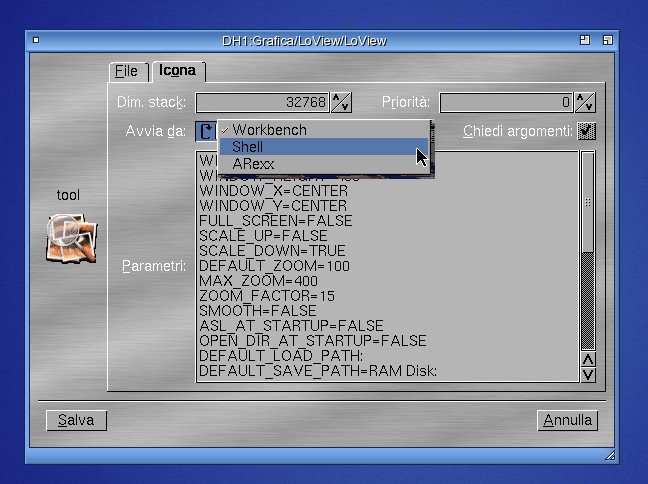
 ).
).