Oh no! Where's the JavaScript?
Your Web browser does not have JavaScript enabled or does not support JavaScript. Please enable JavaScript on your Web browser to properly view this Web site, or upgrade to a Web browser that does support JavaScript.

piAROS distro

Last updated on 23 minutes ago
M
miker1264Software Dev
Posted 2 days ago
Here are a bunch of new window themes for Pi_Aros that I made.

Most of them should work. Some are experimental and may not work.
miker1264 attached the following file:
pi_aros_themes.zip [3.77MB / 17 Downloads]
amigamiaamigamiaAdmin
Posted 2 days ago

Bohun wrote:

@Bohun -

amigamia wrote:

@amigamia

Will try the nightly build and report back. The card is a fast one. The previous version of piAROS was booting OK prior to me puting the latest on it. I'll do some testing and let you know. If it's just me then I am doing something wrong Wink


Did you manage to solve the problem? Someone on the Raspi forum reported the same issue with Raspi4.
https://forums.raspberrypi.com/viewtopic.php?t=401574&sid=821df74d3fb32a686a1878c39147a38b


I did! I downloaded the nightly from aros.org + the contrib, extracted all onto the SanDisk card 32GB as I always do and it booted into AROS flawlessly. No errors and no issues with mouse. Wi-Fi network, Audio, Video worked without a tantrum.

I re-downloaded the PiAROS_0.4.2.zip, extracted it and did the same process as the nightly archive. Same issues, boots into the AROS eyes of the ROM file.

I noticed something else from the Oct-12 and the Nov-2 zipped files. When I unzipped the file using the File Manager in windows, I see nothing. There are no files listed.

If I used 7-zip, I see a folder with no name (I think I saw an _ follwed by a space). If then open that, I then see the content that I can extract. Also, there is a folder called "System Volume Information" which is not an AROS folder. I believe that is a Windows generated folder on USB drives. If I try to copy that, it fails with an error (I didn't collect that).

I think there is something wrong in the way the files are zipped on piAROS.
amigamiaamigamiaAdmin
Posted 2 days ago
Checking out the content of the zipped file on archive.org, I see the files were zipped from a Mac OS. In the past I recall that the ._ files cause problems on boot and removing them worked for me. I haven't tried but will try tonight when I am back from work, to remove the ._ files from my mac by use of dot_clean -m /Volumes/piAROS (/piAROS is my SD card volume name)
Edited by amigamia on 04-11-2026 07:24, 2 days ago
M
miker1264Software Dev
Posted 2 days ago
Someone asked if USB sticks are supported.

I can confirm that my Transcend USB multi-card reader works. I just plug it in an empty USB port, insert an inexpensive SD card. It works.

So I assume USB sticks work also. Though I haven't tested to be sure.
Edited by miker1264 on 04-11-2026 18:31, 2 days ago
T
tennis74Newbie
Posted 2 days ago
Tested the nightly build "AROS-20261015-raspi-aarch64-system" i had lying around.

This works perfect with the same Flash disk and hardware (Pi400) which
fails with newer piAROS and nightly builds.

Edit :
Tested the latest piAROS with replaced "aros-aarch64-raspi.img" from old
nigthly version and this boots, but ends with a static mouse pointer and
black screen, blinking with the desktop briefly, similar as before.
It seems if I am able to click and drag the main screen down, the desktop
shows up briefly, but then disappears again. This was also a problem before,
bit it usually stabilized after a few drags.

There must be a regression here.
Edited by tennis74 on 04-11-2026 18:27, 2 days ago
amigamiaamigamiaAdmin
Posted 1 day ago

amigamia wrote:

@amigamia - Checking out the content of the zipped file on archive.org, I see the files were zipped from a Mac OS. In the past I recall that the ._ files cause problems on boot and removing them worked for me. I haven't tried but will try tonight when I am back from work, to remove the ._ files from my mac by use of dot_clean -m /Volumes/piAROS (/piAROS is my SD card volume name)


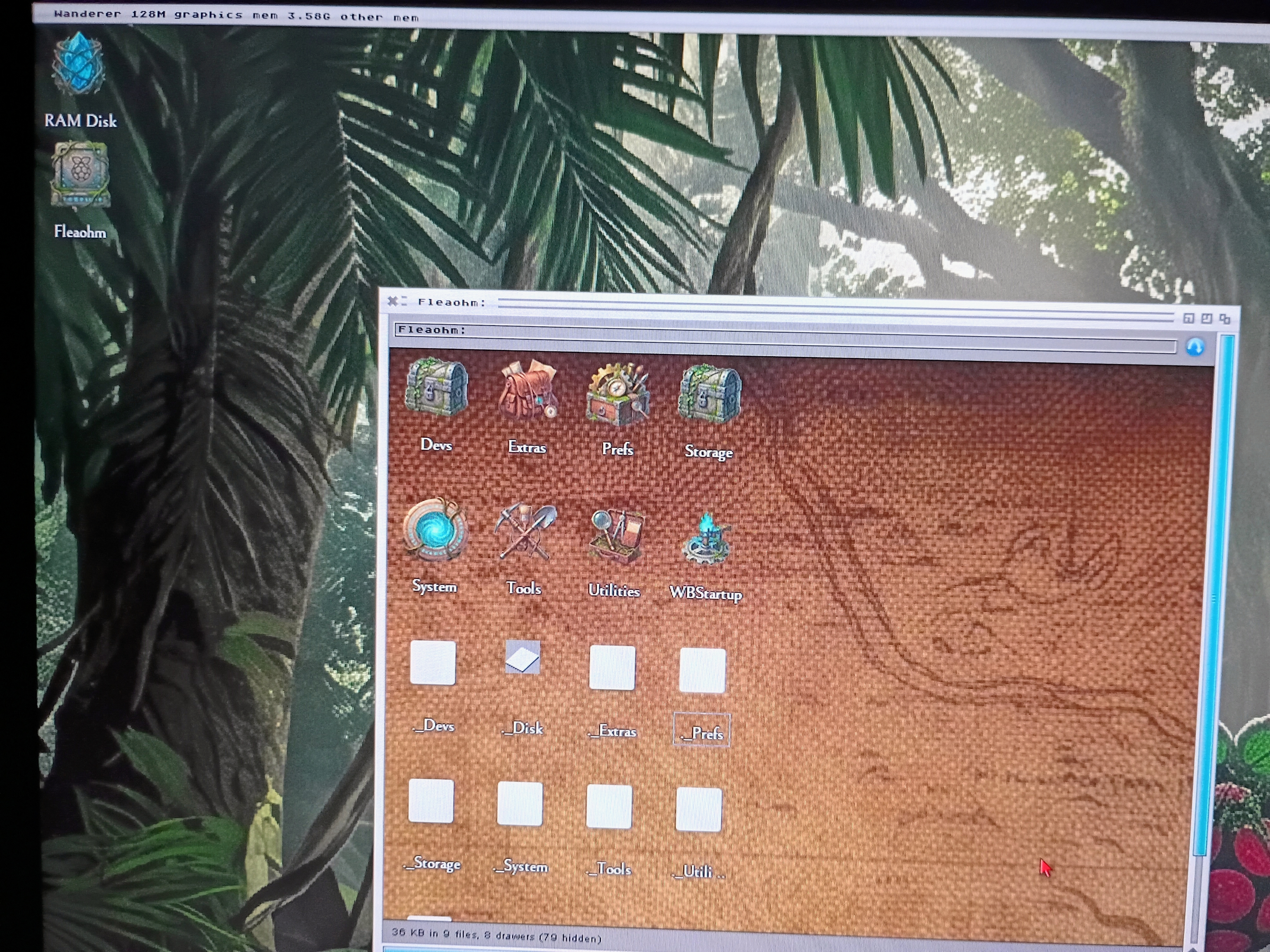
After the dot clean command and then putting the files on another SD card, piAROS booted on the 400. With some errors which I closed up but it want into the desktop. Still some quirkiness about the files (See the broken icons in the prefs folder). I truly believe something in the compression process is messing the files up and the ._ files are messing things up.
amigamia attached the following image:
img_20261104_210605473_hdr_ae.jpg
M
miker1264Software Dev
Posted 20 hours ago
For Pi_Aros I downloaded the Nov 2nd zip archive again to test it.

I unpacked the archive with 7Zip & Windows Extract Tool. Although the Windows method took longer the results were the same. Files are ok.

However, the instructions say to "copy everything" from the archive onto a FAT32 formatted micro SD. That can be misleading. DON'T do that. There are two subdirectories in the extracted archive. One is _MACOSX, avoid that one entirely. The one that I used is piAROS_0.4.2

Copy the contents of piAROS_0.4.2 to a FAT32 formatted micro SD card. It should boot fine. Though I have noticed some icon anomalies. The picture files when clicked don't open. But that should be very easy to fix. :-)

Note: the _MACOSX folder is a hidden system folder created by Mac OS when files or folders are compressed into a zip archive. Don't copy both the _MACOSX & PiAROS directoried to the micro SD card. That will cause unwanted errors.
Edited by miker1264 on 05-11-2026 14:13, 17 hours ago
B
BohunSenior Member
Posted 17 hours ago
I've uploaded a new, improved version 0.4.2. I've cleaned up the files. I'd like to ask you to verify that these files are indeed gone. I also cleaned them up before, and I have no idea why they're still in the archive.

In my defense, since I'm running on a Mac, after downloading the archive and burning it to the SD card, the Mac re-creates these files, so I have no way to check if the archive is clean or not. I'll try doing this on MorphOS, but for now, I'm asking for help in verifying.
B
BohunSenior Member
Posted 16 hours ago
I downloaded the new archive to my RPi 500+ and unpacked it. I don't see any dot files, so I guess it's OK.
In this version, I've replaced the BoingIconBar with coffeecat's Dockbar, just like the one in AROS.games. It's worth checking out, as it's a major improvement.
Edited by Bohun on 05-11-2026 15:16, 16 hours ago
M
miker1264Software Dev
Posted 15 hours ago
Screenshot with the new DockBar ?

I would bet it looks really nice!?
B
BohunSenior Member
Posted 15 hours ago

miker1264 wrote:

@miker1264 - Screenshot with the new DockBar ?

I would bet it looks really nice!?


unfortunately the dockbar is transparent to the screengrabber
amigamiaamigamiaAdmin
Posted 12 hours ago

Bohun wrote:

@Bohun - I've uploaded a new, improved version 0.4.2. I've cleaned up the files. I'd like to ask you to verify that these files are indeed gone. I also cleaned them up before, and I have no idea why they're still in the archive.

In my defense, since I'm running on a Mac, after downloading the archive and burning it to the SD card, the Mac re-creates these files, so I have no way to check if the archive is clean or not. I'll try doing this on MorphOS, but for now, I'm asking for help in verifying.


I have found that on a MAC it's best to run the dot_clean command and point it to the SD card volume. Example: dot_clean -m /Volumes/piAROS where piAROS is the SD card Volume with the files already extracted on it.

It will take slightly longer because of SD card R/W access times but it's worth it.
Edited by amigamia on 05-11-2026 19:01, 12 hours ago
M
miker1264Software Dev
Posted 8 hours ago
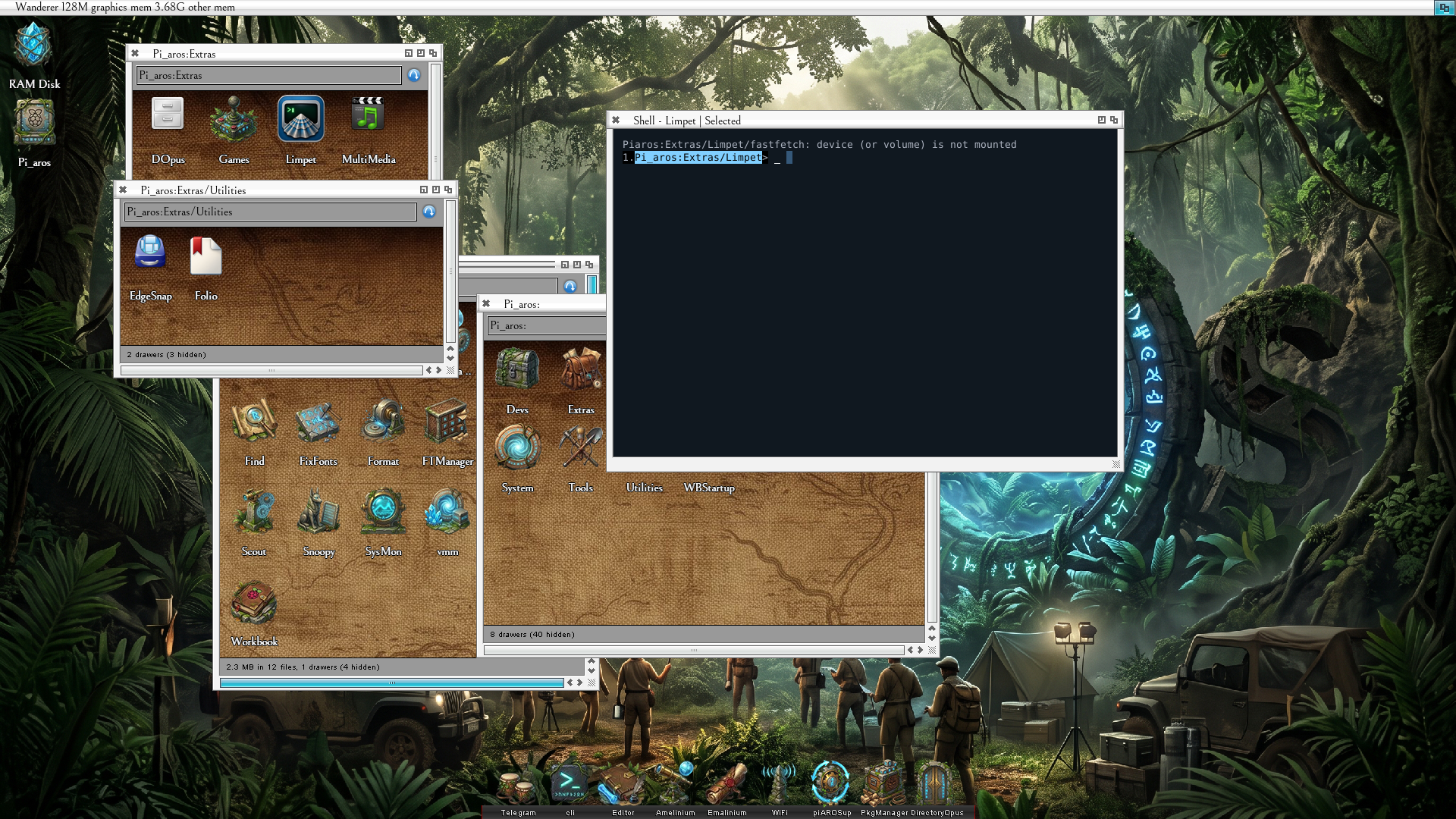
PiAros is working well. I was just doing some testing.

Oh, and I also built the Aarch64 Toolchain and I built PiAros. ;-)

Now the fun begins! Compiling new software for PiAros.
Bohun, sonountaleban
miker1264 attached the following image:
pi_aros_first_boot2.png
B
BohunSenior Member
Posted 5 hours ago
Great. We're waiting for new programs for aarch64 because there really aren't many of them.
B
BohunSenior Member
Posted 3 hours ago
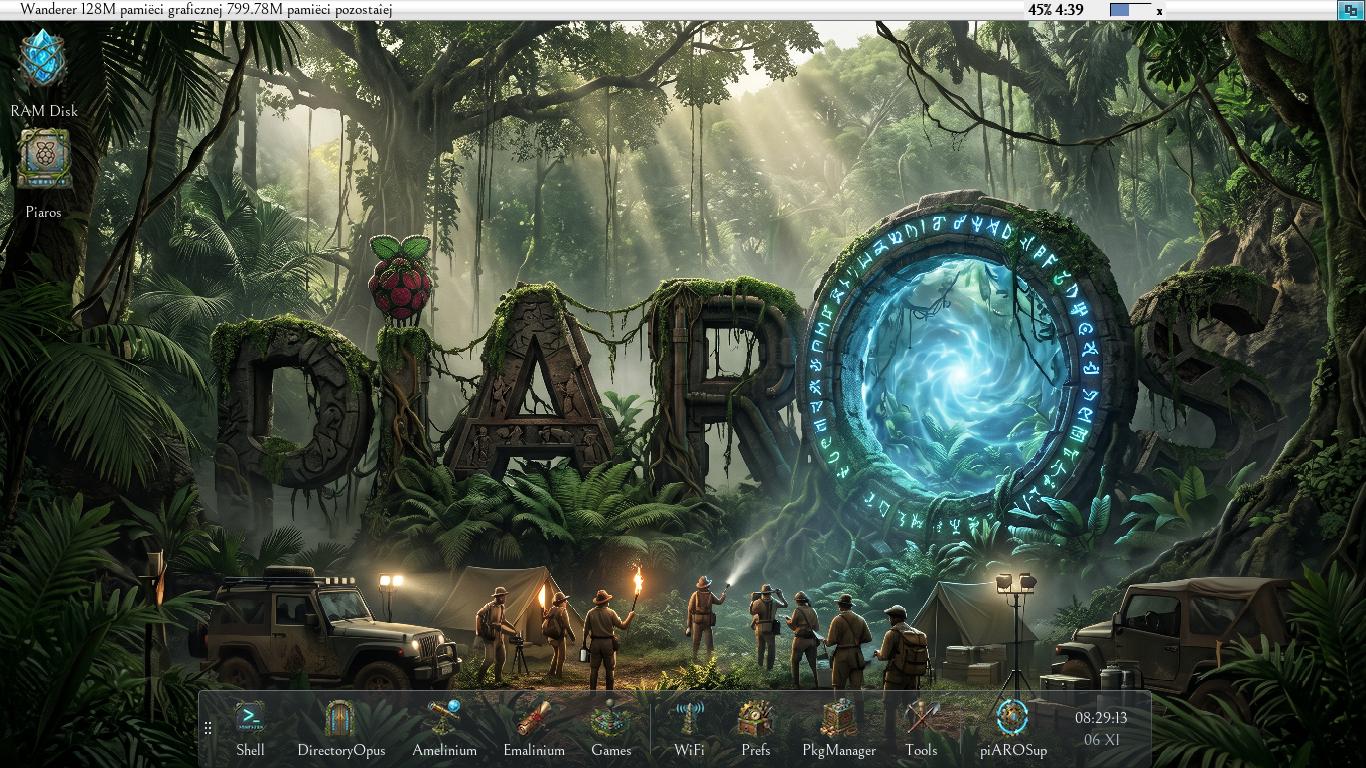
To make Docker visible through ScreenGrabber, run it from the shell with the --no-compose parameter.
If you want Docker to be visible in any screenshots, remove it from WBStartup and add the following line to User-Startup:
Run <NIL: >NIL: QUIET SYSPfftackages/Dockbar/Dockbar --no-compose
i.imgur.com/PNn8Ffu.jpeg
Edited by Bohun on 06-11-2026 05:16, 2 hours ago
Bohun attached the following image:
piaros042.jpeg
amigamiaamigamiaAdmin
Posted 23 minutes ago

amigamia wrote:

@amigamia -

Bohun wrote:

@Bohun - I've uploaded a new, improved version 0.4.2. I've cleaned up the files. I'd like to ask you to verify that these files are indeed gone. I also cleaned them up before, and I have no idea why they're still in the archive.

In my defense, since I'm running on a Mac, after downloading the archive and burning it to the SD card, the Mac re-creates these files, so I have no way to check if the archive is clean or not. I'll try doing this on MorphOS, but for now, I'm asking for help in verifying.


I have found that on a MAC it's best to run the dot_clean command and point it to the SD card volume. Example: dot_clean -m /Volumes/piAROS where piAROS is the SD card Volume with the files already extracted on it.

It will take slightly longer because of SD card R/W access times but it's worth it.


The latest piAROS boots on RPi 400 without any errors. I still ran the dot_clean command targeting the SD Card after I unzipped the files because I did that on a MAC.
You can view all discussion threads in this forum.
You cannot start a new discussion thread in this forum.
You cannot reply in this discussion thread.
You cannot start on a poll in this forum.
You cannot upload attachments in this forum.
You can download attachments in this forum.
Moderator: Administrator