Oh no! Where's the JavaScript?
Your Web browser does not have JavaScript enabled or does not support JavaScript. Please enable JavaScript on your Web browser to properly view this Web site, or upgrade to a Web browser that does support JavaScript.

IconBackup

Last updated on 15 minutes ago
AMIGASYSTEMAMIGASYSTEMDistro Maintainer
Posted 1 day ago
www.arosworld.org/infusions/forum/attachments/iconbackup.jpg


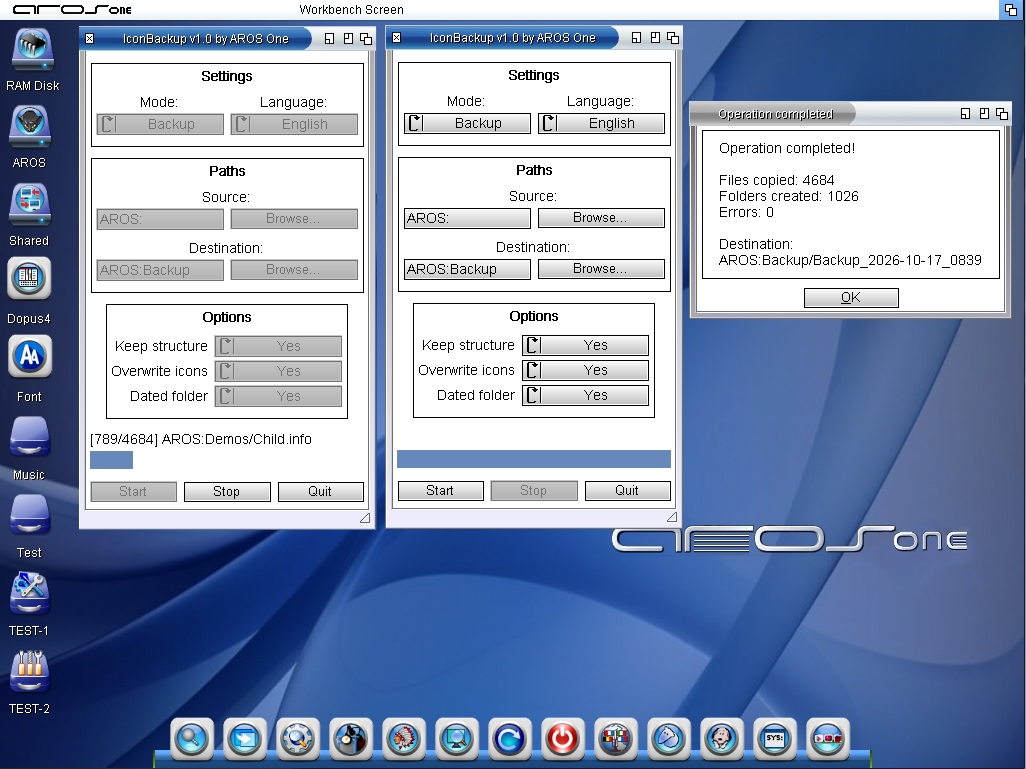
IconBackup x86_64-aros-v11 is available on the Aros Archive; the 32-bit version will be available as soon as I have some time.

IconBackup is a small Public Domain application for backup and restoring of icons (.info) of an AROS Volume or Folder.
Backup: copies the icons keeping the folder structure starting from the volume root, into a dated folder (Backup_YYYY-MM-DD_HHMM, optional).
Restore: each icon returns to its original path (the first folder of the backup is the volume name).
The icons are copied byte by byte: stack, tooltypes and images remain identical. The copy goes through a temporary file, so an error does not ruin the already existing icon.
Real percentage (first counting pass) and path of the icon being copied; Stop button; the destination folder is skipped during the scan.
Log file with errors (IconBackup.log in the backup, or RAM:IconBackup-Restore.log for the restore).
Interface in 6 languages: Italian, French, German, Spanish, Polish
B
BohunSenior Member
Posted 2 hours ago
A very useful tool. Now also available in an ARM version. Thank you for sharing the sources Smile
Now piAROS users can easily replace icons with Farosenza ones or with their own.

I no longer feel guilty about dabbling in fantasy icons ;-)
Edited by Bohun on 03-11-2026 15:27, 2 hours ago
You do not have access to view attachments
M
miker1264Software Dev
Posted 33 minutes ago
I rather like the idea of Icon Alias. It's similar to editing Theme.var but it's Icons.var that contains the path to your Icons Backup location. The presence of the file means that Icon Alias is enabled. Icon Library does the rest. It substitutes the images when displaying the icons while the original icons are left untouched.

It's a lot easier than Icon Backup. Just provide an alternative icon set and edit Icons.var file. That's easy!

I've already demonstrated Icon Alias. It works! ;-)

Now where did I put those original source files? I have to look for them.
Edited by miker1264 on 03-11-2026 17:13, 29 minutes ago
M
miker1264Software Dev
Posted 15 minutes ago

Bohun wrote:

@Bohun - A very useful tool. Now also available in an ARM version. Thank you for sharing the sources Smile
Now piAROS users can easily replace icons with Farosenza ones or with their own.

I no longer feel guilty about dabbling in fantasy icons ;-)


Why would anyone want to replace those wonderful fantasy icons? I like those icons. They match the theme.

To be honest when I turned on my Pi400 there was a short pause of a few seconds, I expected a text screen but it went directly to the desktop to all those nice looking icons! I was surprised. :-)

The Pi400 boots really fast.
Edited by miker1264 on 03-11-2026 17:30, 12 minutes ago
You can view all discussion threads in this forum.
You cannot start a new discussion thread in this forum.
You cannot reply in this discussion thread.
You cannot start on a poll in this forum.
You cannot upload attachments in this forum.
You cannot download attachments in this forum.
Users who participated in discussion: AMIGASYSTEM, miker1264, Bohun