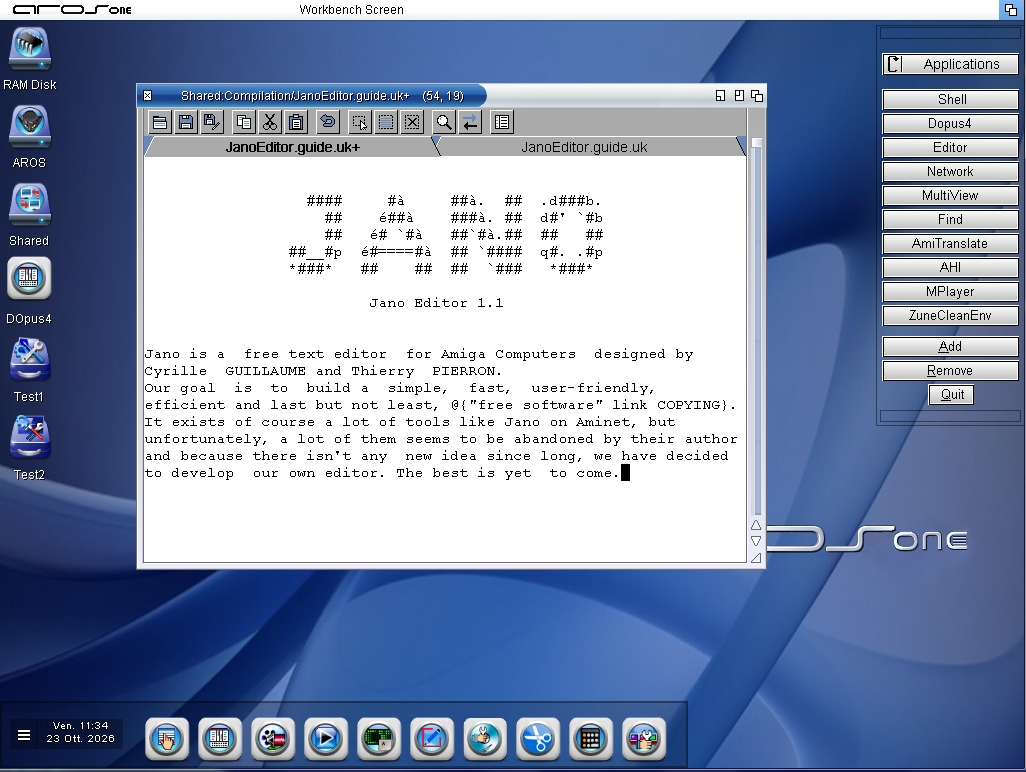
The project is complete; all that remains are the tests and then publication on the Aros Archive:
New Features:
- Toolbar buttons:
Open File, Save, Save As, Copy, Cut, Paste, Undo, Select, Select All, Deselect All, Find, Find and Replace, Number Lines.
- File Requester (DiskIO.c):
It now opens at 560×420 pixels instead of 320×256. If the screen is smaller, it scales down and is always kept within the screen: previously, it could extend beyond the screen because its position was calculated without checks. If you resize it, the program remembers the new dimensions.
- Undo Button:
It has a curved arrow icon, located after Paste and separated from the others. It undoes the last change, just like the menu item. If you hold down Shift while clicking it, it performs “Redo” instead, because the command already detects the Shift key.
- Ctrl+X, Ctrl+C, Ctrl+V:
The Edit menu items now display “Ctrl X,” “Ctrl C,” and “Ctrl V,” as was already the case for “Ctrl Q.” The keys are handled by the Editor itself, performing the same actions as the menu. I’ve also kept Amiga+X, C, and V functional; otherwise, those combinations would have started typing the letter into the text (you can disable them with a small modification)
- Replace the highlighted text with the highlighted text:
When you type a character, the selection is deleted and the character takes its place;
when you press Enter, the selection is deleted and a new line is started; when you paste, the selection is replaced by the contents of the clipboard. If the clipboard is empty, the selection is restored (as if you had clicked “Undo”).
Fixes
- DiskIO.c saving: If writing failed (e.g., disk full), the program would still report “saved” and remove the modified flag, even though the original file was already truncated. Now the error is displayed, and the file remains marked as modified. The same applies to an error when closing the file.
- DiskIO.c loading: If memory ran out halfway through the file, the program would crash (null pointer). Additionally, in the event of an error, the file buffer was not freed.
- Project.c: Save As: The “modified” status was reset before saving, so a failed save could result in text loss without warning. Now it is reset only after a successful save.
- Utility.c: The function that calculates tab spaces would read one byte beyond the table with certain values. Additionally, a very long #include line could write beyond a 256-byte buffer.
- Prefs.c: A long preference file name would write beyond a 100-byte buffer. A corrupted or truncated preference file could write outside the fields. Two copies did not terminate the string with a null character, and the path could remain corrupted.
- Search.c: “Search for the word under the cursor” used an 8-bit variable for the position, so it failed on lines longer than 255 characters.
- Macros.c: The title buffer during macro recording was 40 bytes and could overflow with a long translation. It is now 128 bytes.
- ClipLoc.c: With the catalog installed, the last three phrases in the search window (“replaced,” “occurrence,” “occurrences”) displayed the wrong translation due to an empty entry in the table. This only occurs with the Italian catalog.
- Project.c, “Insert File”: If an error occurred, it would leak memory, and the error message was incorrect.

 AMIGASYSTEMDistro Maintainer