Oh no! Where's the JavaScript?
Your Web browser does not have JavaScript enabled or does not support JavaScript. Please enable JavaScript on your Web browser to properly view this Web site, or upgrade to a Web browser that does support JavaScript.

serk118uk's Native Application & Ports

Last updated on 19 days ago

serk118ukserk118ukSoftware Dev
Posted 22 days ago

OlafSch wrote:

@OlafSch -

serk118uk wrote:

@serk118uk -

deadwood wrote:

@deadwood - Looking great!

One of my email accounts is now IMAP-only, so yes IMAP support would be welcomed as more users can be in the same situation. As to application (YAM or Simplemail) I don't have preference.


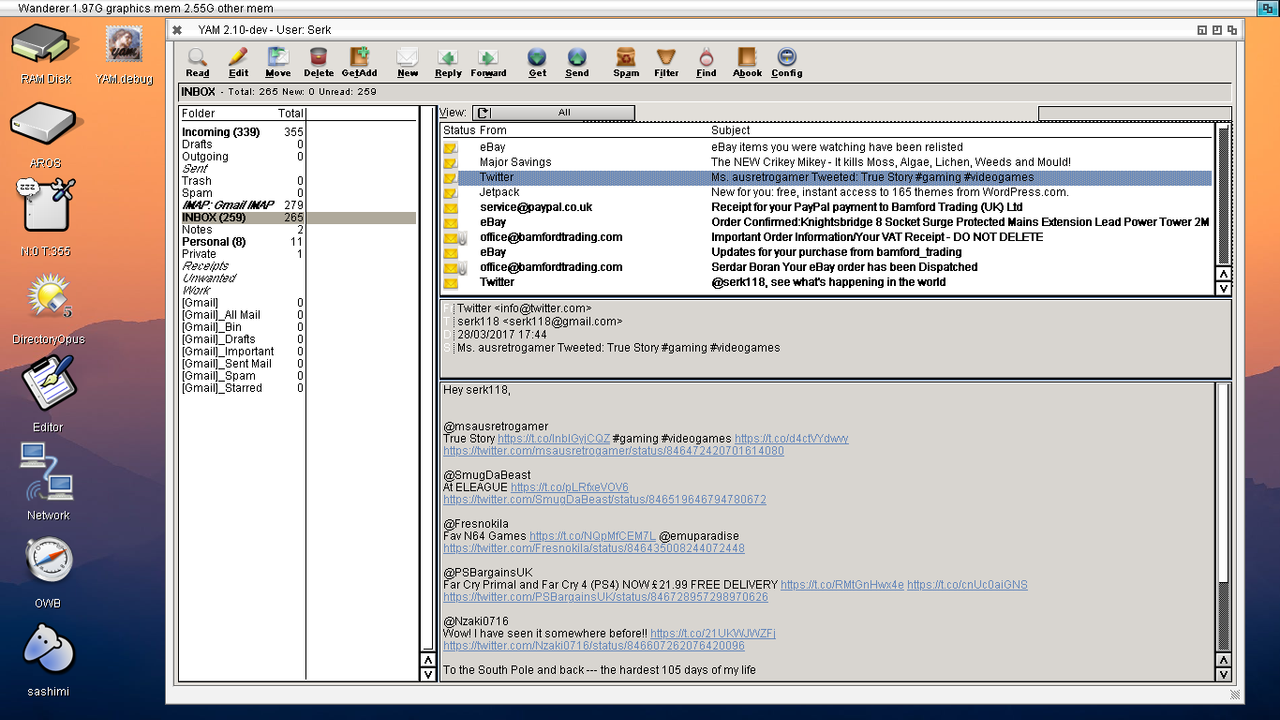
In that case i had to integrate simpleMail IMAP into YAM .
i.postimg.cc/W3rq7b1w/yam-run2.png


i.postimg.cc/W3rq7b1w/yam-run2.png


Possible to also compile it for Aros 68k?


Possibly yes but sorry 68k version has to wait until x86_64 version at dailly usage state..
serk118ukserk118ukSoftware Dev
Posted 22 days ago
YAM TESTING

Download at

https://filebin.net/h7khmdkki0lqtj1r
https://filebin.n...kki0lqtj1r

Use Installer so EVERYTHING done automatically for you

Do read aros read me to setup your mail account, do not activate both
POP3 and IMAP ,(both does work but for our test stick to one)


1st run will be slow plus a .log file will be created so take time let
YAM download ALL mails at 1st run.


If any issues please email back.

One zune class might be issue but lets see .

i already compiled and will submit fix patch to deadwood if test fails on zune class.
,
If yam crashes. I need the .log files and if guru appear use Sashimi >ram:yam_crashlog.txt and attach here email me please.

I also like to see success stories of your screen shoots if yam works for you.

1st run. Set for imap


Pop3
https://youtu.be/EtjenpJ75F8?feature=shared
Edited by serk118uk on 28-09-2026 12:48, 22 days ago
AMIGASYSTEMAMIGASYSTEMDistro Maintainer
Posted 21 days ago
YAM works, even though a “Guru” error pops up every now and then! I tried sending and receiving emails (POP3 - SMTP).

Amitranslate keeps displaying the message shown in the previous screenshot, while Amifox only works if you enable “Use SSL=No” in Tooltypes.
You do not have access to view attachments
serk118ukserk118ukSoftware Dev
Posted 21 days ago

AMIGASYSTEM wrote:

@AMIGASYSTEM - YAM works, even though a “Guru” error pops up every now and then! I tried sending and receiving emails (POP3 - SMTP).

Amitranslate keeps displaying the message shown in the previous screenshot, while Amifox only works if you enable “Use SSL=No” in Tooltypes.


YAM works , guru due to one of the class I already fixed , I will upload to you later on should fix no more guru
serk118ukserk118ukSoftware Dev
Posted 21 days ago
@@AMIGASYSTEM

Attached fixed classes , please backup yours and copy fixed ones, if guru dont appear than i am also attaching patch file here for deadwood,
Edited by serk118uk on 29-09-2026 09:28, 21 days ago
You do not have access to view attachments
serk118ukserk118ukSoftware Dev
Posted 21 days ago
if no guru than good to apply patch file which is included in thebarfix.zip
serk118ukserk118ukSoftware Dev
Posted 21 days ago
Mean time I updated GLFW and Raylib to todays latest versions , i will upload and refresh aros-archives..
AMIGASYSTEMAMIGASYSTEMDistro Maintainer
Posted 21 days ago
Okay, I'll run some tests. The Guru doesn't show up very often; I've encountered it when changing my password.
As for Amitranslate, if there aren't any improvements, I'll remove it from the next AROS One 64-bit v11.

TheBar.mcc and TheBar.mcc, you can create the patch and post the updated versions of TheBar.mcc and TheBar.mcc; I don't want to make any mistakes.
serk118ukserk118ukSoftware Dev
Posted 21 days ago

AMIGASYSTEM wrote:

@AMIGASYSTEM - Okay, I'll run some tests. The Guru doesn't show up very often; I've encountered it when changing my password.
As for Amitranslate, if there aren't any improvements, I'll remove it from the next AROS One 64-bit v11.

TheBar.mcc and TheBar.mcc, you can create the patch and post the updated versions of TheBar.mcc and TheBar.mcc; I don't want to make any mistakes.


Patch for deadwood, what's crashing, do you have sashimi output for me? BTW you can use imap too, I want YAM stable if you could help me with sashimi output, on my side I don't get any guru to fix whats crashing YAM.
D
deadwoodAROS Dev
Posted 21 days ago
Thanks for the patch. I'll review and integrate it in a few days.
serk118ukserk118ukSoftware Dev
Posted 21 days ago
Carlo you can leave Amitranslate out for now , I want to focus on YAM atm
serk118ukserk118ukSoftware Dev
Posted 19 days ago
I download AMP2 while learning about videoplayer tricks/hints to carry into arVIDEO and i forgotten about amp2 port for aros.
AMP2 Ported to AROS x86_64 , but i dont actually know how stable, i run few tests and played .mpg and .avi/.qt and other supported video formats, i have no plan to do any other works on AMP2.
Grab and test if you like..
https://github.co...ROS-x86_64
AMIGASYSTEMAMIGASYSTEMDistro Maintainer
Posted 19 days ago
Thanks, I'll try it right away (AMP2 Is Unregistered !). Anyway, MPEG works perfectly.
As for YAM IMAP, it doesn't save; you get a configuration error for the username and password.

For the Guru, this is rare and unpredictable. Here's the error message:
*** Logged alert:
Program failed
Task : 0x000000004A04B980 - YAM
Error: 0x00080000 - Unknown CPU error
PC : 0x000000004AD055A6
Module YAM Segment 1 .text (0x000000004ABCFAD0) Offset 0x0000000000135AD6

Disassembly:

0x0000000000000000 ******************************** <illegal address>
*** Logged alert:
Program failed
Task : 0x000000004A04B980 - YAM
Error: 0x00080000 - Unknown CPU error
PC : 0x000000004AD055A6
Module YAM Segment 1 .text (0x000000004ABCFAD0) Offset 0x0000000000135AD6
serk118ukserk118ukSoftware Dev
Posted 19 days ago
Thanks for the log , you can edit .Config to add imap or other info.
serk118ukserk118ukSoftware Dev
Posted 19 days ago
@AMIGASYSTEM

Hi Carlo,

I need a few files and two quick answers.

Please run the **debug build (attached here)** (YAM.debug), reproduce both problems, and
send me:

1. **PROGDIR:yam_native.log/ imap log ** (the whole file).
YAM.debug writes this automatically. It is flushed per line, so it
survives a crash.

2. **The full AROS alert output.**
save the log if you can.

3. **YAM/.config *after* you tried to add the IMAP account.**
The decisive check for me is whether the file contains these two lines:

 IMAP00.User = ...
 IMAP00.Password = ...


4. **YAM/.folders** and, if one exists, the IMAP-bound folder's
YAM/Folders/IMAP_*/.fconfig.

5. Two quick questions:
- Does **POP3** work on that same machine with the same account and the
same App Password? (This tells me whether it is a credentials problem or
an IMAP save/load problem.)
- What exactly did you type for **Server / Port / Security / Username /
Password**, and did you press **Save** in the Config window?

If you can, also enable a bit more logging before reproducing. In
S:User-Startup add:


SetEnv yamdebug "@net @error @always @config @gui file:SYS:Tools/yam/yam_native.log"


(adjust the path to where YAM actually runs), then reboot.

Finally, please note the **exact sequence** that produces the Guru, e.g.:


open Config -> TCP/IP -> IMAP -> + -> click Username -> type ... -> ...


It appears only on a specific step, so please try to crash YAM using .YAM.debug.

Thanks!
You do not have access to view attachments
You can view all discussion threads in this forum.
You cannot start a new discussion thread in this forum.
You cannot reply in this discussion thread.
You cannot start on a poll in this forum.
You cannot upload attachments in this forum.
You cannot download attachments in this forum.