Oh no! Where's the JavaScript?
Your Web browser does not have JavaScript enabled or does not support JavaScript. Please enable JavaScript on your Web browser to properly view this Web site, or upgrade to a Web browser that does support JavaScript.

Raspberry 3

Last updated on 5 hours ago

CoolCat5000CoolCat5000Member
Posted 3 days ago
Hi @terminills ,
Was you working on bluetooth support?

Regards,
amigamiaamigamiaAdmin
Posted 3 days ago

Bohun wrote:

@Bohun - Perhaps the author could be persuaded to make a Linux-hosted version. As I understand it, once launched AROS-bootstrap as a Linux application, the entire 64-bit environment from native distro would work regardless of the RPi version from 3 upwards.


Noooo!!! Please, with this Linux hosted. Defeats the purpose of having a new native operating system. I understand it for development but for standard daily usage, what compels anyone to just stick with Linux?
amigamiaamigamiaAdmin
Posted 3 days ago

CoolCat5000 wrote:

@CoolCat5000 - well, at least it booted (very fast)!
Couldnt test it cause i dont have usb mouse (only bluetooth)


I got it to boot at the same point as you did but with USB Keyboard and mouse, nothing moves on the screen. Perhaps it's the USB stack not all there yet. I am using a RPi 3b+.

Can anyone else confirm USB works or doesn't work?
D
deadwoodAROS Dev
Posted 3 days ago
I also don't have mouse pointer visible (but mouse works, I can click icons) - but I'm running in QEMU. Is far as I understand the missing mouse pointer is QEMU-specific issue and it should not be happening on real hardware.
CoolCat5000CoolCat5000Member
Posted 3 days ago
It has some usb stack (looking from the logs).

Dunno how functional it is, i dont have usb mouse (i do have usb keyboard, if there are some shortcut that moves the mouse i could try)

Regards,
CoolCat5000CoolCat5000Member
Posted 2 days ago
To not step into other people feets i started another project (wip)

https://github.co...m68k-emu68

So far, so good!

πŸ™‚
B
BohunJunior Member
Posted 2 days ago
RPi 3B+ purchased. I don't know where else I'll fit it in my "Amiga server room," but I can't resist the pleasure of testing the native ARM version of AROS.
deadwood, retrofaza, CoolCat5000
CoolCat5000CoolCat5000Member
Posted 2 days ago
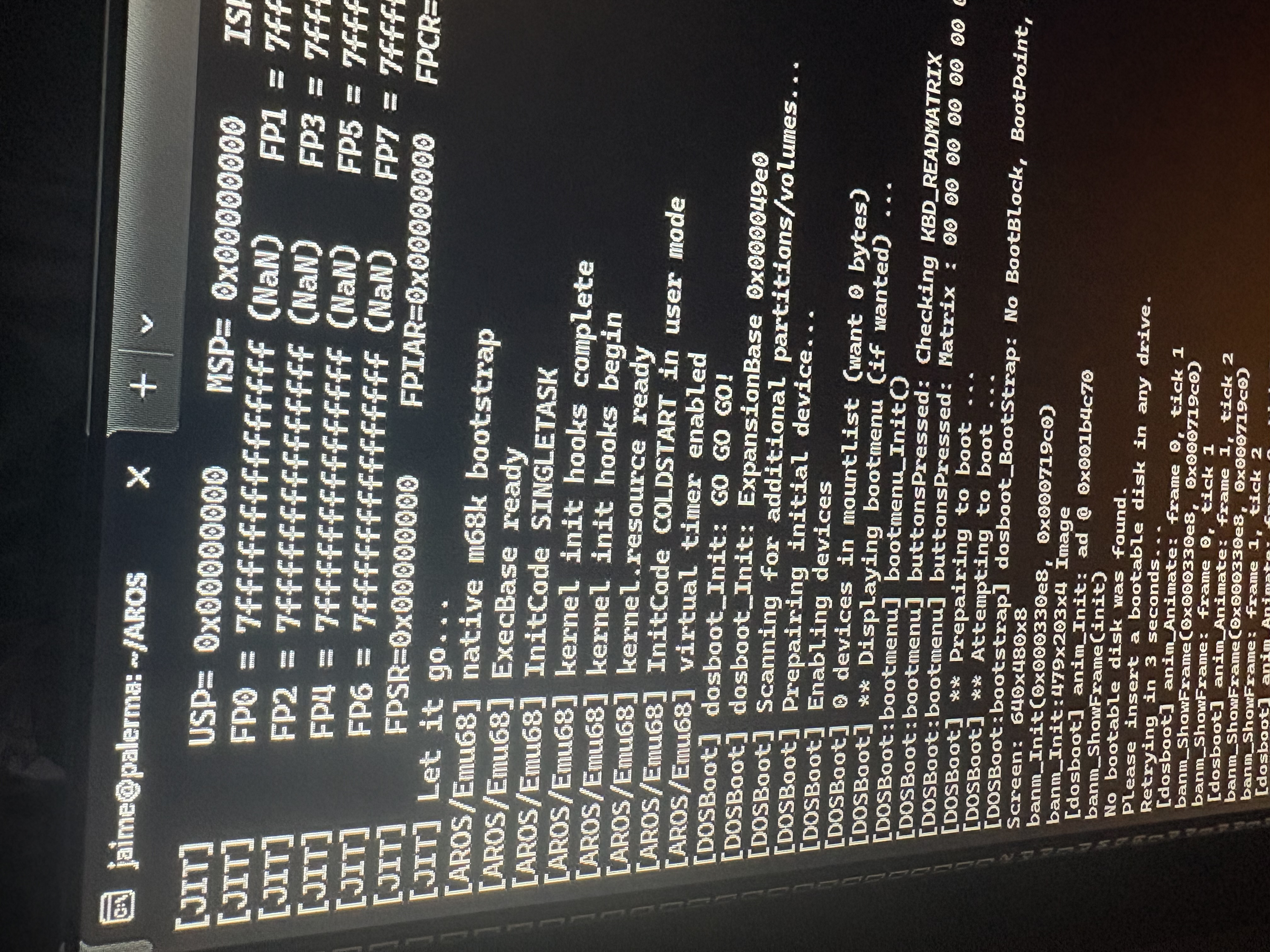
Dunno how interesting this could be (i think it’s the first aros 68k build that doesnt rely on the chipsets), but almost gotcha aros 68k running under emu68.

Still no gfx, but it seems cool to me (searching for boot media). πŸ™‚
CoolCat5000 attached the following image:
img_1023.jpeg
ami-elvisami-elvisJunior Member
Posted 20 hours ago

Bohun wrote:

@Bohun - RPi 3B+ purchased. I don't know where else I'll fit it in my "Amiga server room," but I can't resist the pleasure of testing the native ARM version of AROS.

Would love to get a report about your experience later. I'm stuck building AROS PC's but Pi's need no space so I could have some of those as well Smile
amigamiaamigamiaAdmin
Posted 14 hours ago
I can't get any USB KB/Mouse to work on my RPi 3B+. Have tried a few different ones but nothing works. Let me know if you guys manage
D
deadwoodAROS Dev
Posted 12 hours ago
Please check the latest nightly build - I think there were some fixes related to USB yesterday or the day before.
D
deadwoodAROS Dev
Posted 8 hours ago
@amigamia

Some comments from the developer (he tested with several keyboard and all work for him):

- make sure usb/keyboard is connected during boot
- update to latest nightly
- after boot, insert pendrive - see if you get Poseidon popup/pendrive is recognized
B
BohunJunior Member
Posted 6 hours ago
My RPi 3B+ starts and gets to a gray window titled AROS. The Wanderer icon doesn't load. The mouse pointer doesn't respond to mouse movements. I've tried two models, including the original Raspberry Pi. During startup, Poseidon displays messages about detecting USB devices. After inserting a flash drive, it's correctly detected and assigned a massstorage.class.
CoolCat5000CoolCat5000Member
Posted 5 hours ago
I dont know how poseidon relates to the underline driver, but as of my quick experience with cherryusb i think you have 2 differents classes to support.
MSC , related to the storage, and HID, related to thing like mouse and keyboard.
You can view all discussion threads in this forum.
You cannot start a new discussion thread in this forum.
You cannot reply in this discussion thread.
You cannot start on a poll in this forum.
You cannot upload attachments in this forum.
You can download attachments in this forum.
Users who participated in discussion: amigamia, terminills, deadwood, ntromans, retrofaza, Jeff1138, CoolCat5000, ami-elvis, Bohun