
- Home
- Discussion Forum
- AROS FORUMS
- General Chat
- Hollywood Applications
Hollywood Applications
Last updated on 4 months ago
 AMIGASYSTEMDistro Maintainer
With the new version of the Hollywood language released a while ago, there have also been changes to the binary files, where, in my opinion, something doesn’t quite add up.
In practice, the new development version of Hollywood significantly streamlines the binaries by removing libraries that are now required externally.
Well, or rather badly: previously, some applications ‘that didn’t include the library internally’ would look for it in the programme folder or in the system’s Libs/Hollywood folder.
Now, however, all required libraries, “and there are quite a few”, must be located in the programme folder. In practice, this means the system will end up with dozens and dozens of duplicate libraries. If we then add that some older Hollywood applications refuse to use new libraries and instead require a specific older version, the confusion only increases.
The Amiga philosophy dictates that all libraries, as is the case with other operating systems, must be located in a single system folder: ‘Libs’ for AROS and Amiga. This ensures there is only one copy, making updates straightforward; otherwise, they would all need to be updated as applications are updated.
In practice, the new development version of Hollywood significantly streamlines the binaries by removing libraries that are now required externally.
Well, or rather badly: previously, some applications ‘that didn’t include the library internally’ would look for it in the programme folder or in the system’s Libs/Hollywood folder.
Now, however, all required libraries, “and there are quite a few”, must be located in the programme folder. In practice, this means the system will end up with dozens and dozens of duplicate libraries. If we then add that some older Hollywood applications refuse to use new libraries and instead require a specific older version, the confusion only increases.
The Amiga philosophy dictates that all libraries, as is the case with other operating systems, must be located in a single system folder: ‘Libs’ for AROS and Amiga. This ensures there is only one copy, making updates straightforward; otherwise, they would all need to be updated as applications are updated.
MagicSNJunior Member
Posted 5 months agoWhat is the status regarding AROS64 BTw? do I assume right Hollywood only supports AROS32? (I have a Hollywood GUI - done by a Betatester, I never used Hollywood - for Dungeonkeeper here).
retrofazaDistro Maintainer
Posted 5 months agoFirst and foremost, developers creating their own software within the Hollywood application should start putting more pressure on Hollywood’s developer to finally release a 64-bit version...
AMIGASYSTEMDistro MaintainerHollywood currently only supports 32-bit, but it is possible to run many Hollywood applications on AROS 64-bit using the built-in ‘EmuV0’ emulator
https://www.forum...426#p22426
The attached thread lists the various Hollywood app compatibilities with AROS 64-bit; if you like, we can test your Hollywood GU!
https://www.arosw...post_10678
https://www.forum...426#p22426
The attached thread lists the various Hollywood app compatibilities with AROS 64-bit; if you like, we can test your Hollywood GU!
https://www.arosw...post_10678
ntromansVeteran Member
Posted 4 months ago@AMIGASYSTEM - With the new version of the Hollywood language released a while ago, there have also been changes to the binary files, where, in my opinion, something doesn’t quite add up.
In practice, the new development version of Hollywood significantly streamlines the binaries by removing libraries that are now required externally.
Well, or rather badly: previously, some applications ‘that didn’t include the library internally’ would look for it in the programme folder or in the system’s Libs/Hollywood folder.
Now, however, all required libraries, “and there are quite a few”, must be located in the programme folder. In practice, this means the system will end up with dozens and dozens of duplicate libraries. If we then add that some older Hollywood applications refuse to use new libraries and instead require a specific older version, the confusion only increases.
The Amiga philosophy dictates that all libraries, as is the case with other operating systems, must be located in a single system folder: ‘Libs’ for AROS and Amiga. This ensures there is only one copy, making updates straightforward; otherwise, they would all need to be updated as applications are updated.
I finally got round to downloading and installing Hollywood 11 yesterday and absolutely agree with the issues you've identified above. I've checked the documentation and it should still be possible to have the plugins in libs:hollywood/. Also, the Hollywood display/compiler GUI for AROS does not work (this is on 32 bit) . I've reported both issues as bugs over on the Hollywood forum.
Cheers,
Nigel.
ntromansVeteran Member
Posted 4 months agoHad a reply on the Hollywood forums. Neither issue is a bug, rather a change to how how Hollywood works on Amigaoid systems.
For the GUI not working, it seems the Hollywood compiler, key and Hollywood.sys are no longer stored in Hollywood:system but rather in Hollywood: directly. Then the GUI works fine.
For the libs:Hollywood issue, it seems some new pre-processor @OPTIONS need to hbe set. From the manual:
So Hollywood authors writing for AROS (or any other Amigaoid system) will need to set these when using Hollywood 11.
Cheers,
Nigel.
For the GUI not working, it seems the Hollywood compiler, key and Hollywood.sys are no longer stored in Hollywood:system but rather in Hollywood: directly. Then the GUI works fine.
For the libs:Hollywood issue, it seems some new pre-processor @OPTIONS need to hbe set. From the manual:
Quote
would be a waste of CPU time and memory (especially on low-end systems like AmigaOS 3) to always load all of the installed plugins on startup so only the plugins that the scripts explicitly requests by using the @REQUIRE preprocessor command will be loaded now. If you want the old behaviour back, you can set the new AutoLoadPlugins tag in the @OPTIONS preprocessor command to True. In that case, Hollywood will behave as before and load all installed plugins on startup every time. Note that this change also affects executables compiled by Hollywood: Executables compiled by Hollywood will no longer automatically load all Hollywood plugins that are stored in the same directory as the executable either now. Only plugins that the script explicitly requests by using the @REQUIRE preprocessor command will be loaded. This behaviour is much better than the old one because previously you could manipulate how a Hollywood program behaved just by dropping some new Hollywood plugins in the same directory as the executable, which isn't a good default behaviour. Once again, if you want the old behaviour back, just set the new AutoLoadPlugins tag in the @OPTIONS preprocessor command and Hollywood executables will automatically load all plugins that are in the same directory as the executable, just like it was in previous Hollywood versions. Amiga users do note that if you also want to have plugins stored in LIBS:Hollywood loaded, you need to set the GlobalPlugins tag in @OPTIONS to True as well, but only when compiling executables. When running scripts Hollywood will automatically scan LIBS:Hollywood too if AutoLoadPlugins is set to True or you use @REQUIRE or LoadPlugin() to load a plugin.
So Hollywood authors writing for AROS (or any other Amigaoid system) will need to set these when using Hollywood 11.
Cheers,
Nigel.
 TemplarioJunior Member
Perhaps a little solution to this problem is that the Hollywood programs and games have the plugins embeded the plugins inside of executables.
ntromansVeteran Member
Posted 4 months ago@Templario - Perhaps a little solution to this problem is that the Hollywood programs and games have the plugins embeded the plugins inside of executables.
Absolutely, but if you want to cut down the size of the executable or app, being able to use dynamically linked pugins is very handy.
Chers,
Nigel.
1 user reacted to this post
Templario
ntromansVeteran Member
Posted 4 months agoAnother aspect of Hollywood has changed from 10 to 11 which affects plugins, but this is only an issue if you have the Hollwood development environment on your machine and in particular Hollywood:plugins
Hollywood 10 looked for plugins firstly in libs:Hollywood and then Holywood:plugins, but Hollywood 11 looks in plugins first, so if like me you had old versions of the plugins in this folder this can lead to unexpected results.
I've just removed the plugins folder to ensure libs:Hollywood is always used.
Cheers,
Nigel.
Hollywood 10 looked for plugins firstly in libs:Hollywood and then Holywood:plugins, but Hollywood 11 looks in plugins first, so if like me you had old versions of the plugins in this folder this can lead to unexpected results.
I've just removed the plugins folder to ensure libs:Hollywood is always used.
Cheers,
Nigel.
Edited by ntromans on 29-06-2026 15:01, 4 months ago
Amiwell79Distro Maintainer
Posted 4 months agohi
A new soundfx plugin has come out to manipulate audio files
regards
A new soundfx plugin has come out to manipulate audio files
regards
AMIGASYSTEMDistro Maintainer@ntromans - .
I've just removed the plugins folder to ensure libs:Hollywood is always used.
Cheers,
Nigel.
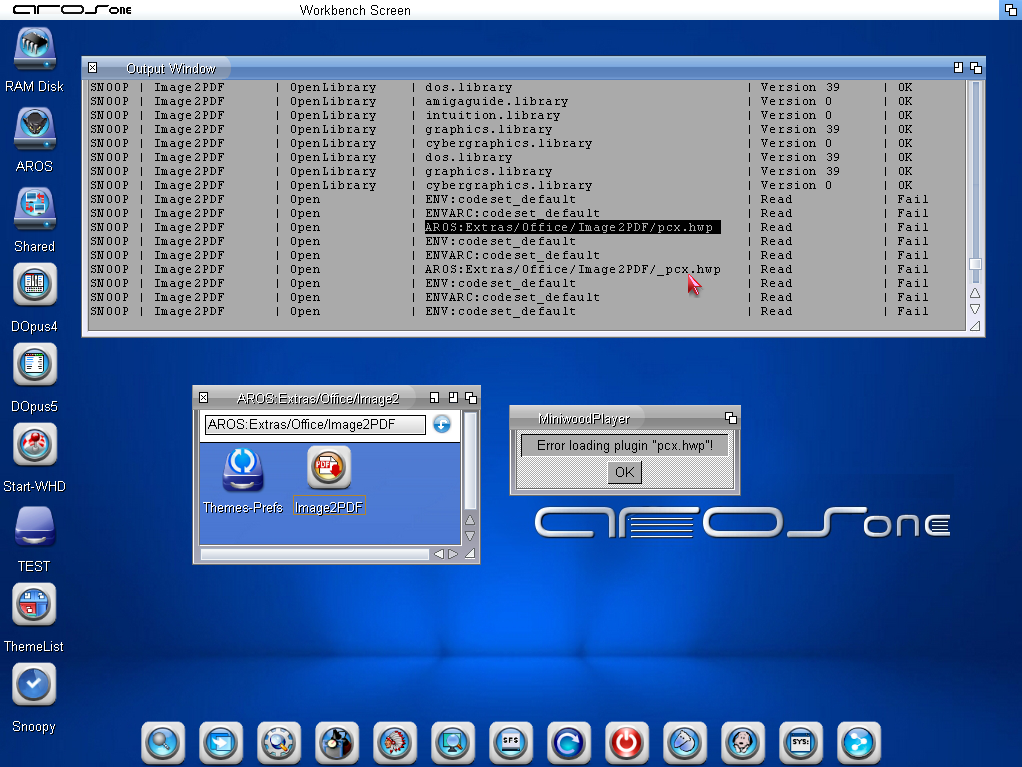
Are you sure? The latest applications compiled with Hollywood 11 no longer use Libs:Hollywood, but look for plugins ‘only’ in the binary folder.
In new applications, such as Image2PDF, try deleting the plugins from the programme folder and you’ll see that it no longer launches and will request the plugins from the folder.
ntromansVeteran Member
Posted 4 months ago@AMIGASYSTEM -@ntromans - .
I've just removed the plugins folder to ensure libs:Hollywood is always used.
Cheers,
Nigel.
Are you sure? The latest applications compiled with Hollywood 11 no longer use Libs:Hollywood, but look for plugins ‘only’ in the binary folder.
In new applications, such as Image2PDF, try deleting the plugins from the programme folder and you’ll see that it no longer launches and will request the plugins from the folder.
This issue is when you have the Hollywood developer files installed and pointed to by the logical assign Hollywood:. In that case (and you're using an Amiga-like system) then there are three places that plugins can be loaded from:
(1) The folder in which the priogram resides (I imagine this is the first place looked at although haven't tested this).
(2) libs:Hollywood (but for Hollywood 11 only if @OPTIONS {globaplugins=TRUE} is set in the program)
(3) If the assign Hollywood: exists, then also Hollywood:plugins/.
The change between Hollywood 10 and 11 is that for 10 (2) was looked at before (3), but for 11 (3) is looked at before (2). So I think if you have the Hollwood develeper files installed and you don't want to keep updating plugins in two places (libs:Hollywood and Hollywood:plugins/), just get rid of the latter. Of course if the programmer has not used the globalplugins setting, plugins will stilll need to be in the program folder too.
Cheers,
Nigel.
P.S. an additional change for the proramme if you have to explicitly declare plugis via @REQUIRE or load all available plugins by using @OPTIONS {AutoLoadPlugins=TRUE}
AMIGASYSTEMDistro MaintainerDalla traduzione non ho capito bene quello che hai scritto, io parlo "Solo" Appllicazioni Hollywood 11 che ora su AROS funzionano "solo" se i PlugIn si trovono in una cartella.
Vedi screenshot !
Man mano gli sviluppatori stanno aggiornando le loro Applicazioni con Hollywood 11 e questa crearà un caosa a mio perche avrai tanti PlugIn "Doppioni" sparsi per i sistema.
Se poi consideri che i software sviluppati con Hollywood precedenti dovrai avere ancora tanti doppioni in Libs:Hollywood o nelle loro cartella.
Vedi screenshot !
Man mano gli sviluppatori stanno aggiornando le loro Applicazioni con Hollywood 11 e questa crearà un caosa a mio perche avrai tanti PlugIn "Doppioni" sparsi per i sistema.
Se poi consideri che i software sviluppati con Hollywood precedenti dovrai avere ancora tanti doppioni in Libs:Hollywood o nelle loro cartella.
AMIGASYSTEM attached the following image:
ntromansVeteran Member
Posted 4 months agoJust to clarify, I am *not* saying to delete plugins from the program's folder, just from Hollywood:plugins/ which is *only* present if you have purchased the Hollywood compiler. If a user has not bought the Hollywood compiler there is not problem, I just though I'd mention it for those of us who program in Hollywood as it caught me out until the cause was clarified over on the Hollywood forums.
I agree having plugins in all folders is pretty bad, so what developers now need to add to the start of their program is:
(assuming you need those specific plugins).
By doing this plugins can be just in libs:Hollywood.
Cheers,
Nigel.
I agree having plugins in all folders is pretty bad, so what developers now need to add to the start of their program is:
Code Download source
@OPTIONS {GlobalPlugins=TRUE}

@REQUIRE "MUIroyale"

@REQUIRE "xml"

@REQUIRE "vectorgraphics"

@REQUIRE "polybios"

@REQUIRE "svgimage"
(assuming you need those specific plugins).
By doing this plugins can be just in libs:Hollywood.
Cheers,
Nigel.
You can view all discussion threads in this forum.
You cannot start a new discussion thread in this forum.
You cannot reply in this discussion thread.
You cannot start on a poll in this forum.
You cannot upload attachments in this forum.
You can download attachments in this forum.
You cannot start a new discussion thread in this forum.
You cannot reply in this discussion thread.
You cannot start on a poll in this forum.
You cannot upload attachments in this forum.
You can download attachments in this forum.
Moderator: Administrator, Moderators