
Oh no! Where's the JavaScript?
Your Web browser does not have JavaScript enabled or does not support JavaScript. Please enable JavaScript on your Web browser to properly view this Web site, or upgrade to a Web browser that does support JavaScript.

Asus eeePC 900A install problem

Last updated on 3 hours ago
L
laiosxJunior Member
Posted 2 days ago
I have a problem to install on this Netbook , partinioning fail , the disk is an 8gb mini PCIe , is set as IDE in bios , install cant procced as partitioning fail , any idea how to get this done ?
AMIGASYSTEMAMIGASYSTEMDistro Maintainer
Posted 2 days ago
What are you using to partition the drive? Avoid partitioning it yourself; use InstallAROS, which will do everything automatically.
If you’re using InstallAROS, then the hard drive might be faulty.
L
laiosxJunior Member
Posted 2 days ago
I dont partition it manually , installAROS partitioning fails , the disk is ok it has puppy linux installed
AMIGASYSTEMAMIGASYSTEMDistro Maintainer
Posted 2 days ago
Before proceeding with the installation, you ran Wipe Disk; you might want to run it twice, as there may still be a Linux bootloader on the hard drive.
L
laiosxJunior Member
Posted 2 days ago
I try it multiple times but the same I also erased the disk with gparted live and tried with the disk as unallocated and as fat32 but the same . there must be some kind of remain of grub bootloader beacause even with erased the disk it tries to boot and get this screen
[img]
live.staticflickr.com/65535/55289606571_ac9bb86eaf_b.jpg
Screen by CatnipX[/img]
[img]
live.staticflickr.com/65535/55289890339_edc370a19b_b.jpg
Aros by CatnipX, on Flickr[/img]
Edited by laiosx on 24-05-2026 02:16, 2 days ago
AMIGASYSTEMAMIGASYSTEMDistro Maintainer
Posted 2 days ago
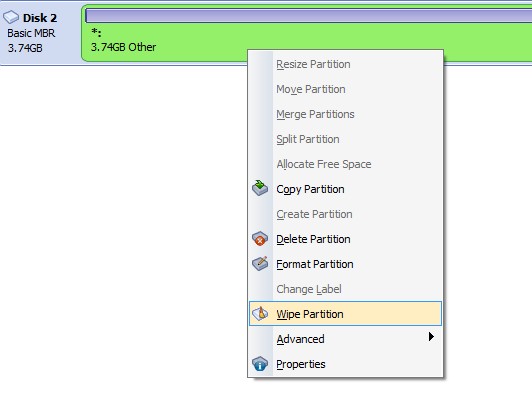
That’s what I thought; sometimes InstallAROS doesn’t manage to wipe the drive properly. Try using a partition management programme and select the ‘Wipe’ function, see the screenshot. You can do this for just the first few gigabytes, then perhaps wipe the partition again.

This method definitely works, just make sure the hard drive is completely free of partitions at the end!
AMIGASYSTEM attached the following image:
wipe.jpg
L
laiosxJunior Member
Posted 1 day ago
I used AOMEI Partition assistand I wipped the disk indeed the grubloader reamains erased but the same I don't know something isn't compatible in this little netbook the disk is a mini PCIe perhaps not compatible
https://flic.kr/p/2seSYvz
live.staticflickr.com/65535/55291028659_17d255fa1c_b.jpg


Wip by CatnipX, on Flickr
live.staticflickr.com/65535/55290945303_b0788d7838_b.jpg
Wip3 by CatnipX, on Flickr
Edited by amigamia on 25-05-2026 08:48, 11 hours ago
N
ncafferkeyAROS Dev
Posted 21 hours ago
Check if you can see the drive in HDToolBox and post a screenshot of that. The drive may not be unit 0.
L
laiosxJunior Member
Posted 3 hours ago
[img]
live.staticflickr.com/65535/55293532235_1335019475_b.jpg
706218784_10243161198306329_7379365056842819041_n by CatnipX, on Flickr[/img]
trying to install in a usb target leads to the same fail , something in netbook is not compatible although it has native graphics and sound , at the moment I installed Aeros which works fine , I'd prefer ofcourse AROS but anyway , I also tried Icaros but the result same
You can view all discussion threads in this forum.
You cannot start a new discussion thread in this forum.
You cannot reply in this discussion thread.
You cannot start on a poll in this forum.
You cannot upload attachments in this forum.
You can download attachments in this forum.
Moderator: Administrator
Users who participated in discussion: AMIGASYSTEM, ncafferkey, laiosx