
- Home
- Discussion Forum
- AROS FORUMS
- General Chat
- Adf disk with partition tool
Adf disk with partition tool
Last updated on 3 hours ago
CoolCat5000Member
Posted 2 days agoHi, again (sorry for that),
I noticed this code:
https://github.co...b/denebusb
I am getting in a complicated scenario (at least for me).
I would need an usb support from the arm side (it is allready working, I have emulated keyboard and mouse)
I would need an early init usb support (for the mass storage device)
And, in the end I would need a dwc2.device to be presented in the OS installation.
I am not sure if I’m thinking of this properly but I woul like to avoid duplicate code, and have lots of unanswered questions.
Should I use hidd approach? Have an expansion/autoconfig is correct for the initial resident support that later will be replaced by the os .device?
Have the usb exposed on the autoconfig will be enough to aros search for bootable files?
Questions, that I don’t even know if it make sense. But I would get rid of Gayle/atapi/CD-ROM at once as none of this would exists on raspberry pi 3b
I am not sure if I’m going to the right path, maybe the adf and automount iso would be the right step for the moment
I allready have floppy and atapi somewhat alive, and go to usb would be more complex and even more moving parts.
If someone more experienced could give a hint, at least for what path I should pursue first I would appreciate,
Kind regards,
Ps: this an xhci device reference
https://github.co...hci-driver
(I would need to make a dwc2 in the case of raspberry pi 3b, to be installed in the os)
And this is the emu68 sdcard driver (rom) also for reference https://github.co...s/sdcard.h
(I would need some usb driver/rom for the early init support)
I didn’t approached the hidd stuff just to don’t go crazy in just one move 🙃
I am talking of 3 handsoff of the stack (arm->early init->OS), it sounds crazy enough allready.
I noticed this code:
https://github.co...b/denebusb
I am getting in a complicated scenario (at least for me).
I would need an usb support from the arm side (it is allready working, I have emulated keyboard and mouse)
I would need an early init usb support (for the mass storage device)
And, in the end I would need a dwc2.device to be presented in the OS installation.
I am not sure if I’m thinking of this properly but I woul like to avoid duplicate code, and have lots of unanswered questions.
Should I use hidd approach? Have an expansion/autoconfig is correct for the initial resident support that later will be replaced by the os .device?
Have the usb exposed on the autoconfig will be enough to aros search for bootable files?
Questions, that I don’t even know if it make sense. But I would get rid of Gayle/atapi/CD-ROM at once as none of this would exists on raspberry pi 3b
I am not sure if I’m going to the right path, maybe the adf and automount iso would be the right step for the moment
I allready have floppy and atapi somewhat alive, and go to usb would be more complex and even more moving parts.
If someone more experienced could give a hint, at least for what path I should pursue first I would appreciate,
Kind regards,
Ps: this an xhci device reference
https://github.co...hci-driver
(I would need to make a dwc2 in the case of raspberry pi 3b, to be installed in the os)
And this is the emu68 sdcard driver (rom) also for reference https://github.co...s/sdcard.h
(I would need some usb driver/rom for the early init support)
I didn’t approached the hidd stuff just to don’t go crazy in just one move 🙃
I am talking of 3 handsoff of the stack (arm->early init->OS), it sounds crazy enough allready.
CoolCat5000Member
Posted 2 days agoForget everything about this!
I think I will do the first AI suggestion. A hacky, give a sintetic “boot data” as it was from the iso and make it work. (It would be a huge work anything else. It had suggested that in the first place and I refused it as a hack, but after a while thinking about it, it is the easier approach and make sense for the moment)
Kind regards, (now I hope to come back here just after I get this booting)
2 blinds, me and the AI, but let’s see if we can get this to work. (Have the iso booting, no matter how, would be a good milestone before the right way of anything)
I think I will do the first AI suggestion. A hacky, give a sintetic “boot data” as it was from the iso and make it work. (It would be a huge work anything else. It had suggested that in the first place and I refused it as a hack, but after a while thinking about it, it is the easier approach and make sense for the moment)
Kind regards, (now I hope to come back here just after I get this booting)
2 blinds, me and the AI, but let’s see if we can get this to work. (Have the iso booting, no matter how, would be a good milestone before the right way of anything)
 AMIGASYSTEMDistro Maintainer
I would like to point out that to create an AROS Live USB drive correctly, you need to do so from within the operating system using InstallAROS; I don’t believe this is currently possible on AROS 68k.
Burning an ISO directly using programmes such as Rufus does not work with AROS ISOs.
Recently, with the latest versions of Rufus, I managed to burn an AROS ISO but encountered some strange errors.
Furthermore, I’m not sure if AROS 68k handles USB ports in the same way as AROS 32- and 64-bit versions when using WinUAE.
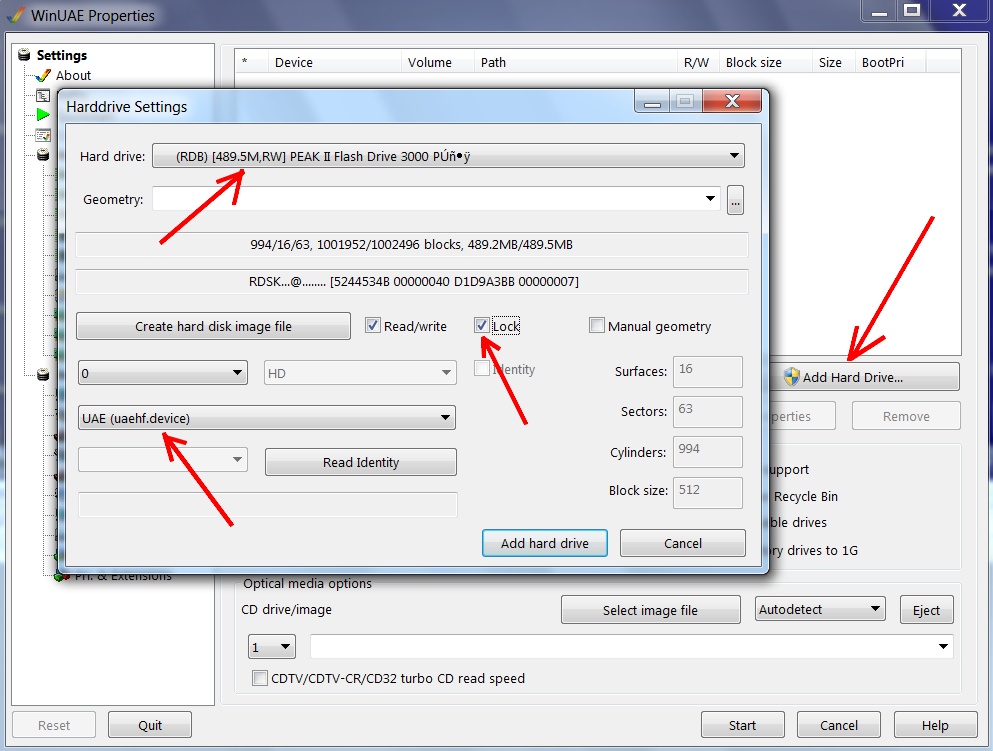
I’ve created a USB image for you to burn to a USB stick 512MB using Rufus and boot directly from the USB stick with WinUAE.
I initialised and formatted (SFS) a small USB stick using my AfA One (Amiga OS 3.9 + AfA OS) and copied the contents of an AROS build onto the USB stick, which boots fine from WinUAE with the ROMs included in the archive
For instructions on how to load the USB stick into WinUAE, see the screenshot! The archive also contains my WinUAE configuration for booting the USB stick; you just need to correct the ROM path.
You can also use the USB image as a HardFile in WinUAE!
Download Image USB Pendrive
https://drive.goo...sp=sharing
Burning an ISO directly using programmes such as Rufus does not work with AROS ISOs.
Recently, with the latest versions of Rufus, I managed to burn an AROS ISO but encountered some strange errors.
Furthermore, I’m not sure if AROS 68k handles USB ports in the same way as AROS 32- and 64-bit versions when using WinUAE.
I’ve created a USB image for you to burn to a USB stick 512MB using Rufus and boot directly from the USB stick with WinUAE.
I initialised and formatted (SFS) a small USB stick using my AfA One (Amiga OS 3.9 + AfA OS) and copied the contents of an AROS build onto the USB stick, which boots fine from WinUAE with the ROMs included in the archive
For instructions on how to load the USB stick into WinUAE, see the screenshot! The archive also contains my WinUAE configuration for booting the USB stick; you just need to correct the ROM path.
You can also use the USB image as a HardFile in WinUAE!
Download Image USB Pendrive
https://drive.goo...sp=sharing
AMIGASYSTEM attached the following image:
CoolCat5000Member
Posted 1 day agoHi @AMIGASYSTEM, I am learning about the bootnode and what it expects.
You mentioned cdtv as the way of have bootable cdrom, but the A4091 expansion scsi also has boot from the CD-ROM support. (That, it seems, can give us true hope)
I gave up the usb approach cause maybe burning an iso would fail in the same way of CD-ROM.
That said, probably aros workflow does use ADF+cd to have the boot workflow.
All of this is an interesting topic, for make the emulator support the aros workflow, to advance for iso boot support and also to make it boot from the usb.
All the perspectives are interesting projects by itself.
I am not the right person to enrich with details, but as user it seems that there are space for modernization. All I talked before is not invalid, it just requires a lot of work. Sadly me and the AI are two blinds to advance in the subject, but it sounds to me as possible, dunno if will have the time/token$ to make it happen.
I will for sure try to success on booting AROS, but I am not sure yet how.
And all the rest will be just curiosity for a far far far future investigation.
Thanks for all the practical info and support.
You mentioned cdtv as the way of have bootable cdrom, but the A4091 expansion scsi also has boot from the CD-ROM support. (That, it seems, can give us true hope)
I gave up the usb approach cause maybe burning an iso would fail in the same way of CD-ROM.
That said, probably aros workflow does use ADF+cd to have the boot workflow.
All of this is an interesting topic, for make the emulator support the aros workflow, to advance for iso boot support and also to make it boot from the usb.
All the perspectives are interesting projects by itself.
I am not the right person to enrich with details, but as user it seems that there are space for modernization. All I talked before is not invalid, it just requires a lot of work. Sadly me and the AI are two blinds to advance in the subject, but it sounds to me as possible, dunno if will have the time/token$ to make it happen.
I will for sure try to success on booting AROS, but I am not sure yet how.
And all the rest will be just curiosity for a far far far future investigation.
Thanks for all the practical info and support.
AMIGASYSTEMDistro MaintainerI mentioned CD Amiga CD32; the CDTV has a different bootloader. I’ve attached an old video of mine showing how to create a bootable CD for Amiga CD32
https://youtu.be/...
https://youtu.be/...
CoolCat5000Member
Posted 1 day agoI don’t even know the difference between those @AMIGASYSTEM
I first suspected of the iso not be bootable, but now I am not sure that it even need such bit/flag
From what I understand the issue was kind of how the ISO was treated, a block device like ide not CD.
The specific issue I got was cause AROS was looking for boot data in the <16 sector.
(And if I burned the iso to a pen drive that wouldn’t change)
You allready made a pen drive that I will study, but from what I read of the scsi board, the impression is that if I can made AROS treat the ISO as a cd block size and made it go to the data >16 it could boot (the right boot node specs)
But that is just speculation.
The first thing I must investigate is if the iso is been accessing from the right ATAPI path (cd-rom, not hard disk)
After i fully understand what is happening I can try to emulate the missing bits (maybe answering fake <16 expected data answers)
But I will need also to investigate the bootnode specs (it definitely try to boot from the ISO)
As you made a bootable usb image, I will also investigate that.
I have enough on my plate for months of arosland 😁
Have the usb booting from a simple iso burning would be ideal, let’s see how far I can get
And once again, thanks
I first suspected of the iso not be bootable, but now I am not sure that it even need such bit/flag
From what I understand the issue was kind of how the ISO was treated, a block device like ide not CD.
The specific issue I got was cause AROS was looking for boot data in the <16 sector.
(And if I burned the iso to a pen drive that wouldn’t change)
You allready made a pen drive that I will study, but from what I read of the scsi board, the impression is that if I can made AROS treat the ISO as a cd block size and made it go to the data >16 it could boot (the right boot node specs)
But that is just speculation.
The first thing I must investigate is if the iso is been accessing from the right ATAPI path (cd-rom, not hard disk)
After i fully understand what is happening I can try to emulate the missing bits (maybe answering fake <16 expected data answers)
But I will need also to investigate the bootnode specs (it definitely try to boot from the ISO)
As you made a bootable usb image, I will also investigate that.
I have enough on my plate for months of arosland 😁
Have the usb booting from a simple iso burning would be ideal, let’s see how far I can get
And once again, thanks
Edited by CoolCat5000 on 19-05-2026 13:06, 1 day ago
CoolCat5000Member
Posted 1 day agoHi @AMIGASYSTEM , maybe this is the baby (the automount thing of winuae) ?
https://github.co.../mounter.c
Ps: probably I will try a magic 😁
ATAPI READ(10)
if lba == 16:
patch "AMIGA BOOT" no PVD
https://github.co.../mounter.c
Ps: probably I will try a magic 😁
ATAPI READ(10)
if lba == 16:
patch "AMIGA BOOT" no PVD
Edited by CoolCat5000 on 19-05-2026 15:26, 1 day ago
CoolCat5000Member
Posted 1 day agoHi all,
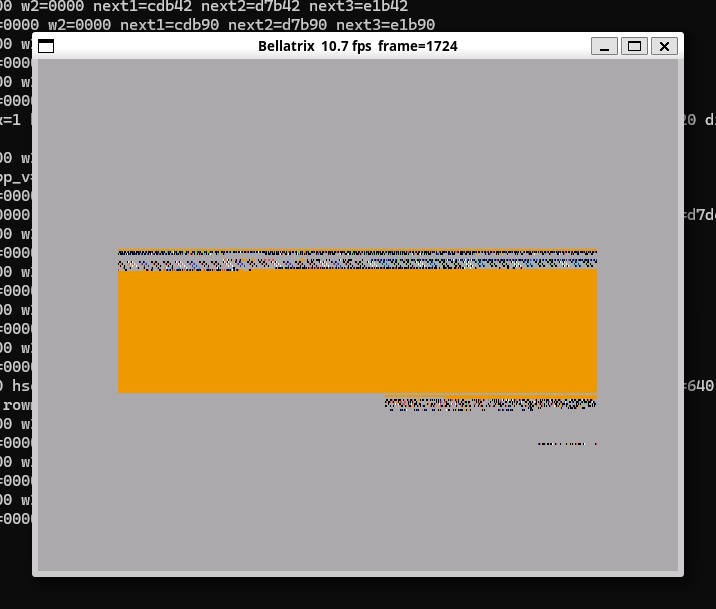
Any idea what screen this was supposed to be? it appear as aros goes into the atapi thing (instead of the insert any bootable media).
Any idea what screen this was supposed to be? it appear as aros goes into the atapi thing (instead of the insert any bootable media).
CoolCat5000 attached the following image:
CoolCat5000Member
Posted 1 day agoDunno why, but aros just try to boot as this:
AddBootNode with DE_BOOTBLOCKS=2 tells AROS to read 2 × 2048 = 4096 bytes at LBA 0 and check for an Amiga boot block. If the signature/checksum fails, AROS doesn't boot from CD and CDFS never gets packets to trigger a mount.
So, i will try to make the automount resident and hope that it will be enough to work.
AddBootNode with DE_BOOTBLOCKS=2 tells AROS to read 2 × 2048 = 4096 bytes at LBA 0 and check for an Amiga boot block. If the signature/checksum fails, AROS doesn't boot from CD and CDFS never gets packets to trigger a mount.
So, i will try to make the automount resident and hope that it will be enough to work.
CoolCat5000Member
Posted 22 hours agoI dont full belive AI, but sharing it opnion: (for me doesnt make sense since it allready works, but its strange that aros doesnt have a more permissive system id support and automount, but i dont know what i am talking about, i am just tring to find a way to boot the iso)
Minimal fix
rom/filesys/cdfs/bcache.c, line 363 — swap the assignment:
bp->bp_ChangeIdx = bp->bp_ChangeNum; /* advance reference point to current hardware state */
rom/filesys/cdfs/cdfs.c, lines 176–185 — also attempt mount when cd_Volume is NULL:
if (*res2 == RETURN_WARN) {
if (dev->cd_Volume)
CDFS_DeviceUnmount(cdfs, dev);
BCache_Invalidate(dev->cd_BCache);
*res2 = CDFS_DeviceMount(cdfs, dev);
if (*res2 == RETURN_OK)
*res = DOSTRUE;
}
Bug 3 (ordering in ata.c) is a contributing factor but does not need an independent fix: once bugs 1 and 2 are corrected, CDFS_DevicePresent will correctly mount the disc on the first packet that arrives
after the daemon's initial au_ChangeNum increment, regardless of the 2-second delay.
Minimal fix
rom/filesys/cdfs/bcache.c, line 363 — swap the assignment:
bp->bp_ChangeIdx = bp->bp_ChangeNum; /* advance reference point to current hardware state */
rom/filesys/cdfs/cdfs.c, lines 176–185 — also attempt mount when cd_Volume is NULL:
if (*res2 == RETURN_WARN) {
if (dev->cd_Volume)
CDFS_DeviceUnmount(cdfs, dev);
BCache_Invalidate(dev->cd_BCache);
*res2 = CDFS_DeviceMount(cdfs, dev);
if (*res2 == RETURN_OK)
*res = DOSTRUE;
}
Bug 3 (ordering in ata.c) is a contributing factor but does not need an independent fix: once bugs 1 and 2 are corrected, CDFS_DevicePresent will correctly mount the disc on the first packet that arrives
after the daemon's initial au_ChangeNum increment, regardless of the 2-second delay.
CoolCat5000Member
Posted 16 hours agoWell, progress... it seems to get worse before get better, but that was a thing that i was not sure if it would even be reachable, make the resident code.
So, even with this strange screen error, there is hope!
[SERIAL] [EXEC] InitCode: calling InitResident (110 02 "expansion.library"
[SERIAL] Found board 00e80000: mfg=28019 prod=17 size=00010000 serial=00000000 diag=00000010
[SERIAL] Configuring board: cd=00002688 mfg=28019 prod=17 size=00010000 type=d1
[AUTOCONFIG] assigned CD board base=00e90000
[AUTOCONFIG] no further boards
[SERIAL] -> configured, 00e90000 - 00e9ffff
[SERIAL] [EXEC] InitCode: calling InitResident (105 82 "debug.library"
[SERIAL] [EXEC] InitCode: leave InitCode(0x02, 0)
[SERIAL] [EXEC] InitCode: enter InitCode(0x01, 0)
[SERIAL] [EXEC] InitCode: kickmemptr=0x00000000 kicktagptr=0x00000000 kickchecksum=0x00000000
[SERIAL] [EXEC] InitCode: calling InitResident (120 01 "exec.library"
[SERIAL] [EXEC] InitCode: calling InitResident (105 01 "diag init"
[SERIAL] callroms
[SERIAL] Read boot ROM base=00e90000 cd=00002688 type=d1
[SERIAL] da_Config=90
[SERIAL] Size=8000 DiagPoint=0010 BootPoint=0000 Name=0000
[SERIAL] Call boot rom @0001bf48 board 00e90000 diag 0001bf38 configdev 00002688
[SERIAL] ->success
[SERIAL] callroms done
[SERIAL] 00000400: 00000400 - 00100000 00001703 -10 'chip memory'
[SERIAL] [EXEC] InitCode: calling InitResident (-49 01 "ATA boot wait"
[SERIAL] [ATA00] Timeout while waiting for device to complete operation
[SERIAL] [EXEC] InitCode: calling InitResident (-50 01 "dosboot.resource"
[SERIAL] ################################################################################
[SERIAL] # Software Failure! #
[SERIAL] # Task : 0x00012820 - Exec Bootstrap Task #
[SERIAL] # Error: 0x84000009 - unknown type of system screen #
[SERIAL] ################################################################################
[SERIAL] PC : 0x00FF3754
[SERIAL] ################################################################################
[SERIAL] ################################################################################
[SERIAL] # Software Failure! #
[SERIAL] # Task : 0x00012820 - Exec Bootstrap Task #
[SERIAL] # Error: 0x84000009 - unknown type of system screen #
[SERIAL] ################################################################################
[SERIAL] PC : 0x00FF3754
So, even with this strange screen error, there is hope!
[SERIAL] [EXEC] InitCode: calling InitResident (110 02 "expansion.library"
[SERIAL] Found board 00e80000: mfg=28019 prod=17 size=00010000 serial=00000000 diag=00000010
[SERIAL] Configuring board: cd=00002688 mfg=28019 prod=17 size=00010000 type=d1
[AUTOCONFIG] assigned CD board base=00e90000
[AUTOCONFIG] no further boards
[SERIAL] -> configured, 00e90000 - 00e9ffff
[SERIAL] [EXEC] InitCode: calling InitResident (105 82 "debug.library"
[SERIAL] [EXEC] InitCode: leave InitCode(0x02, 0)
[SERIAL] [EXEC] InitCode: enter InitCode(0x01, 0)
[SERIAL] [EXEC] InitCode: kickmemptr=0x00000000 kicktagptr=0x00000000 kickchecksum=0x00000000
[SERIAL] [EXEC] InitCode: calling InitResident (120 01 "exec.library"
[SERIAL] [EXEC] InitCode: calling InitResident (105 01 "diag init"
[SERIAL] callroms
[SERIAL] Read boot ROM base=00e90000 cd=00002688 type=d1
[SERIAL] da_Config=90
[SERIAL] Size=8000 DiagPoint=0010 BootPoint=0000 Name=0000
[SERIAL] Call boot rom @0001bf48 board 00e90000 diag 0001bf38 configdev 00002688
[SERIAL] ->success
[SERIAL] callroms done
[SERIAL] 00000400: 00000400 - 00100000 00001703 -10 'chip memory'
[SERIAL] [EXEC] InitCode: calling InitResident (-49 01 "ATA boot wait"
[SERIAL] [ATA00] Timeout while waiting for device to complete operation
[SERIAL] [EXEC] InitCode: calling InitResident (-50 01 "dosboot.resource"
[SERIAL] ################################################################################
[SERIAL] # Software Failure! #
[SERIAL] # Task : 0x00012820 - Exec Bootstrap Task #
[SERIAL] # Error: 0x84000009 - unknown type of system screen #
[SERIAL] ################################################################################
[SERIAL] PC : 0x00FF3754
[SERIAL] ################################################################################
[SERIAL] ################################################################################
[SERIAL] # Software Failure! #
[SERIAL] # Task : 0x00012820 - Exec Bootstrap Task #
[SERIAL] # Error: 0x84000009 - unknown type of system screen #
[SERIAL] ################################################################################
[SERIAL] PC : 0x00FF3754
CoolCat5000Member
Posted 4 hours agoI will need help on this one.
I am not sure if i broked something or i advanced to a place that i wasnt before (intuition wants a screen?)
That is what i have so far:
https://github.co...src/boards
(the objective is to have the automount and boot directly from the iso)
But i have no idea what is happening or what should i do to fix it.
(does aros boot on a 68000?, that is what i have with musashi atm)
Any help is welcome,
I am not sure if i broked something or i advanced to a place that i wasnt before (intuition wants a screen?)
That is what i have so far:
https://github.co...src/boards
(the objective is to have the automount and boot directly from the iso)
But i have no idea what is happening or what should i do to fix it.
(does aros boot on a 68000?, that is what i have with musashi atm)
Any help is welcome,
AMIGASYSTEMDistro MaintainerWith a 68000 CPU, AROS would take hours to load the operating system – assuming it can even support it. AROS 68k is based on Amiga OS 3.1, which requires a 68020 CPU.
The best choice is an Amiga Expanded with at least a 68060 CPU; at the moment, the best experience is only available on WinUAE. See the configuration I have attached in the archive:
AROS One 68k on WinUAE
https://youtu.be/...
The best choice is an Amiga Expanded with at least a 68060 CPU; at the moment, the best experience is only available on WinUAE. See the configuration I have attached in the archive:
AROS One 68k on WinUAE
https://youtu.be/...
You can view all discussion threads in this forum.
You cannot start a new discussion thread in this forum.
You cannot reply in this discussion thread.
You cannot start on a poll in this forum.
You cannot upload attachments in this forum.
You can download attachments in this forum.
You cannot start a new discussion thread in this forum.
You cannot reply in this discussion thread.
You cannot start on a poll in this forum.
You cannot upload attachments in this forum.
You can download attachments in this forum.
Moderator: Administrator, Moderators