I found this dirty cheap and since is in the compatibility list I grab it it had also ssd installed so it was a nice buy . It is exactly the model A200-1M5 which has the T2450 cpu , all the rest same as A200 PSAE1E . Only problem was it doesn't boot for installation from USB 3.0 it wants USB 2.0 . Please some help with networking . It has the atheros wifi and from the list I see RTL8101E which I don't know to which realtek device coresponds I tried them all I tried the Atheros5000 device which is it's wireless and also thethering with my iphone . Failed to restart wireless networking I get all the cases I miss something please a little help.I put prefs and devlist
Edited by laiosx on 06-05-2026 14:45, 5 months ago
I do not use wifi but can I ask the following questions?
I take it, the wifi card is AR5BXB63? Does the slot work? Just have atheros5000.device only in IPv4 settings.
The best way to list the available networks and diagnose / troubleshoot problems with connecting to a wireless network is to run WirelessManager manually. First uncheck the "Start networking during system boot" box in the Network prefs app, then save and reboot. Then run this in a shell:
Hi
thanks for help , the wifi card is working because as a windows machine was working . If it is the mentioned atheros I don't know actualy I rely upon the specs of the machine , I check the afternoon and I open the case to be sure what is inside and will post again
I do something wrong I idn't manage so far to have a a conection in any of the laptops I didn't check all yet but can't be right I miss something here , I also get the NETGEAR usb same thing same message only in the desktop the veriton it opened the wifimanager on desktop but no connections . Ok In the case of Toshiba A200 I can't see easy the internal wifi I must unscrew the whole bottom in devlist apears the atheros5000 but beyond that nothing here I take the log
- Make sure you have selected the device supported by your Wi-Fi card
- Go to the ‘Wireless Network’ tab
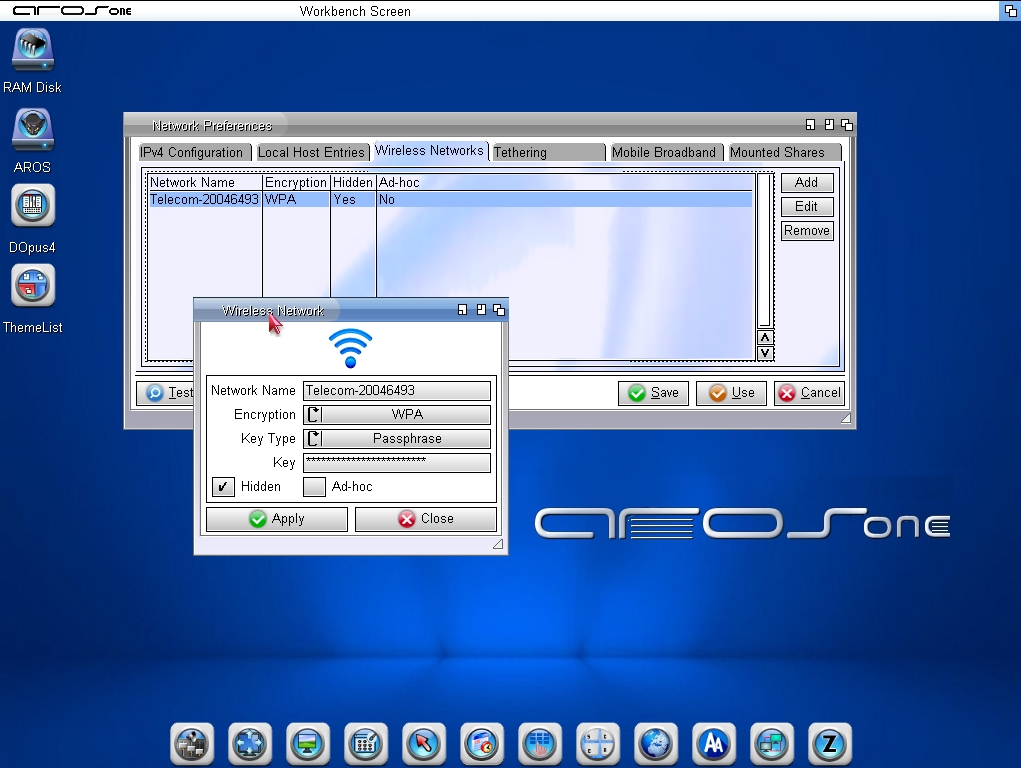
- Manually enter the Wi-Fi network details and password (see my screenshot for an example)
- The network should work straight away
- If it doesn't work, try restarting AROS
I used the Netgear dongle which is a guaranteed supported device Only in the desktop I reached the point to have the wireless manager showing my hotspot in this case from my phone but even then it couldn’t establish connection using the dongle in laptops i get always “ failed to restart wireless connection “ I will post some screenshots
Edited by laiosx on 07-05-2026 14:12, 5 months ago
There's no need to take a machine apart to identify the hardware: use PCITool.
You shouldn't create more than one network interface (someone correct me if that problem has been fixed).
You need to create at least one wireless network entry in the Wireless Networks tab in network prefs.
You can view all discussion threads in this forum. You cannot start a new discussion thread in this forum. You cannot reply in this discussion thread. You cannot start on a poll in this forum. You cannot upload attachments in this forum. You can download attachments in this forum.



 AMIGASYSTEMDistro Maintainer