Oh no! Where's the JavaScript?
Your Web browser does not have JavaScript enabled or does not support JavaScript. Please enable JavaScript on your Web browser to properly view this Web site, or upgrade to a Web browser that does support JavaScript.

EmuV0: Test Software 32bit

Last updated on 11 days ago
AMIGASYSTEMAMIGASYSTEMDistro Maintainer
Posted 3 months ago
Compatibility list updated!

ZuPaPlayer = Exit program Crash System, Crash WMware
AMIGASYSTEMAMIGASYSTEMDistro Maintainer
Posted 2 months ago
In the new version of VintageSongPlayer posted on ArosArchive, a right-click menu has been added. With Emuv0, the right-click menu generates a Guru.

VintageSongPlayer had another problem: it is not possible to move the player to another position on Wanderer with the mouse.
AMIGASYSTEMAMIGASYSTEMDistro Maintainer
Posted 12 days ago
@deadwood

On AROS One 64-bit, I’m testing RNTunes as a media player, as it supports many audio formats, including those that no longer work with MPlayer, such as AC3 and AIFF (which cause MPlayer to crash).

As you can see from the attached video, RNTunes works well as a tool on 64-bit systems, although the crash shown in the video does occur occasionally.

Regarding Zune preferences, I have noticed that they work if present in RAM:ENV; EmuV0 does not have and does not support Env-Archive/Zune.

For the Zune preferences, I found a solution using a script tool (PlaySound) which, before running EmuV0+RNTunes, will copy RNOTunes.prefs to RAM:ENV.

Only Zune wallpapers are not supported by EmuV0; otherwise, all Zune preferences seem to work fine.
Signature: AROS One All Thread
AROS One Home Site
AROS One Facebook
AMIGASYSTEM attached the following file:
test-rno-64bit.zip [4.95MB / 24 Downloads]
D
deadwoodAROS Dev
Posted 12 days ago
I'm not sure I understand. Preferences are copied to RAM:ENV at each boot so once you created them, next time you boot there will be there.
AMIGASYSTEMAMIGASYSTEMDistro Maintainer
Posted 12 days ago
The player (script) copies the Zune preferences file every time a music file is played.

This is what my script does:

.key fname/F
Copy S:RNOTUNES.prefs RAM:ENV/Zune/
CD Extras:AROS-32bit/Music/RNOTunes
C:EmuV0 RNOTunes.exe >Nil: "<fname>"

If you want the Zune file to run every time the system restarts, simply add the “Copy” command to User-startup
D
deadwoodAROS Dev
Posted 12 days ago
I think we are talking about different things. If a file is present in ENVARC:Zune it will be automatically copied to ENV:Zune during each boot - you don't have to copy it manually when program starts. This command in standard Startup-Sequence handles that copying:


Copy >NIL: "ENVARC:" "ENV:" ALL NOPRO NOREQ PAT "~(def_#?.info)"
AMIGASYSTEMAMIGASYSTEMDistro Maintainer
Posted 12 days ago
Yes, I know that if you copy the Zune preference files to PrefsEnv-ArchiveZune, they will be copied to RAM:ENV on restart; I use this method on AROS One for certain settings, both 32-bit and 64-bit

I didn’t do this to avoid mixing 64-bit preferences with 32-bit ones and potentially causing conflicts.
D
deadwoodAROS Dev
Posted 12 days ago
Ok, I understand now, thanks.
AMIGASYSTEMAMIGASYSTEMDistro Maintainer
Posted 11 days ago
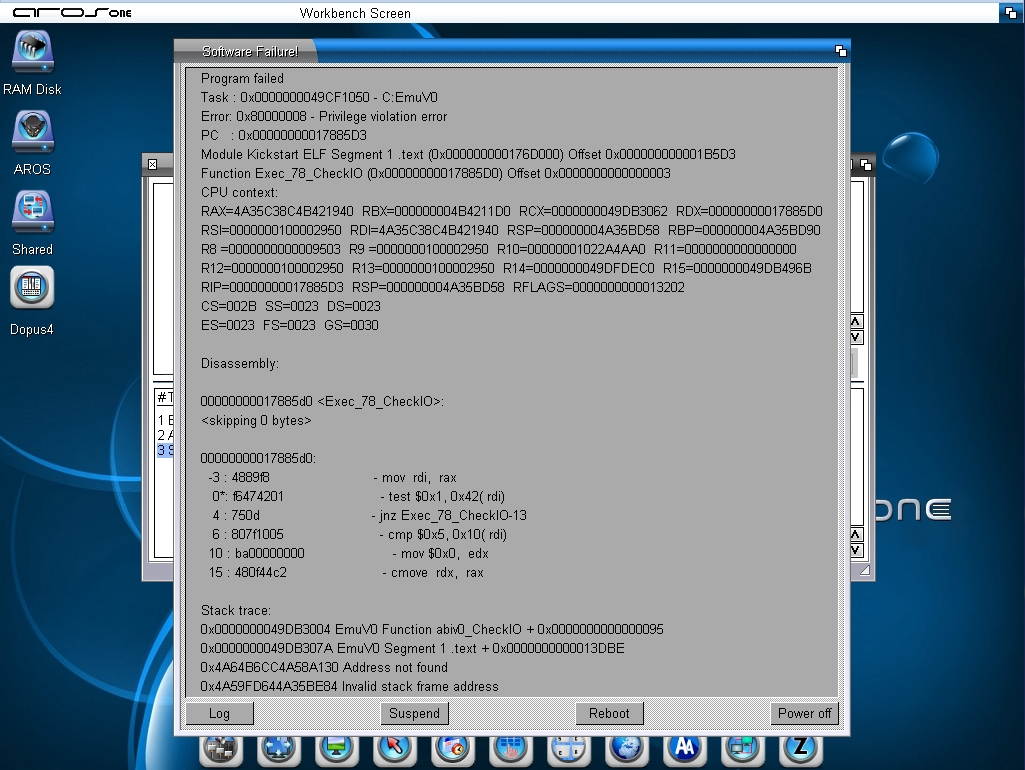
Regarding RNOTunes, I should point out that the Guru icon appears alongside EmuV0 when you add and play an MP3, AIFF or other music file to the playlist, see screenshot!
AMIGASYSTEM attached the following image:
rnotunes.jpg
You can view all discussion threads in this forum.
You cannot start a new discussion thread in this forum.
You cannot reply in this discussion thread.
You cannot start on a poll in this forum.
You cannot upload attachments in this forum.
You can download attachments in this forum.
Users who participated in discussion: deadwood, AMIGASYSTEM