
- Home
- Discussion Forum
- AROS FORUMS
- Public Announcements
- Amiberry preview-v6.3.4 x86_64 - alpha!
Amiberry preview-v6.3.4 x86_64 - alpha!
Last updated on 4 months ago
DeremonMember
Posted 6 months agoHi,
after months of working with the fundamental help of @deadwood and the extensive testing by @retrofaza, Amiberry preview-v6.3.4 -alpha- has come to life, and now is open for testing!
Of course this is an alpha and not all the features are working, but at the moment these are enough to have basic emulation functionalities, a lot less crashes than the early alpha!
Here is a brief description of what works and what not:
What is working:
What is not working for sure:
The rest is unknown/untested territory, I have attached the zip file here. Before publishing it (as alpha) to archives I need more testing
What problems you can expect:
Crashes
JIT 64bit serious errors (indirect JIT is not working so all JIT memory must be 32bit)
Extra configurations:
Aside from application configurations it's possible to configure the 32Bit memory to reserve for the program (available address space), while it is calculated to a maximum of 384MiB you can set it manually on the tooltype using the option:
NATMEM_SIZE=MemoryInMiB (for example NATMEM_SIZE=305)
Caveats:
Using pixelated (now the default) "filter" will improve performance
Closing Amiberry before changing configuration will prevent some crashes
If you cannot use fullscreen 800x600 it will switch to full-window
On hosted only keyboard layout "A" is working correctly
On hosted the default RAM assigned as available address space is 128MB however using NATMEM_SIZE=305 is safe if you want to use RTG
GUI does not support changing units (eg. pointing a directory on a different disk/assign) but you can directly edit the .uae config file, it will work
Known issues:
AROS memory is unprotected so switching configs that uses JIT + a lot of Z3 RAM may crash the program
In windowed mode mouse is not always "grabbed" and AmigaOS/AROS68k right click menu may trigger the host one instead, clicking out of the window and in again may help
Using too much RAM can cause JIT 64bit serious error which can eventually crash AROS
On hosted you cannot use joystick/pads
You cannot use (due to AROS limits) HDF files >= 2GiB or VHD dynamic files filled with data >=2GiB, is better use directories instead
* RTG/Z3 RAM needs at least 305MB of available address space (you can see it on RAM panel and set it as described with NATMEM_SIZE)
**May not work on real hardware (depends on SDL2)
***Rescan ROMs works on VM or Hosted and it is fundamental to use WHDBoot, if using real hardware you can rescan on hosted/VM before using it on real or follow this guide: https://github.co...patibility to manually copy roms with the right name
after months of working with the fundamental help of @deadwood and the extensive testing by @retrofaza, Amiberry preview-v6.3.4 -alpha- has come to life, and now is open for testing!
Of course this is an alpha and not all the features are working, but at the moment these are enough to have basic emulation functionalities, a lot less crashes than the early alpha!
Here is a brief description of what works and what not:
What is working:
- Emulation (yay!), JIT, cycle exact and "fastest possible"
- RTG*
- Quickstart
- Display modes: Windowed, Fullscreen (limited to 800x600), Full-window, Filtering (Warning! Slow!)
- Sound (Don't go too low with buffer)
- Keyboard emulation and Joystick/pad**
- WHDBoot
What is not working for sure:
- Drawbridge/Floppybridge
- Fullscreen lesser than and greater than 800x600 (use full-window, but it may be slow!)
- BSDSocket (sorry)
- Rescan ROMs on real hardware***
- Virtual Keyboard(?)
The rest is unknown/untested territory, I have attached the zip file here. Before publishing it (as alpha) to archives I need more testing
What problems you can expect:
Crashes
JIT 64bit serious errors (indirect JIT is not working so all JIT memory must be 32bit)
Extra configurations:
Aside from application configurations it's possible to configure the 32Bit memory to reserve for the program (available address space), while it is calculated to a maximum of 384MiB you can set it manually on the tooltype using the option:
NATMEM_SIZE=MemoryInMiB (for example NATMEM_SIZE=305)
Caveats:
Using pixelated (now the default) "filter" will improve performance
Closing Amiberry before changing configuration will prevent some crashes
If you cannot use fullscreen 800x600 it will switch to full-window
On hosted only keyboard layout "A" is working correctly
On hosted the default RAM assigned as available address space is 128MB however using NATMEM_SIZE=305 is safe if you want to use RTG
GUI does not support changing units (eg. pointing a directory on a different disk/assign) but you can directly edit the .uae config file, it will work
Known issues:
AROS memory is unprotected so switching configs that uses JIT + a lot of Z3 RAM may crash the program
In windowed mode mouse is not always "grabbed" and AmigaOS/AROS68k right click menu may trigger the host one instead, clicking out of the window and in again may help
Using too much RAM can cause JIT 64bit serious error which can eventually crash AROS
On hosted you cannot use joystick/pads
You cannot use (due to AROS limits) HDF files >= 2GiB or VHD dynamic files filled with data >=2GiB, is better use directories instead
* RTG/Z3 RAM needs at least 305MB of available address space (you can see it on RAM panel and set it as described with NATMEM_SIZE)
**May not work on real hardware (depends on SDL2)
***Rescan ROMs works on VM or Hosted and it is fundamental to use WHDBoot, if using real hardware you can rescan on hosted/VM before using it on real or follow this guide: https://github.co...patibility to manually copy roms with the right name
Edited by Deremon on 18-12-2025 16:36, 6 months ago
7 users reacted to this post
retrofaza, deadwood, Amiwell79, OlafSch, Farox, Argo, x-vision
Deremon attached the following file:
amiberry_634a_x86-64.zip [14.11MB / 300 Downloads]
deadwoodAROS Dev
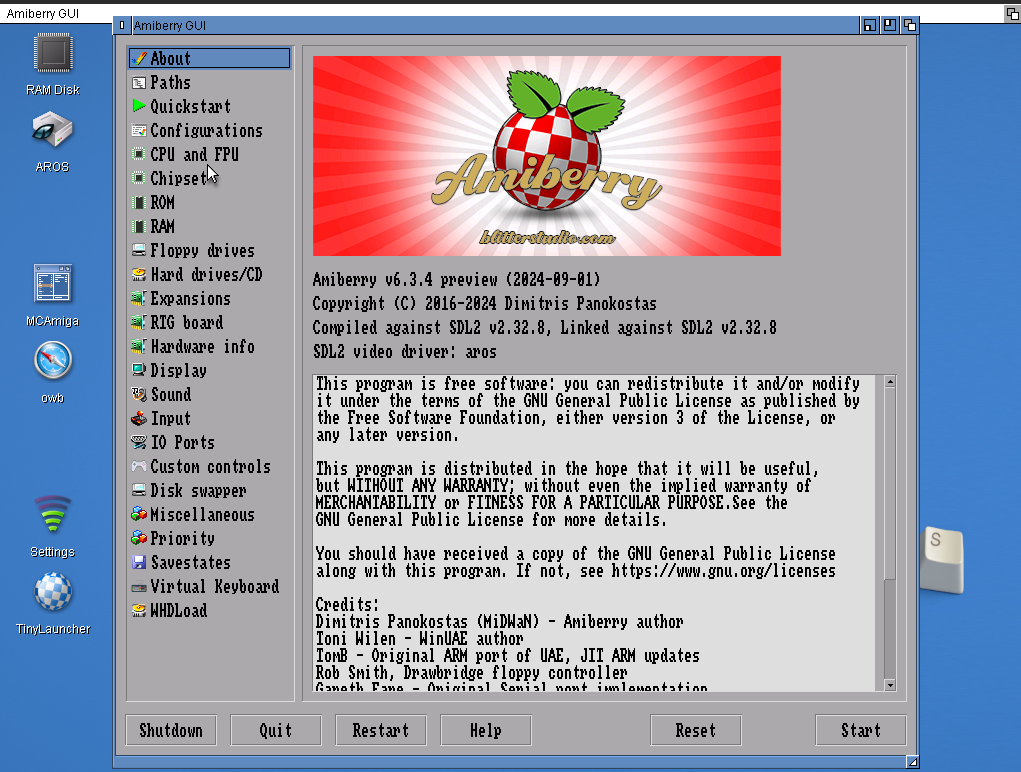
Posted 6 months agoAnd here is a how it presents. Go try it out
6 users reacted to this post
OlafSch, Farox, amigamia, pixie, Argo, x-vision
 AMIGASYSTEMDistro Maintainer
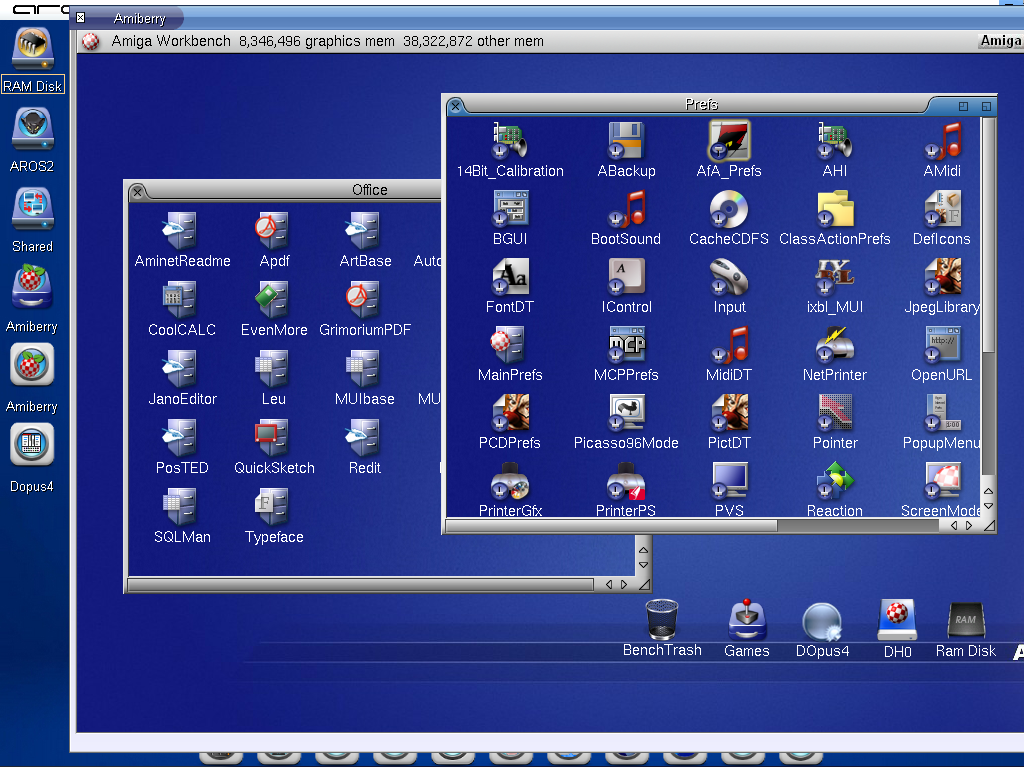
Thank you, Deremon, you've done an exceptional job. I tested a fairly complex system like my AfA One, and it worked perfectly!

2 users reacted to this post
Farox, Argo
AMIGASYSTEM attached the following image:
FaroxMember
Posted 6 months agoCongratulations guys,
this was not really an easy task, and i know because i have started to port version 5.8.1 and later a version 7.1.1 with the help of @Deremon (and based on the work done by @deadwood with a previous version), but for now stuck in a bad state of performance.
Anyway enjoy this preview.
this was not really an easy task, and i know because i have started to port version 5.8.1 and later a version 7.1.1 with the help of @Deremon (and based on the work done by @deadwood with a previous version), but for now stuck in a bad state of performance.
Anyway enjoy this preview.
1 user reacted to this post
OlafSch
Amiwell79Distro Maintainer
Posted 6 months agocongratulation
ntromansSenior Member
Posted 6 months agoMany, many thanks again for working on this. Ive dowloaded the program it starts up fine on my i5 machine. I'll need to transfer over my 68k files now to try it properly. I have a full AmigaOS 68k system (originally cloned from my old A1200) that boots into Workbench and is used to run applications including PageStream and FinalCalc; it runs pretty much perfectly under Janus so will be good test for Amiberry.
Cheers,
Nigel.
Cheers,
Nigel.
1 user reacted to this post
Deremon
AMIGASYSTEMDistro Maintainer@Deremon
Amiberry works very well. I tried to start AROS directly with Amiberry, which in turn starts OS 3.9. I would say it's really nice and high quality. See the attached video. For convenience, I cut out the rather long loading times from the video.
https://youtu.be/...
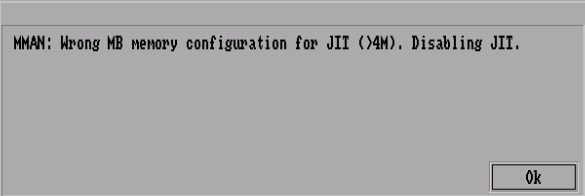
The only problem is that without JIT, the emulation is slow for complex systems. I am not sure if JIT works and how to set it up. When I try to set up JIT in any way, I get an error message. See screenshot.
Amiberry works very well. I tried to start AROS directly with Amiberry, which in turn starts OS 3.9. I would say it's really nice and high quality. See the attached video. For convenience, I cut out the rather long loading times from the video.
https://youtu.be/...
The only problem is that without JIT, the emulation is slow for complex systems. I am not sure if JIT works and how to set it up. When I try to set up JIT in any way, I get an error message. See screenshot.
AMIGASYSTEM attached the following image:
DeremonMember
Posted 6 months ago@AMIGASYSTEM - @Deremon
Amiberry works very well. I tried to start AROS directly with Amiberry, which in turn starts OS 3.9. I would say it's really nice and high quality. See the attached video. For convenience, I cut out the rather long loading times from the video.
https://youtu.be/...
The only problem is that without JIT, the emulation is slow for complex systems. I am not sure if JIT works and how to set it up. When I try to set up JIT in any way, I get an error message. See screenshot.
JIT works but motherboard memory and processor slot memory cannot be more than 4MB otherwise amiberry will crash it's a limitation of the memory assignment by amiberry and memory management under AROS
If you want to use a lot of RAM and JIT and you have a lot of ram (ideally at least 2G) you can set NATMEM_SIZE=1024 or NATMEM_SIZE=768 on tooltype and assign a lot of Z3 RAM (amiberry will calculate the maximum possible Z3)
bsdsocket is unfortunately not working currently
[ITA]
JIT funziona ma la motherboard ram e la processor slot non possono avere più di 4M assegnati o amiberry crasha è un problema tra la gestione della memoria di AROS e quella di Amiberry
Se vuoi aumentare la ram metti nel tooltype NATMEM_SIZE=1024 oppure NATMEM_SIZE=768 (trova quello che è meglio per te) e potrai assegnare più ram Z3, amiberry calcolerà automaticamente a seconda della RAM assegnata disponibile quanta Z3 potrai assegnare
bsdsocket non funziona al momento purtroppo
Edited by Deremon on 17-12-2025 13:04, 6 months ago
FaroxMember
Posted 6 months agoAbout crash when exit Amiberry if you make change on config, i found that if you configure a key to press when you want to close the program (i used F11 for example) Aros didn't crash (tested on Native).
AMIGASYSTEMDistro Maintainer--- English ---
Thanks Deremon, NATMEM_SIZE=1024 is perfect, it calculates 512 of Z3
Question: since I would like to start Amiberry directly from Guru, as shown in the video, I need some information
- How do I add the parameter ‘NATMEM_SIZE=1024’ after the Amiberry command?
Or
- If I use WBRun, how can I add the No-GUI and config file path parameters to the tooltype?
--- Italiano ---
Grazie Deremon, NATMEM_SIZE=1024 è perfetto, mi calcola 512 di Z3
Domada, dato che vorrei avviare Amiberry direttamente dal Guru, come mostrato nel video, avrei bisogno di alcune info
- Come aggiungere il parametro "NATMEM_SIZE=1024" dopo il comando Amiberry ?
Oppure
- Se uso WBRun, come posso aggiungere nel tooltype i parmetri No-GUI e percorso file config?
Thanks Deremon, NATMEM_SIZE=1024 is perfect, it calculates 512 of Z3
Question: since I would like to start Amiberry directly from Guru, as shown in the video, I need some information
- How do I add the parameter ‘NATMEM_SIZE=1024’ after the Amiberry command?
Or
- If I use WBRun, how can I add the No-GUI and config file path parameters to the tooltype?
--- Italiano ---
Grazie Deremon, NATMEM_SIZE=1024 è perfetto, mi calcola 512 di Z3
Domada, dato che vorrei avviare Amiberry direttamente dal Guru, come mostrato nel video, avrei bisogno di alcune info
- Come aggiungere il parametro "NATMEM_SIZE=1024" dopo il comando Amiberry ?
Oppure
- Se uso WBRun, come posso aggiungere nel tooltype i parmetri No-GUI e percorso file config?
DeremonMember
Posted 6 months ago@AMIGASYSTEM - --- English ---
Thanks Deremon, NATMEM_SIZE=1024 is perfect, it calculates 512 of Z3
Question: since I would like to start Amiberry directly from Guru, as shown in the video, I need some information
- How do I add the parameter ‘NATMEM_SIZE=1024’ after the Amiberry command?
Or
- If I use WBRun, how can I add the No-GUI and config file path parameters to the tooltype?
--- Italiano ---
Grazie Deremon, NATMEM_SIZE=1024 è perfetto, mi calcola 512 di Z3
Domada, dato che vorrei avviare Amiberry direttamente dal Guru, come mostrato nel video, avrei bisogno di alcune info
- Come aggiungere il parametro "NATMEM_SIZE=1024" dopo il comando Amiberry ?
Oppure
- Se uso WBRun, come posso aggiungere nel tooltype i parmetri No-GUI e percorso file config?
If you use WBRun you cannot pass parameters to amiberry but from shell you can use:
Code Download source
amiberry NATMEM_SIZE=1024 -f conf/config_name.uae -G-f is to run amiberry loading your conf
-G starts emulation directly, no GUI
to skip using -G you can change config_name.uae and modify use_gui=yes to use_gui=no
AMIGASYSTEMDistro MaintainerOK, thank you. I knew about the command line and used -f, while I had set no-gui in config_name.uae. I was just missing NATMEM_SIZE=1024.
Another question: can you set up ‘Amibridge’ as on JanusUAE to integrate Workbench on Wanderer?
EDIT:
Regarding WBRun, I confirm that it can run Tooltypes, but currently only with the parameter ‘NATMEM_SIZE=1024’.
---- Italiano ----
Ok grazie, per la linea di comando conoscevo ed ho usato -f mentre no-gui lo avevo impostato nel config_name.uae, mi mancava solo NATMEM_SIZE=1024
Altra domanda: si può impostare "Amibridge" come su JanusUAE per integrare il Workbench su Wanderer !
EDIT:
Riguardo WBRun confermo che può eseguire il Tooltypes, ma al momento solo il parametro "NATMEM_SIZE=1024"
Another question: can you set up ‘Amibridge’ as on JanusUAE to integrate Workbench on Wanderer?
EDIT:
Regarding WBRun, I confirm that it can run Tooltypes, but currently only with the parameter ‘NATMEM_SIZE=1024’.
---- Italiano ----
Ok grazie, per la linea di comando conoscevo ed ho usato -f mentre no-gui lo avevo impostato nel config_name.uae, mi mancava solo NATMEM_SIZE=1024
Altra domanda: si può impostare "Amibridge" come su JanusUAE per integrare il Workbench su Wanderer !
EDIT:
Riguardo WBRun confermo che può eseguire il Tooltypes, ma al momento solo il parametro "NATMEM_SIZE=1024"
AMIGASYSTEMDistro Maintainer@Farox - About crash when exit Amiberry if you make change on config, i found that if you configure a key to press when you want to close the program (i used F11 for example) Aros didn't crash (tested on Native).
I have never had a crash when exiting Amiberry with F9. It happened a couple of times when I activated/modified all the function keys (Open GUI, Quick Key, Action Repaly, FullScreen, Minimize) in Miscellaneous.
--- Italiano ---
Non ho mai avuto un crash quando chiudo Amiberry con F9. È successo un paio di volte quando ho attivato/modificato tutti i tasti funzione (Apri GUI, Tasto rapido, Riproduci azione, Schermo intero, Riduci a icona) in Varie.
DeremonMember
Posted 6 months ago@AMIGASYSTEM - OK, thank you. I knew about the command line and used -f, while I had set no-gui in config_name.uae. I was just missing NATMEM_SIZE=1024.
Another question: can you set up ‘Amibridge’ as on JanusUAE to integrate Workbench on Wanderer?
EDIT:
Regarding WBRun, I confirm that it can run Tooltypes, but currently only with the parameter ‘NATMEM_SIZE=1024’.
---- Italiano ----
Ok grazie, per la linea di comando conoscevo ed ho usato -f mentre no-gui lo avevo impostato nel config_name.uae, mi mancava solo NATMEM_SIZE=1024
Altra domanda: si può impostare "Amibridge" come su JanusUAE per integrare il Workbench su Wanderer !
EDIT:
Riguardo WBRun confermo che può eseguire il Tooltypes, ma al momento solo il parametro "NATMEM_SIZE=1024"
Unfortunately the only tooltype parameter supported at the moment is the NATMEM_SIZE the other parameters have to be passed via command line
Amiberry has "host-run" instead of amibridge but is on the "to-do" pile since I need to fix more important features first (eg. bsdsocket)
2 users reacted to this post
aha, retrofaza
AMIGASYSTEMDistro MaintainerFirst of all, thank you once again for bringing Amiberry to AROS 64bit.
I would like to point out a problem I encountered in the Workbench menus, especially in the substantial ones or RTG, including AROS 68k. They work with a noticeable delay after loading Workbench, sometimes out of sync if you use the ‘Pop-Pup’ menu.
Overall, the RTG and AROS 68k systems work well, although they are a bit slow on my DualCore on VM. I need to try them on native.
Regarding direct boot from grub, the best choice is to use Run >nil: in front of amiberry, otherwise it can cause slowdowns or guru errors when exiting the GUI if Run >nil: is at the end of the string.
If started from Grub and Wander is enabled in the Startup-sequence, Wanderer will appear automatically as soon as you exit Amiberry, practically hidden behind the screen
-- Italiano --
Intanto ti ringrazio ancora una volta per aver portato Amiberry su AROS 64bit
Ti segnalo un problema che ho riscontrato nei menu del Workbench specialmente in quelli corposi o RTG, incluso AROS 68k, funzionano in netto ritardo dopo il caricamento del Workbench, alcune volte sfasati se si usa il menu "Pop-Pup"
Nel complesso i sistemi RTG e AROS 68k funzionano bene anche se sul mio DualCore risultano un po' lenti su VM, devo provare su nativo.
Riguardo l'avvio diretto dal grub, la migliore scelta è quella di usare Run >nil: davanti ad amiberry, diversamente può causare rallentamenti o guru in uscita dalla Gui se Run >nil: si trova alla fine della Stringa.
Se avviato da Grub e Wander è abilitato nella Startup-sequence, Wanderer comparirà automaticamente appena usciti da Amiberry, praticamente e nascosto dietro lo schermo
I would like to point out a problem I encountered in the Workbench menus, especially in the substantial ones or RTG, including AROS 68k. They work with a noticeable delay after loading Workbench, sometimes out of sync if you use the ‘Pop-Pup’ menu.
Overall, the RTG and AROS 68k systems work well, although they are a bit slow on my DualCore on VM. I need to try them on native.
Regarding direct boot from grub, the best choice is to use Run >nil: in front of amiberry, otherwise it can cause slowdowns or guru errors when exiting the GUI if Run >nil: is at the end of the string.
If started from Grub and Wander is enabled in the Startup-sequence, Wanderer will appear automatically as soon as you exit Amiberry, practically hidden behind the screen
-- Italiano --
Intanto ti ringrazio ancora una volta per aver portato Amiberry su AROS 64bit
Ti segnalo un problema che ho riscontrato nei menu del Workbench specialmente in quelli corposi o RTG, incluso AROS 68k, funzionano in netto ritardo dopo il caricamento del Workbench, alcune volte sfasati se si usa il menu "Pop-Pup"
Nel complesso i sistemi RTG e AROS 68k funzionano bene anche se sul mio DualCore risultano un po' lenti su VM, devo provare su nativo.
Riguardo l'avvio diretto dal grub, la migliore scelta è quella di usare Run >nil: davanti ad amiberry, diversamente può causare rallentamenti o guru in uscita dalla Gui se Run >nil: si trova alla fine della Stringa.
Se avviato da Grub e Wander è abilitato nella Startup-sequence, Wanderer comparirà automaticamente appena usciti da Amiberry, praticamente e nascosto dietro lo schermo
DeremonMember
Posted 6 months agoThanks there is still much to do
I have noted a little delay after workbench/AROS68k start, I think the problem is that we do not have SMP working yet, linux/macos can distribute the load on multiple cores resulting in a faster emulation, especially using JIT. For example I noted it on my low-end Intel N100 but that is not present on my other more powerful Ryzen CPU
Good to know about the Run >nil: can be useful, I'm very curious to see a preview of an AROS68k or amigaOS started directly by AROS startup-sequence
[ita]
Grazie, c'è ancora molto da fare
Ho notato un ritardo nell'avvio di workbench o AROS68k ma il problema penso stia nella mancanza del multicore su AROS, linux o macos possono distribuire il carico su più core e questo si sente quando devi emulare è sicuramente più veloce, specialmente quando si usa JIT. Per esempio sul mio Intel N100 è un problema sempre presente, cosa che però non accade sul mio Ryzen
Buono a sapersi per il Run >nil: sicuramente tornerà utile, sono davvero curioso di vedere un anteprima di AROS68k o amigaOS che parte direttamente dalla startup-sequence di AROS
I have noted a little delay after workbench/AROS68k start, I think the problem is that we do not have SMP working yet, linux/macos can distribute the load on multiple cores resulting in a faster emulation, especially using JIT. For example I noted it on my low-end Intel N100 but that is not present on my other more powerful Ryzen CPU
Good to know about the Run >nil: can be useful, I'm very curious to see a preview of an AROS68k or amigaOS started directly by AROS startup-sequence
[ita]
Grazie, c'è ancora molto da fare
Ho notato un ritardo nell'avvio di workbench o AROS68k ma il problema penso stia nella mancanza del multicore su AROS, linux o macos possono distribuire il carico su più core e questo si sente quando devi emulare è sicuramente più veloce, specialmente quando si usa JIT. Per esempio sul mio Intel N100 è un problema sempre presente, cosa che però non accade sul mio Ryzen
Buono a sapersi per il Run >nil: sicuramente tornerà utile, sono davvero curioso di vedere un anteprima di AROS68k o amigaOS che parte direttamente dalla startup-sequence di AROS
Edited by Deremon on 18-12-2025 16:36, 6 months ago
AMIGASYSTEMDistro MaintainerIn the video I posted earlier, OS 3.9 bb4 RTG was started directly from Grub!
Now I've made a new video, where you can see AROS 68k, or rather AROS One 68k, booting from Grub. Bear in mind that I used an old DualCore with 8GB of RAM with Vmware, but the difference is made by the PC's video card and sound card; with integrated audio and video, it would have been very slow.
AROS 68k works reasonably well with 512 MB of RAM. I haven't tested compatibility, which will certainly be lower than on Amiga systems.
In the video, AROS One 68k starts from Grub, while Wanderer loads silently after a slight delay. Finally, after exiting Amiberry, AROS One 64Bit appears.
If you can test it, I am attaching the final part of the startup sequence (I used Quiet instead of Run >Nil to prevent the Shell from appearing).
https://youtu.be/...
--- Italiano ---
Nel video che ho postato precedentemente OS 3.9 bb4 RTG è stato avviato direttamente dal Grub !
Ora ho fatto un nuovo video, qui puoi vedere avviare dal Grub AROS 68k, o meglio AROS One 68k, considera che ho usato con Vmware un vecchio DualCore con 8GB di RAM, ma la differenza la fanno la Sheda Video e Scheda Audio del PC, con Sheda Audio e Video Integrata sarebbe stato molto lento.
AROS 68k funziona discretamente con i 512 MB di RAM, non ho testato la Compatibilità che sicuramente sarà più bassa rispetto ai sistemi Amiga.
Nel video AROS One 68k parte dal Grub mentre Wanderer con un po' di ritardo si caricherà silenzioso, alla fine uscito da Amiberry apparirà AROS One 64Bit
se puoi testarlo ti allego la parte finale della Startup-sequence (usato Quiet al posto di Run >Nil per non far apparire la Shell)
Now I've made a new video, where you can see AROS 68k, or rather AROS One 68k, booting from Grub. Bear in mind that I used an old DualCore with 8GB of RAM with Vmware, but the difference is made by the PC's video card and sound card; with integrated audio and video, it would have been very slow.
AROS 68k works reasonably well with 512 MB of RAM. I haven't tested compatibility, which will certainly be lower than on Amiga systems.
In the video, AROS One 68k starts from Grub, while Wanderer loads silently after a slight delay. Finally, after exiting Amiberry, AROS One 64Bit appears.
If you can test it, I am attaching the final part of the startup sequence (I used Quiet instead of Run >Nil to prevent the Shell from appearing).
https://youtu.be/...
--- Italiano ---
Nel video che ho postato precedentemente OS 3.9 bb4 RTG è stato avviato direttamente dal Grub !
Ora ho fatto un nuovo video, qui puoi vedere avviare dal Grub AROS 68k, o meglio AROS One 68k, considera che ho usato con Vmware un vecchio DualCore con 8GB di RAM, ma la differenza la fanno la Sheda Video e Scheda Audio del PC, con Sheda Audio e Video Integrata sarebbe stato molto lento.
AROS 68k funziona discretamente con i 512 MB di RAM, non ho testato la Compatibilità che sicuramente sarà più bassa rispetto ai sistemi Amiga.
Nel video AROS One 68k parte dal Grub mentre Wanderer con un po' di ritardo si caricherà silenzioso, alla fine uscito da Amiberry apparirà AROS One 64Bit
se puoi testarlo ti allego la parte finale della Startup-sequence (usato Quiet al posto di Run >Nil per non far apparire la Shell)
Code Download source
If EXISTS "S:User-Startup"

 Execute "S:User-Startup"

EndIf


CD SYS:Extras/Emulator/AMiGA-OS/


Stack 210000 >Nil:


Run QUIET Amiberry NATMEM_SIZE=1024 -f AROS-68k.uae -G


Wait 15


If EXISTS "WANDERER:Wanderer"

 WANDERER:Wanderer


 If NOT ERROR

 EndCLI

 EndIf

EndIf
retrofazaDistro Maintainer
Posted 6 months agoThe AGS package can now also be used thanks to the new Deremon port
2 users reacted to this post
Argo, Farox
AMIGASYSTEMDistro Maintainer@Deremon
I created the Datatypes Descriptors for ADF, DMS and Slave, with the respective def_Icons where I associated Amiberry.
Everything works, but the ADF, DMS, etc. files are not launched by Amiberry. Is there a way via Tootypes that allows Amiberry to launch these files?
I created the Datatypes Descriptors for ADF, DMS and Slave, with the respective def_Icons where I associated Amiberry.
Everything works, but the ADF, DMS, etc. files are not launched by Amiberry. Is there a way via Tootypes that allows Amiberry to launch these files?
retrofazaDistro Maintainer
Posted 6 months ago@AMIGASYSTEM
Something like this?
https://www.youtube.com/watch?v=wVLjsjTHvmk
Directs def_icon to the iconx file:
.K file/F
SYS:Extras/Emu/Amiberry/amiberry -f SYS:Extras/Emu/Amiberry/conf/A500.uae -0 "<file>"
Something like this?
https://www.youtube.com/watch?v=wVLjsjTHvmk
Directs def_icon to the iconx file:
.K file/F
SYS:Extras/Emu/Amiberry/amiberry -f SYS:Extras/Emu/Amiberry/conf/A500.uae -0 "<file>"
Edited by retrofaza on 25-12-2025 07:46, 6 months ago
You can view all discussion threads in this forum.
You cannot start a new discussion thread in this forum.
You cannot reply in this discussion thread.
You cannot start on a poll in this forum.
You cannot upload attachments in this forum.
You can download attachments in this forum.
You cannot start a new discussion thread in this forum.
You cannot reply in this discussion thread.
You cannot start on a poll in this forum.
You cannot upload attachments in this forum.
You can download attachments in this forum.
Moderator: Administrator