
Oh no! Where's the JavaScript?
Your Web browser does not have JavaScript enabled or does not support JavaScript. Please enable JavaScript on your Web browser to properly view this Web site, or upgrade to a Web browser that does support JavaScript.

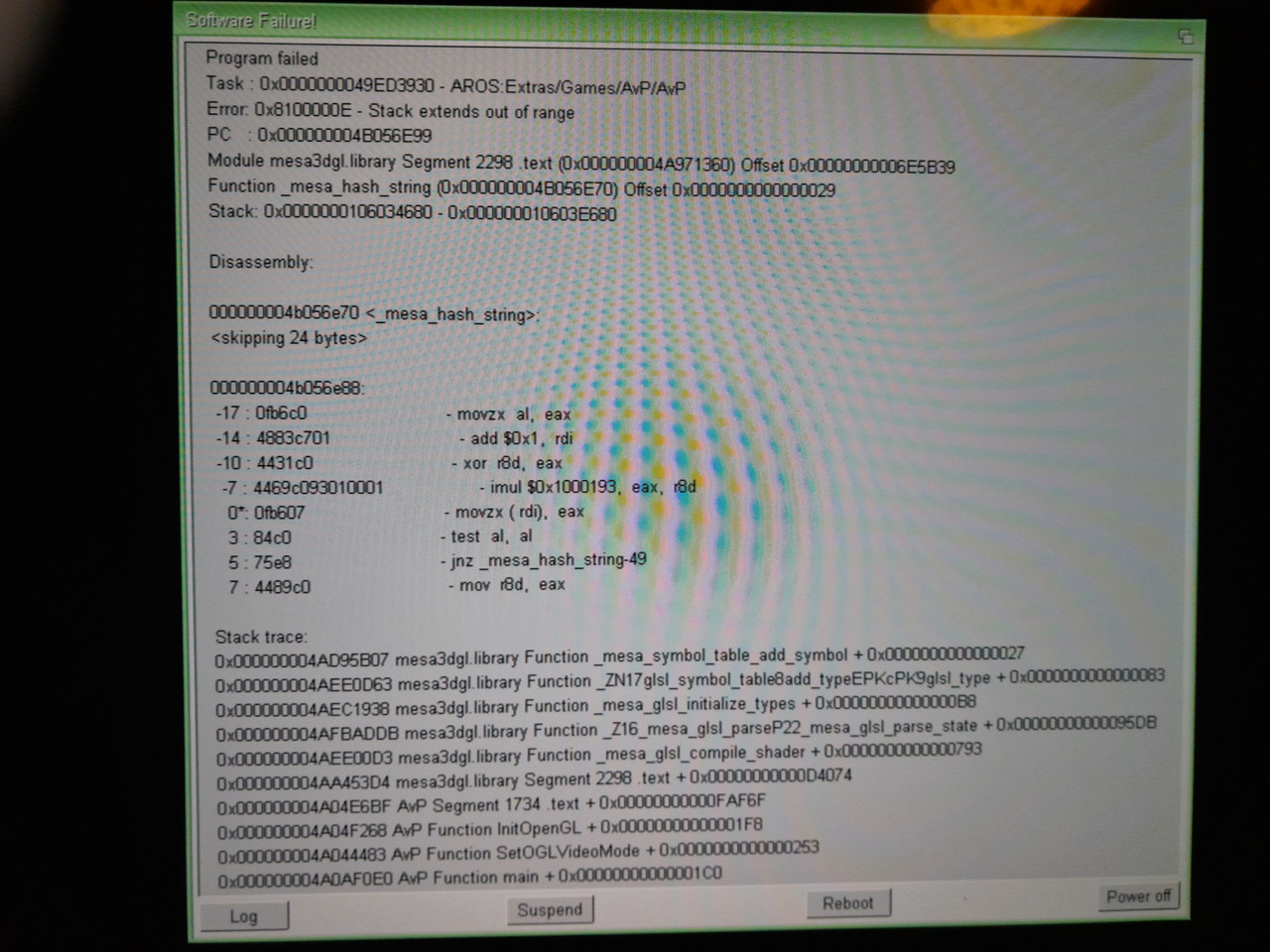
Crash mesa3dgl.library - Stack extends out of range
Last updated on 35 minutes ago
S
sonountalebanMember
Posted 18 hours ago
Hello,
I'm making AvP (Aliens vs Predator) game running on AROS v11 however sometimes I got crashes like the one I've attached here.
The game is based on the old source code available on AROS Archives, updated to the latest version, although there are very few newer changes, not related to the rendering stuff.
It still uses SDL1.2, the stack is set to 1 MB I think and I'm running it on native AROS One v1.3.
What could it be?

i.postimg.cc/PqqMQ1nF/20261029-184344.jpg
Edited by sonountaleban on 29-10-2026 15:07, 18 hours ago
D
deadwoodAROS Dev
Posted 18 hours ago
I'd check what stack really gets assigned to this program (use tasklist from shell). 1MB might not be enough - mesa is really stack-hungry, especially with softpipe (software rasterizer) driver.
S
sonountalebanMember
Posted 16 hours ago
Thanks, whatever value I set in the info file is ignored, indeed I see from tasklist output it's still assigned 40k. If I use this code here https://en.wikibooks.org/wiki/Aros/Developer/Docs/Examples/StackSwap it's better, however the game stuck during the quitting.
AMIGASYSTEMAMIGASYSTEMDistro Maintainer
Posted 16 hours ago
@ Sonountaleban
I had the same problem with the YQuake2 source code when I ported it to v11—an unresolvable stack overflow as soon as I ran the game, and again when exiting the game. Claude, did you fix it? Now YQuake2 starts up without setting the stack.
S
sonountalebanMember
Posted 16 hours ago

AMIGASYSTEM wrote:

@AMIGASYSTEM - @ Sonountaleban
I had the same problem with the YQuake2 source code when I ported it to v11—an unresolvable stack overflow as soon as I ran the game, and again when exiting the game. Claude, did you fix it? Now YQuake2 starts up without setting the stack.


How did you fix it?
D
deadwoodAROS Dev
Posted 7 hours ago
Generally you should not need to use StackSwap. Stack set on icon should be applied to the process by the system, unless:

a) your icons has a CLI tooltype - this tooltype requires the process to be run through shell and makes it use default shell stack
b) the task that works with GL is not actually the "main" process created by starting the game but a subtask that does not have proper stack size set.

Do this test: open shell, set stack to 1000000, start game from shell, check in another shell if the process has correct stack.
S
sonountalebanMember
Posted 3 hours ago

deadwood wrote:

@deadwood - Generally you should not need to use StackSwap. Stack set on icon should be applied to the process by the system, unless:

a) your icons has a CLI tooltype - this tooltype requires the process to be run through shell and makes it use default shell stack
b) the task that works with GL is not actually the "main" process created by starting the game but a subtask that does not have proper stack size set.

Do this test: open shell, set stack to 1000000, start game from shell, check in another shell if the process has correct stack.


Yes, if I set stack via shell, I can see the correct value. Cheers.
About b) how can I set it if it's possible?
Edited by sonountaleban on 30-10-2026 05:23, 3 hours ago
D
deadwoodAROS Dev
Posted 1 hour ago
b) it depends - if you are creating a process directly there is NP_StackSize tag you can pass

BTW, did you check a) if you icon doesn't have CLI tooltype? That's the most common issues with "stack" I saw.
AMIGASYSTEMAMIGASYSTEMDistro Maintainer
Posted 51 minutes ago
@sonountaleban
Technically, I can't explain exactly how he fixed it maybe my situation was different. If you're having trouble, ask Claude; he'll definitely solve the problem for you and maybe even eliminate the stack request, just like he did with some of my apps that were having the same issue.

If it can be fixed from the shell, try using StackAttack (in Automatic mode and the command in user-startup); it’s also likely that you can launch it from the icon without using the CLI in the tooltypes.

https://www.arosw...post_15310
S
sonountalebanMember
Posted 38 minutes ago

deadwood wrote:

@deadwood - b) it depends - if you are creating a process directly there is NP_StackSize tag you can pass

BTW, did you check a) if you icon doesn't have CLI tooltype? That's the most common issues with "stack" I saw.


Yes, removing that CLI it solves this issue, thanks.
However it doesn't use other processes, even though I see there are two pthreads with 2 MB of stack created after the launch of the game. Could they have been created by external libraries like OpenAL or Mesa3D?
S
sonountalebanMember
Posted 35 minutes ago

AMIGASYSTEM wrote:

@AMIGASYSTEM - @sonountaleban
Technically, I can't explain exactly how he fixed it maybe my situation was different. If you're having trouble, ask Claude; he'll definitely solve the problem for you and maybe even eliminate the stack request, just like he did with some of my apps that were having the same issue.

If it can be fixed from the shell, try using StackAttack (in Automatic mode and the command in user-startup); it’s also likely that you can launch it from the icon without using the CLI in the tooltypes.

https://www.arosw...post_15310


Ok, thanks, but I want a clean solution, possibly without using AI at least for these kind of small issues.
You can view all discussion threads in this forum.
You cannot start a new discussion thread in this forum.
You cannot reply in this discussion thread.
You cannot start on a poll in this forum.
You cannot upload attachments in this forum.
You cannot download attachments in this forum.
Users who participated in discussion: deadwood, AMIGASYSTEM, sonountaleban